
Scan to Download
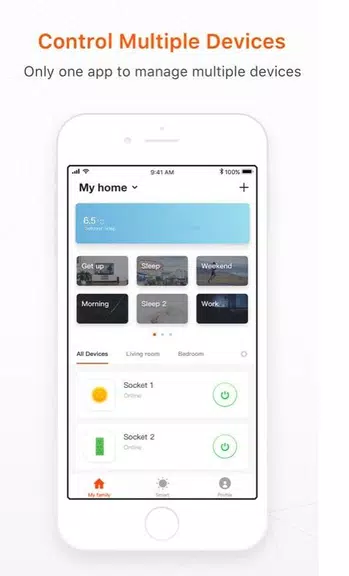
Genio is a smart home control app that puts lighting, outlets, cameras and appliances into a single, easy-to-navigate mobile interface so you can manage a modern connected home from one place. Designed for straightforward setup and daily use, Genio discovers compatible devices over your local Wi-Fi, provides quick on/off control, supports grouped actions for rooms or zones, and integrates with compatible voice assistants for hands-free commands. If you want a practical tool for consolidating multiple device brands and automating routine tasks, this app offers a clear, device-focused approach rather than a cluttered, feature-heavy dashboard.
The app offers remote control over devices on your home network, allowing you to switch lights, power outlets and appliances while at home or, when properly configured, from outside the local network. Camera monitoring is presented as live view and simple playback for recent events; camera controls focus on privacy-aware options such as mute, snapshot and disable. Voice assistant support lets you use natural phrases to trigger scenes or control individual devices. Genio emphasizes grouped control so you can operate several devices together—turn off all lights on a floor, arm a camera and shut down nonessential outlets with a single action.
Genio’s interface is organized around rooms and device types to reduce friction when you’re making quick adjustments. Primary controls are tappable tiles with clear labels and status indicators; devices that support dimming or temperature adjustments display sliders on the same screen for immediate fine-tuning. The visual style favors high-contrast icons, simple color cues for device state, and unobtrusive animations that help you track changes without distracting from tasks. Navigation relies on a top-level dashboard, a room-by-room view and a dedicated controls page, so commonly used devices are reachable in two taps or fewer.
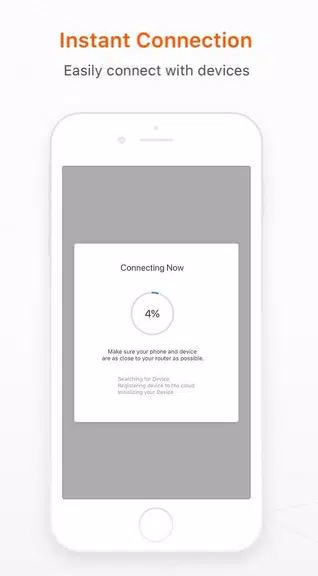
Onboarding walks you through network checks and device discovery with step-by-step pairing hints tailored to common smart plugs, bulbs and camera models. Progression in Genio is practical rather than game-like: as you add devices and group them into rooms, the app recommends automation opportunities—scheduling lights for evening hours, powering down outlets at night, or activating camera monitoring when you leave home. These recommendations help you build a more efficient setup over time, moving from manual toggles to scheduled routines and grouped scenes that reduce daily effort.
Genio supports named scenes and scheduled events so you can create custom ambiances (for example "Evening" or "Away") and trigger them on timers or by simple rules. Scene editing allows you to set device states, dim levels and camera modes in one place; schedules can repeat daily, weekdays only, or be tied to sunrise/sunset times where supported. You can also create temporary overrides and fine-tune schedules without losing presets. The focus is on practical customization that improves convenience and energy management without a steep learning curve.
Accessibility options include adjustable text sizes, clear contrast modes and voice-control integration for hands-free operation. When devices and your phone are on the same Wi-Fi, basic control generally works locally even if the internet is down; remote features such as outside-the-home access or cloud-based notifications require an internet connection and any necessary account linking. The app includes simple diagnostics and device status indicators to help you identify connection issues, and a compatibility note that some brands or legacy models may behave differently depending on firmware and manufacturer implementation.
Genio provides device logs and basic status histories for quick troubleshooting and offers guidance during setup when a device fails to appear. The user experience aims for predictability: clear feedback after each action, safe defaults for privacy-sensitive features like cameras, and conservative permissions requests to keep configuration straightforward. While the app does not promise universal compatibility across every smart product, it is built to be a reliable hub for common household devices and to grow in usefulness as you add scenes, schedules and grouped controls.
For daily life, Genio reduces time spent switching individual items and helps manage energy use by centralizing control and enabling simple automation. It is useful for homeowners who want a single interface to monitor cameras, switch lights, and power appliances remotely or on a schedule, while also offering incremental features that reward continued setup and refinement of routines.
File size: 62.90 M Latest Version: 1.2.7
Requirements: Android Language: English
Votes: 448 Package ID: com.mirabella.genio
Developer: Mirabella Genio

Make your house a home with our selection of innovative apps. Discover programs to simplify cleaning, organize closets, and manage home maintenance. Take the hassle out of chores and keep your space running smoothly. Design, visualize, and renovate like a pro using our augmented reality and 3D modeling tools. Enhance security and monitor your property 24/7 with our connected home tech.






LIVE A HERO
Retro Hero Mr Kim
Empire of Passion
Arcane Quest Legends
Magic Snap: Momotaro
AllStar Manga Heroes
Lunescape
ONE PIECE Thousand Storm JP
Tap Titans 2










































