Scan to Download
DeafPaw is a focused training companion app built to help owners communicate reliably with deaf dogs using clear visual hand signals and an easy-to-follow toolkit. The app combines customizable signal creation, guided lessons, and gesture recognition so owners can teach basic obedience and adapt routines for a non-hearing companion. With DeafPaw you get step-by-step progressions, in-app demonstrations, and practice sessions designed to make visual communication consistent and accessible for people with any level of training experience.
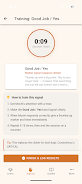
The app presents training material through a clean, high-contrast visual style that emphasizes simple hand shapes and body positioning so dogs and owners can focus on cues. Visual demonstrations include short animated sequences and example still frames that break each gesture into clear components. A built-in library of starter signals covers common commands such as sit, stay, come, and heel while the interface supports large icons, adjustable playback speed for demonstrations, and an uncluttered layout for quick reference during live sessions.
Training with DeafPaw follows an iterative mechanics model: introduce a signal, practice with short repetitions, then gradually extend the duration or distance. The app guides owners through staged sessions where each stage adds a small change—longer wait times, greater distance, or distraction levels—so progress is measurable and manageable. Gesture recognition is offered as a training aid to provide feedback during practice; it analyzes motion patterns from your device camera and indicates whether the performed motion matches the stored cue closely enough to progress to the next stage.
Controls are intentionally simple to keep attention on the dog rather than the screen. A single-tap start for practice rounds, swipe gestures to move between stages, and an easy record-and-save function for custom signals let owners work hands-free when necessary. DeafPaw stores saved signals in a personal library so you can rename, edit, or duplicate cues and adjust sensitivity for gesture recognition per device. Playback controls allow slow motion, looped repetition, and annotated frames to clarify finger or wrist position.
The app organizes training into short lessons and multi-step progressions that resemble levels: introduction, guided repetition, real-world simulation, and reinforcement. Each lesson tracks completion and logs simple practice metrics such as number of successful repetitions, average recognition accuracy, and last practice date. This level structure helps owners pace training into daily micro-sessions and build toward reliable results without overwhelming the dog. Reminders and session timers keep practice consistent while allowing owners to focus on gradual, positive reinforcement.
Customization is central: owners can create unique signals to match household habits, choose between hand-only or combined hand-and-body cues, and adjust recognition thresholds based on camera position or lighting. Replay value comes from varied practice routines, simulated distractions, and the ability to refine cues as the dog progresses; many owners will revisit older lessons to maintain skills or to teach new family members. DeafPaw’s editable library and logged history make it practical to revisit and refine training over months, supporting long-term behavior maintenance.
Accessibility features include large on-screen controls, contrast options, and optional text captions for each demonstration to assist owners with hearing differences or visual preferences. The core learning modules and example animations are designed to work offline so you can train outdoors or in areas without a connection; gesture recognition uses on-device processing to protect privacy and ensure responsive feedback. DeafPaw is built to accommodate a range of devices, but performance and recognition quality may vary depending on camera resolution and lighting conditions.
While gesture recognition provides useful feedback, it is not perfect in every environment; inconsistent lighting or unusual camera angles can affect accuracy. The app focuses on visual cues for deaf dogs and does not replace sound-based training methods for hearing dogs. Successful results depend on steady, consistent practice, positive reinforcement, and patience from the owner and pet. Practical tips within the app encourage short frequent sessions, consistent signal placement, and reward timing to make learning faster and more reliable.
DeafPaw aims to make visual training approachable and repeatable, combining intuitive controls, a structured progression system, and flexible customization to support owners teaching everyday commands and building dependable communication with their deaf dog.
File size: 34.00 M Latest Version: 1.2
Requirements: Android Language: English
Votes: 280 Package ID: com.jakestudios.deafpaw
Developer: JakeStudios




Make your house a home with our selection of innovative apps. Discover programs to simplify cleaning, organize closets, and manage home maintenance. Take the hassle out of chores and keep your space running smoothly. Design, visualize, and renovate like a pro using our augmented reality and 3D modeling tools. Enhance security and monitor your property 24/7 with our connected home tech.






LIVE A HERO
Retro Hero Mr Kim
Empire of Passion
Arcane Quest Legends
Magic Snap: Momotaro
AllStar Manga Heroes
Lunescape
ONE PIECE Thousand Storm JP
Tap Titans 2