
Scan to Download
Stuffrite is a budgeting app built to help you plan and automate where your money will be spent, not only record where it went; the name appears here because clear identification helps search and discovery and because the app centers on predictable cash flow. Stuffrite constructs a forward-looking financial setup that blends envelope-style budgeting with a Time Machine projection tool so you can see balances weeks or months ahead. The introductory setup guides you through creating virtual envelopes for bills, savings, and everyday spending, linking them to real accounts if you choose, and defining goals called Horizons so the app can move funds automatically and reduce manual bookkeeping.
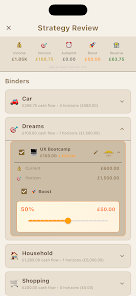
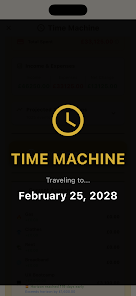
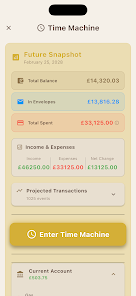
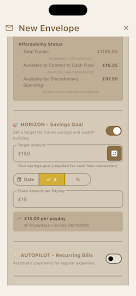
The Time Machine projects future account balances by applying scheduled bills, regular incomes, and envelope-based spending patterns to upcoming days and weeks, giving a timeline of likely balances so you can avoid surprises. Envelope budgeting in the app treats each envelope as a job for your money: funds are set aside for rent, groceries, or a weekend fund and spending should stop when an envelope is empty. Account Mirror Mode allows linked envelopes to reflect real bank balances so the app reduces phantom money and keeps spending realistic. Autopilot and Horizons let you name targets and create rules that trigger transfers over time, so recurring contributions to savings or bill envelopes happen without repeated manual transfers.
The user interface favors direct manipulation and simple gestures: drag to reorder envelopes, swipe transactions to categorize them, and tap envelopes to view history and projection details. Setting up an Autopilot rule is a guided sequence with clear choices for frequency, amount, and priority, and the Time Machine includes adjustable sliders to preview different income or expense scenarios. Notifications are contextual and adjustable so you can be alerted only for low envelope balances or important horizon milestones. Everything is designed for one-handed use on phones, with larger touch targets for key controls and clear labels for accessibility readers.
Progress in Stuffrite is measured by how envelopes and Horizons mature over time: initial setup focuses on mapping recurring bills and creating priority envelopes, and subsequent weeks show increasing automation as Autopilot transfers and rules reduce manual adjustments. Horizons act like goal progress meters that populate as you fund them; the app surfaces small wins such as a fully funded bill envelope or a milestone toward an emergency fund. Rather than levels, the system emphasizes meaningful habits—regular paycheck allocation, consistent savings, and fewer overdraft incidents—so the progression is behavioral and financial rather than gamified.
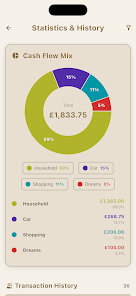
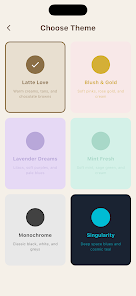
The visual language is practical and information-focused with a cockpit-style dashboard that highlights upcoming paydays, money staying inside your system, and outgoing commitments. Icons and colors are customizable at the envelope level so you can quickly identify categories, and charts can be adjusted to show daily, weekly, or monthly views. The Wall and Payday Cockpit organize incoming and outgoing flows visually, while debt tracking presents pay-down plans in straightforward timelines. Custom icons, envelope colors, and compact or expanded views let you adapt the interface to your preferences without changing underlying behavior.
Stuffrite is designed for repeated daily and weekly use rather than one-off sessions: you revisit the Time Machine to test scenarios, tune Autopilot rules as income or expenses change, and maintain Horizons as goals evolve. The app rewards continued engagement by making financial forecasts more accurate over time as recurring patterns are recorded. Because the utility grows with continued use, the app remains relevant through life changes such as new jobs, moving, or changing household arrangements.
The local-first design keeps the core financial model and data on your device, improving privacy and reducing reliance on constant network access; many features function offline and sync only when you choose to link accounts or use Workspace Mode. Text labels, high-contrast options, and screen-reader-friendly controls support accessibility, and the app explains trade-offs such as the need to link bank accounts for full Account Mirror functionality. Workspace Mode enables selective sharing of specific envelopes with a partner in real time while keeping full account details private on the device, so collaboration is limited to what you intentionally expose.
Initial setup and tuning require time to reflect actual cash flow accurately, and account linking is optional but necessary for automatic deductions and real-time balance syncing; these are reasonable trade-offs for tighter financial control. The app surfaces challenge systems like projected deficits and low-envelope alerts to encourage corrective action rather than punish users, and the focus remains on creating reliable routines that reduce surprises in daily money management.
File size: 52.00 M Latest Version: 1.2.3
Requirements: Android Language: English
Votes: 358 Package ID: com.stuffrite.app
Developer: Warming Neon Ltd


Make your house a home with our selection of innovative apps. Discover programs to simplify cleaning, organize closets, and manage home maintenance. Take the hassle out of chores and keep your space running smoothly. Design, visualize, and renovate like a pro using our augmented reality and 3D modeling tools. Enhance security and monitor your property 24/7 with our connected home tech.






LIVE A HERO
Retro Hero Mr Kim
Empire of Passion
Arcane Quest Legends
Magic Snap: Momotaro
AllStar Manga Heroes
Lunescape
ONE PIECE Thousand Storm JP
Tap Titans 2