Scan to Download
Trak’n’Trac is an IoT and AI-powered traceability platform built for shrimp processing plants, giving managers continuous visibility from harvest through shipment. The mobile and web components collect and display batch movement, environmental conditions, and handling events so operations teams can verify compliance, investigate exceptions, and reduce spoilage. Designed to integrate with existing plant workflows, Trak’n’Trac focuses on practical data capture and clear, time-stamped records that support audits and day-to-day decision making without adding unnecessary complexity.
The platform provides real-time batch tracking, sensor-driven status updates, and AI-assisted analytics that highlight anomalies and trends. Visual dashboards let users zoom from facility-wide overviews to detailed timelines for a single batch, and maps show shipment routes and storage locations. Data capture supports common IoT sensors for temperature, humidity, and door-opening events, while manual input screens allow operators to attach notes, photos, or corrective actions. Built-in reporting formats help generate compliance records for audits and traceability requirements and allow configurable thresholds so teams only receive relevant alerts.
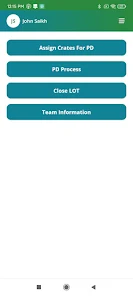
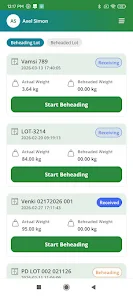
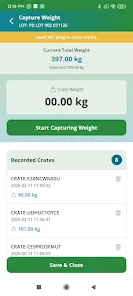
Trak’n’Trac organizes information around clear control patterns: dashboards and widgets are arranged for quick glanceability, detail views support tap-to-expand controls on mobile, and the interface uses progressive disclosure so operators see the right level of detail for their role. Users navigate by selecting facility, line, batch, or shipment; timeline controls let teams scrub through handling history and replay environmental data. The AI components summarize patterns and surface suggested investigations, while manual controls let supervisors accept, annotate, or escalate exceptions. Offline data caching allows continued data entry when connection to the cloud is interrupted; cached records synchronize automatically when connectivity is restored.
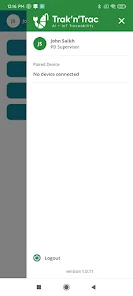
Typical deployment is phased: sensor installation and basic data flow are established first, followed by integration with existing plant systems and user training. A calibration period helps align sensor thresholds and AI sensitivity to local conditions; during this time, the system records baselines and provides recommended tuning actions. Progression from pilot to full production commonly follows a few-week ramp where teams increase the number of monitored lines and refine alerting rules. Role-based access controls assign permissions for operators, supervisors, logistics coordinators, and auditors so each user sees the appropriate controls and reports.
The user interface favors clarity over decoration: color-coded status indicators, heatmaps for storage areas, and simple icons make it easy to interpret conditions at a glance. Mobile screens emphasize touch-friendly controls and large tap targets, while the web console supports deeper analysis with sortable tables, export options, and printable compliance reports. Accessibility considerations include adjustable text sizes, high-contrast display modes, and keyboard-friendly navigation for desktop users. Training materials, in-app help, and context-sensitive tooltips reduce onboarding friction and support busy plant teams.
In practice, Trak’n’Trac helps reduce uncertainty by providing a single source of truth for handling and transport conditions, which can lower waste and speed up investigations into quality issues. Analytics help pinpoint bottlenecks and recurring failure points so managers can prioritize corrective actions. On the other hand, the solution is specialized for shrimp processing workflows and may require adaptation for other product types; deployment depends on IoT hardware and system integration, so there is an upfront investment in sensors and configuration. Initial setup and tuning are typically required to align the platform with a plant’s specific routines and data sources, but once configured, routine operation and historical replay provide lasting operational value.
File size: 62.00 M Latest Version: 1.0
Requirements: Android Language: English
Votes: 497 Package ID: com.trakntrac
Developer: Supporthint

Explore the world with confidence using our intuitive map software. Navigate unfamiliar cities, find hidden gems, and plan adventures with ease. Our powerful apps feature robust offline functionality, real-time traffic updates, and crowd-sourced points of interest. Customize maps to match your needs - save favorite locations, download areas for offline access, and share recommendations.






LIVE A HERO
Retro Hero Mr Kim
Empire of Passion
Arcane Quest Legends
Magic Snap: Momotaro
AllStar Manga Heroes
Lunescape
ONE PIECE Thousand Storm JP
Tap Titans 2