Scan to Download
Clicapp is a complete management app for professionals who need to organize appointments, customer records and basic finances in one place. Designed with self-employed people and small service providers in mind, Clicapp combines a smart calendar, messaging reminders and financial overviews into a single interface so you can reduce administrative overhead and spend more time on billable work. The introduction experience guides new users through adding a first client, scheduling appointments and enabling receipt delivery so the app begins saving time from day one.
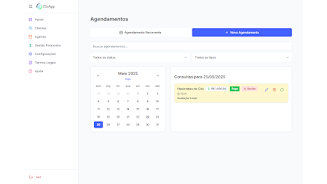
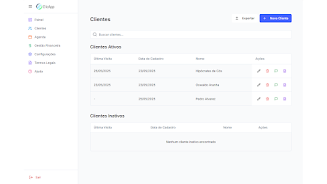
The core calendar offers day, week and month views with quick actions for creating, editing and rescheduling bookings. Appointments can be labeled, categorized and marked as paid or unpaid so the status of each slot is visible at a glance. Client records hold contact details, service history and notes that help you recall preferences and past visits during conversations. Payment tracking highlights overdue items and the app can generate and send receipts to customers through the built-in messaging channel to reduce manual follow‑up.
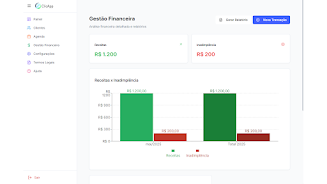
Financial monitoring brings together revenues and defaults into clear summaries, and the dashboard presents daily performance metrics and upcoming events such as client birthdays. Detailed reports let you filter by date, service type or client group to review trends for invoicing and tax preparation. Cloud synchronization keeps the data backed up and consistent across devices while preserving the ability to work on a single device when needed.
Creating and managing bookings is done through simple touch controls: tap to add an appointment, drag to reschedule and long press to open edit options. The app supports recurring bookings and configurable reminder schedules so clients receive notifications automatically before an appointment. Messaging integration is streamlined: once a client is linked to a booking, one tap opens a message composer and automated receipts can be sent after payments are recorded. The flow is intentionally linear to reduce manual steps between scheduling, confirming and collecting payment.
Onboarding walks you through the essentials so you build a usable system quickly. As you add clients and appointments the app’s historical view becomes more valuable, showing service frequency and revenue patterns that inform pricing or retention efforts. Customization options include color-coded labels for services, adjustable reminder timings and active/inactive flags for clients so you can adapt the app to your personal workflow. Templates for common services and quick-entry fields speed up repeated tasks and minimize setup time for new bookings.
The visual style favors a clean, uncluttered layout with readable typography and intentional spacing to make long schedules easier to scan. Controls are optimized for touch with accessible hit targets and optional larger fonts for low-vision use. Notifications are configurable so you control when the app alerts you or your clients, and visual conflict indicators warn of double bookings or overlapping appointments to help avoid scheduling errors. Performance is tuned for smooth scrolling through busy calendars on modern mid-range devices.
Clicapp retains recent data locally so you can view schedules and create entries when a connection is intermittent; queued changes and messages synchronize automatically when an internet connection is re-established. Cloud backup protects against data loss and the synchronization system is designed to minimize conflicts between devices. The app requires an internet connection for reliable message delivery and full cloud features, but basic appointment creation and local viewing remain available offline.
The app is tailored to individual professionals and small teams and may not cover complex enterprise workflows or very large staff deployments. Some integrations and advanced automated messaging options require initial configuration and an active network connection to operate. If your business depends on heavy-weight accounting systems or enterprise resource planning, Clicapp is best used as a focused scheduling and point-of-sale companion rather than a full ERP replacement.
File size: 16.04 M Latest Version: 2.6.37
Requirements: Android Language: English
Votes: 185 Package ID: com.clicapp.lite
Developer: Clicapp





Must Have Finance Apps for Android
Take control of your money with our powerful finance apps. Track spending, create budgets, and set savings goals using our easy-to-use tools. Invest wisely by accessing real-time market data and analyst reports. Manage portfolios and optimize taxes for greater returns. Apply for loans, credit cards, and insurance with our partners for personalized rates. Securely link accounts for a consolidated view of your finances.






LIVE A HERO
Retro Hero Mr Kim
Empire of Passion
Arcane Quest Legends
Magic Snap: Momotaro
AllStar Manga Heroes
Lunescape
ONE PIECE Thousand Storm JP
Tap Titans 2