
Scan to Download
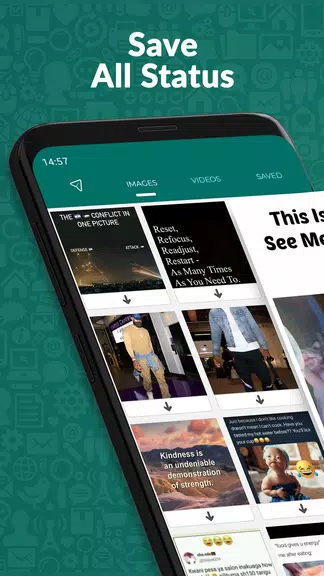
Status Saver, Secret Viewer is a compact utility that lets you save and privately view ephemeral social media updates and statuses. It combines a quick downloader, organized gallery, and a hidden viewing mode so you can archive photos and videos without cluttering your main media library.
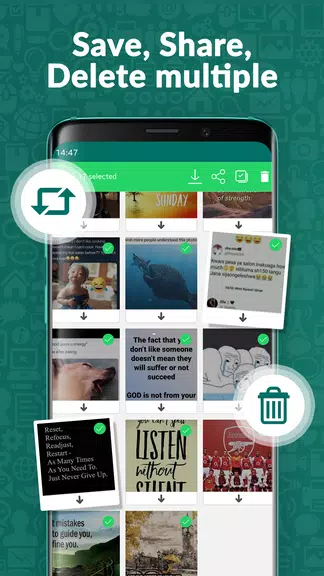
Status Saver, Secret Viewer focuses on three core functions: fast saving, private viewing, and straightforward organization. The app captures images and video statuses from popular messaging platforms, stores them in a dedicated folder, and provides a built-in player and image viewer to preview saved content without leaving the app.
Once installed, the app detects status files that your device temporarily stores when you view updates in messaging apps. It lists available items inside its interface so you can choose which ones to save. Saved files remain inside the app’s folder until you decide to export them to your phone’s gallery or share them externally.
Privacy is a primary concern with any status-saving tool. Status Saver, Secret Viewer offers optional PIN protection and fingerprint lock to prevent unauthorized access. The hidden viewer is designed to display content locally without interacting with the source application, minimizing the chance of altering view metadata. There are clear prompts for permissions and an easy way to clear cached files when you want to remove traces.
The interface prioritizes speed and minimalism. A compact toolbar provides access to download, view, and manage functions. Thumbnails load quickly, and a search filter helps find items by file type or date. The workflow follows a predictable path: detect, preview, save, then organize. For users who prefer automation, an auto-save option can store statuses as they are discovered.
The app is optimized to use limited device resources so it won’t significantly affect battery life or background performance. Media playback uses a lightweight player that supports common formats and adapts to available device codecs. Compatibility spans a wide range of Android versions and device make; however, performance may vary on older hardware and very large media collections.
People use Status Saver, Secret Viewer to archive memorable moments shared as statuses, preserve temporary event photos, and preview content privately without notifying the original poster. It’s also useful for collecting inspiration or reference images and keeping a personal backup of media that would otherwise disappear after a short time.
Download and open the app, grant the requested permissions, and allow a quick scan to populate the status list. Preview items directly in the app and tap the save icon to add them to your private gallery. The app includes brief on-screen guidance for first-time users so the key tools are easy to locate.
Status Saver, Secret Viewer keeps the process of saving and managing ephemeral media simple and predictable while offering privacy options and fast management tools. Its focused feature set makes it a practical companion for anyone who wants to keep temporary social updates without altering the original experience.
File size: 16.50 M Latest Version: 2.1.60
Requirements: Android Language: English
Votes: 268 Package ID: com.app.nativex.statussaver
Developer: Native Fonts



Empower learning and research with our innovative reference apps. Access dictionaries, thesauruses, encyclopedias, and more with our comprehensive databases. Get homework help, study tips, and writing guides from our academic resources. Learn new skills by browsing how-to videos and manuals. Stay up-to-date with latest news, data, and facts curated by our editors.






LIVE A HERO
Retro Hero Mr Kim
Empire of Passion
Arcane Quest Legends
Magic Snap: Momotaro
AllStar Manga Heroes
Lunescape
ONE PIECE Thousand Storm JP
Tap Titans 2










































