Scan to Download
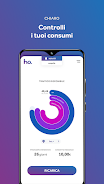
ho. is a minimalist productivity app that centralizes messaging, task management, and quick notes in a single streamlined interface. Designed for fast daily use, ho. helps users capture ideas, coordinate with contacts, and track priorities without clutter, blending simple design with powerful shortcuts for an efficient mobile workflow.
ho. focuses on speeding up routine tasks with a compact set of tools that play well together. It combines instant notes, lightweight chat threads, and a prioritized to-do list so you can switch context quickly. The app uses gestures and shortcuts to reduce taps and keeps the screen free of unnecessary elements.
The interface groups your items into three core lanes: Quick Notes, Conversations, and Actions. Quick Notes are ideal for ephemeral ideas and saved snippets. Conversations are simplified message threads tied to specific tasks or topics. Actions are short, focused tasks you can sort by deadline, importance, or custom tags. This division helps ho. users move from thought to action in seconds.
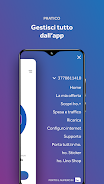
Navigation relies on a single bottom bar and contextual swipes. A short swipe reveals recent notes, while a long swipe opens a smart composer that suggests deadlines, reminders, and contacts. The built-in search finds text inside notes and messages instantly, and filters let you view only starred items or unfinished actions. ho. keeps commands predictable so you build muscle memory fast.
Personalize the app to match your habits without overwhelming options. Choose compact or spacious list density, toggle between light and dark themes, and assign color accents to tag groups. Smart templates let you create recurring note structures or task checklists for regular workflows, and keyboard shortcuts are supported for users with external keyboards.
ho. offers cloud sync that keeps content consistent across your devices. Background sync is optimized to save battery and data, syncing only changes and compressing payloads. The app supports common import/export formats so you can transfer notes and tasks from other services. Compatibility covers modern Android versions and adapts its layout to phones and tablets.
Beyond basic notes and lists, ho. includes timers, a simple calendar view for action items, and one-tap sharing to other apps. Integrations are intentionally selective: connect to popular calendar services for two-way visibility, or push selected tasks to third-party task managers. The goal is practical interoperability without bloating the core experience.
Privacy is built into the architecture with optional passcode or biometric unlock and local encryption for stored data. Syncing can be limited to Wi-Fi-only, and selective backups allow you to control what leaves your device. ho. presents clear options for exporting or deleting your data, designed for users who expect transparent control over their information.
Lightweight engineering keeps CPU and memory use low so ho. runs smoothly on mid-range devices. Startup times are short and list scrolling remains responsive even with hundreds of notes. Background tasks are throttled when the device is idle or low on battery to preserve performance throughout the day.
Begin by creating a Quick Note or adding your first Action. Use the smart composer to tag items and set reminders in one step. If you prefer templates, enable them from settings and import a few to speed setup. Within minutes, ho. will begin to reflect your daily rhythm and offer faster ways to capture and complete items.
People pick ho. when they want a focused mobile companion that minimizes friction. The app is suited for those who juggle messages and tasks and prefer a single surface to manage both. With careful attention to speed, clarity, and privacy, ho. gives you a compact toolkit that helps maintain momentum without adding complexity.
File size: 30.03 M Latest Version: 1.21.25
Requirements: Android Language: English
Votes: 420 Package ID: it.homobile.ho




Must Have Tools Apps for Android
Equip yourself with our all-in-one toolbox app for everyday tasks and projects. Instantly convert between units, calculate tips, scan documents, manage files, and more with handy productivity tools. Includes a level, compass, QR code reader, ruler, speedometer, decibel meter, and flashlight. Save frequently used tools to your customizable dashboard for one-tap access. Track billable hours, wages, budgets, and invoices. Annotate screenshots, magnify labels, and sign PDFs on the go.






LIVE A HERO
Retro Hero Mr Kim
Empire of Passion
Arcane Quest Legends
Magic Snap: Momotaro
AllStar Manga Heroes
Lunescape
ONE PIECE Thousand Storm JP
Tap Titans 2