
Scan to Download
QR-BarCode Generator is a lightweight utility for creating and customizing QR codes and barcodes quickly. It streamlines generating link, contact, Wi-Fi, and product codes with intuitive controls and export options, making it a practical choice for professionals who need fast, reliable code creation on Android devices.
At its core, QR-BarCode Generator transforms text, URLs, and structured data into scannable images. The app supports standard barcode formats alongside several QR variants so you can produce inventory tags, event passes, or digital business cards without switching tools. Its workflow emphasizes speed: input, preview, tweak, and export.
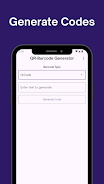
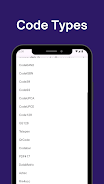
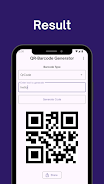
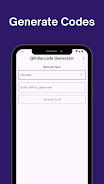
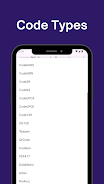
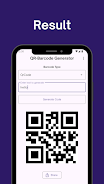
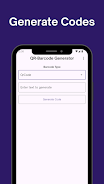
The generation process is straightforward. Select a code type, enter the relevant data, and watch a real-time preview update. A set of sliders and dropdowns governs size, margin, and correction level. Export supports PNG, SVG, and PDF for digital publishing or print. Those exporting for industrial use can retain vector output to avoid pixelation when scaling.
Beyond basic color swapping, QR-BarCode Generator lets users overlay a small logo or center icon, switch to rounded modules, and choose between square or dot patterns. These visual options help align generated codes with marketing assets while preserving scan performance. The app warns when contrast or size choices could hinder readability.
The interface adopts a clear two-column layout: input controls on the left and a live preview on the right. Controls are labeled and grouped by task to reduce friction. The app runs smoothly on mid-range devices, producing instant previews and rapid exports without noticeable lag. Background processing handles batch generation so you can keep working while multiple codes render.
One of the practical strengths is the batch creation tool. Import CSV files, map columns to data fields, and generate dozens or thousands of codes in a single operation. The app includes naming rules and folder export options, which helps integrate generated assets into existing inventory or marketing pipelines.
Data entered into the app remains local unless you choose to share or upload. Exported files can be saved to device storage or shared through standard Android intents. For teams, the app provides consistent output settings so different members produce identical codes for coordinated campaigns.
Whether you need a single QR for a poster or a batch of product barcodes, QR-BarCode Generator covers both casual and professional needs. It balances a minimal learning curve with features advanced users expect, such as CSV imports, vector exports, and visual customization. The app's preview and validation cues help prevent common mistakes that can render codes unscannable.
Install the app, grant storage permissions for exports, and try the vCard template for a quick sample. Explore the settings to set default formats and resolution. With a few taps you can create a branded QR code suitable for print or digital display. Regular updates add convenience features and broaden format support, keeping QR-BarCode Generator useful as scanning standards evolve.
File size: 24.50 M Latest Version: 0.2.0
Requirements: Android Language: English
Votes: 473 Package ID: linc.qr_bar_generator
Developer: Linc Codes

Must Have Tools Apps for Android
Equip yourself with our all-in-one toolbox app for everyday tasks and projects. Instantly convert between units, calculate tips, scan documents, manage files, and more with handy productivity tools. Includes a level, compass, QR code reader, ruler, speedometer, decibel meter, and flashlight. Save frequently used tools to your customizable dashboard for one-tap access. Track billable hours, wages, budgets, and invoices. Annotate screenshots, magnify labels, and sign PDFs on the go.






LIVE A HERO
Retro Hero Mr Kim
Empire of Passion
Arcane Quest Legends
Magic Snap: Momotaro
AllStar Manga Heroes
Lunescape
ONE PIECE Thousand Storm JP
Tap Titans 2










































