
Scan to Download
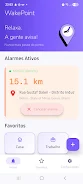
WakePoint is a location-based alarm and family monitoring app. WakePoint wakes you when you’re approaching a destination and lets loved ones follow journeys in real time. The WakePoint interface is designed for quick setup and minimal interaction so you can relax on buses, trains or long rides knowing you won’t miss your stop.
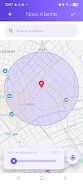
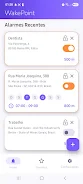
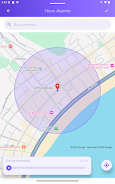
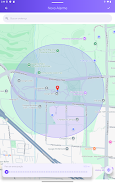
WakePoint uses geofenced alarms that trigger based on your real-time proximity to a chosen destination. You set a target location and select an activation radius that suits your trip; the app supports adjustable distances between 500 meters and 5 kilometers to accommodate fast transit or slower approaches. Scheduled and recurring alarms let you automate daily commutes or repeated routes so you do the setup once and rely on WakePoint thereafter. Shared alarms allow a traveler to start a trip that a trusted contact can observe on a map in real time, and dual-end activation means arrival alerts can sound on both devices when needed.
To start, pick a destination on the map or enter an address, choose how close you want to be alerted, then activate the alarm. While an alarm is active, WakePoint continuously checks GPS location and evaluates distance to the destination; when you cross the set radius an audible alert and device vibration are used to make sure you notice. Sharing an active trip is done from the trip screen so a family member or friend can follow progress; the other person must accept the shared session for live tracking to occur, preserving consent and control.
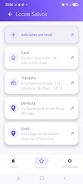
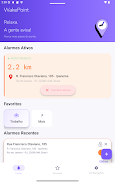
Controls are intentionally simple: create a destination, set radius, and start or stop the alarm. Favorites let you save common places like home, work or school for one-tap activation. Recurring schedules support weekday commutes and other repeating travel patterns so WakePoint can automatically arm itself at the right times. The alarm respects your device sound and vibration settings, and you can choose quiet or louder alerts based on the situation without needing in-app sign-up or cloud accounts for core functionality.
WakePoint is built with privacy-first defaults. Frequently used locations are stored locally on your device so there is no mandatory cloud profile for everyday use. GPS monitoring is activated only while an alarm is running, which helps reduce battery drain compared with continuous background tracking. Basic location detection operates from the device GPS and will work without a data connection, although map tiles and live map detail improve when network access is available. Shared monitoring requires participation from the other person, so unsolicited tracking is not supported.
The app is designed for clear readability and low-friction operation on noisy platforms like buses and trains. Large tap targets, a map-focused layout and lock-screen compatibility mean you can start an alarm and put your phone away. WakePoint aims to be predictable in its behavior: alarms run only for intended trips, monitoring stops when you disable the alarm, and common actions are surfaced on the home screen so the app fits into daily routines.
WakePoint reduces travel stress by automatically waking you when you near your stop and provides real-time reassurance to friends or family without constant messaging. It requires no sign-up for core features and keeps frequent locations local to protect privacy. The main limitations are practical: the minimum activation radius is 500 meters, so very fine-grained proximity alerts below that threshold are not supported; shared monitoring works only if the other person participates in the trip; and continuous background tracking outside of active alarms is intentionally not provided. For commuters, parents checking in on late riders, or anyone who wants a low-effort arrival alert, WakePoint offers a straightforward, battery-conscious solution for reaching destinations reliably.
File size: 16.89 M Latest Version: 1.0.0
Requirements: Android Language: English
Votes: 306 Package ID: com.wakepoint.app
Developer: Artea Labs




Must Have Home Apps for Android
Make your house a home with our suite of helpful home apps. Discover clever tools to organize closets, streamline chores, and simplify cooking. Take the stress out of cleaning and maintenance with handy checklists and schedules. Enhance security and control appliances and lighting with our smart home integrations. Design, visualize, and renovate like a pro using our 3D planning software.






LIVE A HERO
Retro Hero Mr Kim
Empire of Passion
Arcane Quest Legends
Magic Snap: Momotaro
AllStar Manga Heroes
Lunescape
ONE PIECE Thousand Storm JP
Tap Titans 2










































