Flex Media Player is a lightweight, versatile Android app designed to play video and audio files smoothly while offering powerful playback controls and subtitle support. It combines a clean interface with extensive format compatibility, making it easy to manage local media libraries and stream content without sacrificing performance or battery life.
Flex Media Player concentrates on essentials that matter to everyday users: reliable playback, wide codec support, and straightforward file management. The app supports gestures for quick seeking and volume adjustments, hardware acceleration to reduce CPU load, and a built-in equalizer to improve audio output for different headphones and speakers.
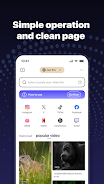
The user interface is uncluttered, prioritizing large touch targets and intuitive gestures. During playback you get slide-based seeking, pinch-to-zoom for aspect ratio changes, and on-screen buttons for play/pause, skip, and speed control. A minimal menu stays hidden until needed, keeping focus on the video while still offering easy access to subtitle, audio track, and brightness settings.
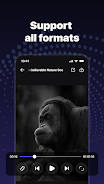
Flex Media Player is built to handle a broad range of media types so you don’t need multiple apps for different files. Common video containers like MP4, MKV, AVI, and MOV are supported alongside audio formats such as MP3, AAC, FLAC, and OGG. The app detects external codecs and uses hardware decoding when available, which improves smoothness on mid-range devices and reduces battery consumption on newer phones and tablets.
Organizing media is simple with folder-based navigation and automatic scanning of local storage. Items can be sorted by name, date, or duration, and the player builds a history of recently watched items for quick access. Thumbnails and media details (codec, resolution, frame rate) help identify files without opening them, and custom playlists let you queue films, music albums, or episodic content.
Power users will appreciate the customization options available. Flex Media Player includes a multi-band equalizer with presets, subtitle synchronization controls, and the ability to choose preferred audio tracks for multi-language files. You can also tweak buffering settings for network streams, enable VP9 or HEVC decoding if supported by your device, and configure the sleep timer for nighttime listening.
The player supports common streaming protocols, allowing direct playback from HTTP links and local network shares (SMB and DLNA). Remote browsing of media libraries on a home server is possible without extra setup, and the app can cast to compatible devices for seamless playback on TVs. Network buffering is adjustable to balance latency and smooth playback depending on your connection quality.
Designed with performance in mind, Flex Media Player leverages hardware acceleration where possible to reduce processor load and maintain high frame rates. Background audio playback is optimized to minimize battery drain, and caching strategies prevent stutters during high-bitrate playback. Regular updates address codec improvements and stability fixes, helping the player remain dependable across Android versions.
The app includes subtitle rendering options with font size, color, and background customization to improve readability. Closed caption compatibility and multilingual menus make the player accessible to a wide audience, and gesture controls help users who prefer touch-friendly navigation over small interface buttons.
Installing Flex Media Player and loading your first files is straightforward: grant storage permission, let the app scan for media, and tap any item to begin playback. For streaming, paste a URL into the play dialog or connect to a local server through the network tab. Settings are organized into clear sections so you can fine-tune playback and appearance without digging through nested menus.
If you need a reliable, no-frills media player that balances compatibility with performance, Flex Media Player is a solid choice. It handles diverse formats, offers practical customization, and keeps controls within easy reach. For users who prefer a focused media experience without needless complexity, this app delivers a practical and polished solution.
File size: 13.97 M Latest Version: 1.0.4
Requirements: Android Language: English
Votes: 475 Package ID: com.flexplayer.playerflex.hdplayer
Developer: tianjinxundu

Must Have Home Apps for Android
Make your house a home with our suite of helpful home apps. Discover clever tools to organize closets, streamline chores, and simplify cooking. Take the stress out of cleaning and maintenance with handy checklists and schedules. Enhance security and control appliances and lighting with our smart home integrations. Design, visualize, and renovate like a pro using our 3D planning software.






LIVE A HERO
Retro Hero Mr Kim
Empire of Passion
Arcane Quest Legends
Magic Snap: Momotaro
AllStar Manga Heroes
Lunescape
ONE PIECE Thousand Storm JP
Tap Titans 2











































