
Scan to Download
Tasky is a streamlined task management Android app designed to keep your day organized with minimal friction. It combines to-do lists, reminders, and project boards into a single interface, helping users prioritize tasks, track progress, and stay focused whether managing personal errands or collaborative work projects.
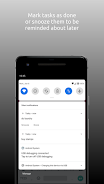
Tasky targets users who need a straightforward yet capable tool for daily planning. The app balances simplicity with depth: quick-add inputs make it easy to capture ideas, while nested projects and tags allow for long-term organization. Notifications and smart due dates reduce the cognitive load of remembering deadlines.
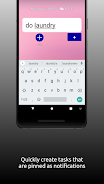
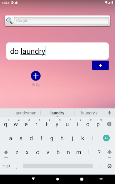
When you open Tasky, the main view focuses on today’s tasks and overdue items. The workflow emphasizes capturing first, organizing later: tap the plus button to jot down a task, assign a deadline or tag, and the entry appears in the appropriate list. Completing tasks is one tap, while long-press reveals editing, moving, or adding subtasks.
Projects in Tasky act as containers for related tasks and allow nesting to represent stages or milestones. Tags offer a cross-project way to filter tasks by context (e.g., @errands, @phone). Combined, projects and tags let you create views that match your personal workflow.
The interface is deliberately uncluttered: a neutral color palette, bold typography for task titles, and subtle animations that provide feedback without distraction. Tasky runs smoothly on a range of Android devices; transitions stay responsive even with long lists. Battery and memory use are optimized so background reminders remain reliable.
Users can tailor Tasky to their preferences. Choose from light or dark themes, tweak notification sounds, and set default reminder lead times. The layout offers compact and comfortable density options so you can display more tasks on a single screen or make entries easier to tap.
Tasky is compatible with common productivity methods. Use it for time-blocking by creating calendar-linked reminders, or adopt a Getting Things Done approach with an inbox, contexts, and weekly review. The app doesn’t force a methodology; it provides the tools to implement whichever system suits you.
While Tasky focuses on individual productivity, it includes lightweight sharing features for collaborative lists. Share a project link or assign tasks to contacts for simple teamwork without a heavy project management overhead. Changes sync quickly so collaborators stay aligned.
Installation is straightforward: download from the Play Store, grant notifications, and import tasks if you’re switching from another app. The onboarding walkthrough highlights core actions so you can be productive within minutes.
People appreciate Tasky for its blend of speed and structure. It stays out of the way during focus work yet offers enough organization for complex projects. Regular updates add refinements without disrupting familiar flows, making it a dependable choice for users who want practical task management on Android devices.
File size: 17.58 M Latest Version: 1.0
Requirements: Android Language: English
Votes: 434 Package ID: xyz.straycode.quicktask
Developer: SomeRandomApps

Must Have Tools Apps for Android
Equip yourself with our all-in-one toolbox app for everyday tasks and projects. Instantly convert between units, calculate tips, scan documents, manage files, and more with handy productivity tools. Includes a level, compass, QR code reader, ruler, speedometer, decibel meter, and flashlight. Save frequently used tools to your customizable dashboard for one-tap access. Track billable hours, wages, budgets, and invoices. Annotate screenshots, magnify labels, and sign PDFs on the go.






LIVE A HERO
Retro Hero Mr Kim
Empire of Passion
Arcane Quest Legends
Magic Snap: Momotaro
AllStar Manga Heroes
Lunescape
ONE PIECE Thousand Storm JP
Tap Titans 2










































