
Scan to Download
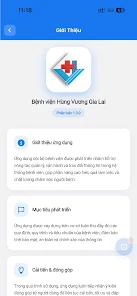
HVGL Office is a compact productivity suite designed to streamline document creation, collaboration, and file management on Android devices. It combines editing tools, cloud synchronization, and export options into a lightweight app that prioritizes speed and a clean interface for professionals and students alike.
At its core, HVGL Office targets people who need quick access to word processing, spreadsheets, and presentation tools without the bloat. The app focuses on essential functions — editing text, formatting tables, and preparing slides — while keeping resource consumption low so it performs well on mid-range phones and tablets.
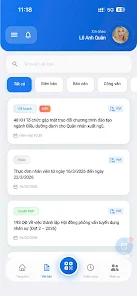
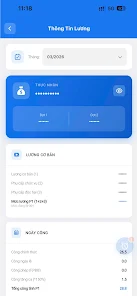
The interface prioritizes clarity. A streamlined menu groups tools by task: text, layout, review, and export. The main editor occupies most of the screen while a collapsible sidebar provides quick access to styles, document outline, and file properties. This layout supports focused editing on smaller displays and lets users switch between functions quickly.
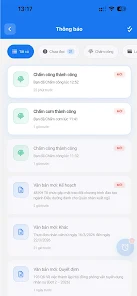
HVGL Office includes a built-in file manager that supports folders, tagging, and document previews. You can pin frequently used files to the home tab for instant access. The manager also shows recent changes and sync status, so users always know whether their latest edits are saved to the cloud.
Compatibility with mainstream document formats is strong, which makes file exchange with desktop suites straightforward. Cloud integrations include options to link to common services for backup and remote access. The app also supports importing images and external fonts for richer document design.
Performance is a highlight: HVGL Office keeps memory use modest and handles medium-sized documents smoothly. Rendering of complex layouts and spreadsheets is optimized to reduce lag during scrolling and editing. Autosave frequency and sync settings can be adjusted to balance battery life and data safety.
Users can tailor the app experience with theme options, toolbar customization, and a simplified reading mode for distraction-free reviewing. Accessibility features include adjustable font sizes, high-contrast themes, and keyboard shortcuts for external keyboards, improving usability for a wide range of users.
Many users prefer HVGL Office for its efficient balance of features and speed. It’s particularly attractive to users who want a capable mobile office suite that doesn’t require a subscription and works reliably on a variety of hardware. Its straightforward collaboration tools and offline editing support make it a practical choice for on-the-go productivity.
Installation is quick through the Android app store. After granting basic permissions for storage and network access, import a document or pick a template to begin. The first-run tutorial highlights key gestures and toolbar locations to get new users productive within minutes.
HVGL Office delivers a pragmatic approach to mobile document management, emphasizing efficiency, compatibility, and a gentle learning curve for everyday productivity tasks.
File size: 37.00 M Latest Version: 2.1.1
Requirements: Android Language: English
Votes: 220 Package ID: vn.hvgl.noibo
Developer: Bệnh viện Hùng Vương Gia Lai

Must Have Home Apps for Android
Make your house a home with our suite of helpful home apps. Discover clever tools to organize closets, streamline chores, and simplify cooking. Take the stress out of cleaning and maintenance with handy checklists and schedules. Enhance security and control appliances and lighting with our smart home integrations. Design, visualize, and renovate like a pro using our 3D planning software.






LIVE A HERO
Retro Hero Mr Kim
Empire of Passion
Arcane Quest Legends
Magic Snap: Momotaro
AllStar Manga Heroes
Lunescape
ONE PIECE Thousand Storm JP
Tap Titans 2










































