
Scan to Download
Muscle and Bone Anatomy 3D is an interactive anatomy reference that brings musculoskeletal structures to life with detailed, rotatable models and labeled layers. Ideal for students, clinicians, and fitness professionals, it combines accurate visuals with tools for exploration, annotation, and practical study in a single portable app.
Designed to make complex anatomy accessible, Muscle and Bone Anatomy 3D focuses on the skeletal system, musculature, and the relationships between bones, muscles, tendons, and ligaments. The app serves as a reference and study aid for learners preparing for exams, practitioners reviewing clinical anatomy, and instructors creating demonstrations.
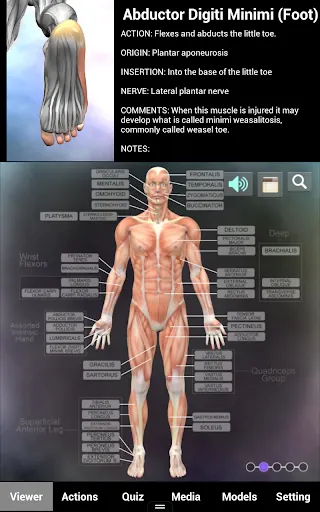
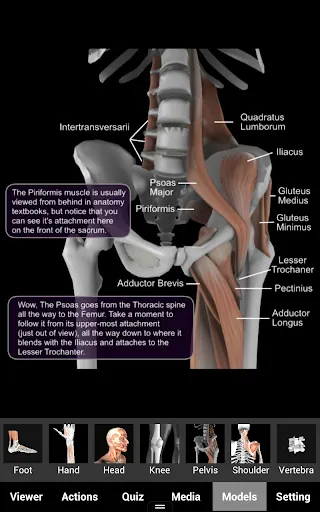
At the core of the experience are high-resolution 3D models that you can rotate, zoom, and dissect in real time. Layers allow you to isolate individual bones or muscle groups, hide or reveal connective tissues, and view origin and insertion points. Each structure is fully labeled and searchable, making it easier to locate and study components from multiple angles.
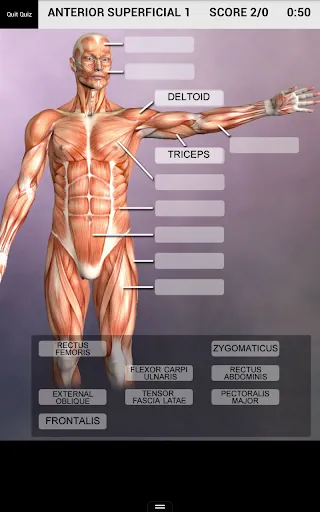
Muscle and Bone Anatomy 3D includes learning-oriented features such as quiz modes, flashcards, and customizable study sets. Users can test their knowledge with timed labeling exercises or practice identification in randomized drills. Notes and bookmarks let learners save tricky regions for repeated review, while a progress tracker helps monitor improvement over time.
The interface emphasizes clarity and quick access to tools. A minimalist control panel keeps model manipulation intuitive: pinch-to-zoom, swipe to rotate, and simple taps to open detailed information panels. Contextual menus provide quick toggles for labels, transparency, and cross-sectional views so you can switch perspectives without losing orientation.
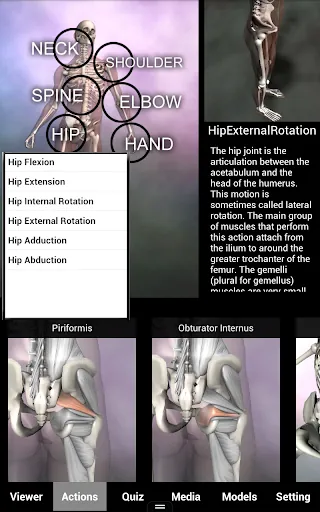
For a deeper understanding of spatial relationships, the app offers cross-sectional slices and layered transparency. These views are especially useful when studying joint mechanics or planning approaches for physical therapy and rehabilitation. Each anatomical entry includes clinical notes that link structure to function, common injuries, and relevant biomechanics.
Users can personalize their study environment by creating annotations, highlighting structures, and adding text labels. Screenshots and annotated exports make it simple to assemble study guides or share findings with peers and patients. Custom color-coding helps differentiate muscle groups, compartments, and surgical landmarks for clearer presentations.
Muscle and Bone Anatomy 3D is practical for classroom demonstrations, bedside education, and remote learning. Instructors can illustrate movement mechanics, while therapists can demonstrate muscle recruitment and injury mechanics to clients. The app’s portability makes it a handy reference during clinical rounds, student consultations, or fitness planning sessions.
Optimized for modern Android devices, the app balances graphical fidelity with responsive performance. It supports a variety of screen sizes and hardware configurations, with options to adjust texture detail and rendering to preserve smooth interaction on older devices. Offline access to downloaded models ensures functionality without continuous internet access.
Integration features streamline workflow for educators and clinicians: exportable screenshots, PDF-friendly annotations, and the ability to assemble custom playlists of models for lessons. The search function is robust, offering synonyms and common clinical terms to speed up retrieval of anatomical structures during fast-paced study or patient conversations.
To get the most from Muscle and Bone Anatomy 3D, combine its visual tools with active recall methods: quiz yourself after manipulating a model, create flashcards from annotated screenshots, and revisit bookmarked regions periodically. Use cross-sectional views to connect surface landmarks to deeper anatomy, and leverage clinical notes to contextualize learning for real-world application.
Muscle and Bone Anatomy 3D distinguishes itself through clear, accurate models and a user-centric feature set that supports both learning and clinical use. With flexible visualization options, annotation capabilities, and performance-conscious design, it is a valuable resource for anyone seeking a deeper, more connected understanding of musculoskeletal anatomy.
File size: 72.00 M Latest Version: 1.2.1
Requirements: Android Language: English
Votes: 161 Package ID: muscleandboneanatomy.viewer
Developer: Real Bodywork

Top Health Free Apps for Android
Take charge of your wellbeing with our innovative health and fitness apps. Monitor your activity, sleep, nutrition and more using our advanced tracking tools. Access personalized insights to develop healthy habits. Check symptoms, manage medications, and connect with doctors through our telehealth services. Follow customized workout plans for any fitness level with our virtual coaching.






LIVE A HERO
Retro Hero Mr Kim
Empire of Passion
Arcane Quest Legends
Magic Snap: Momotaro
AllStar Manga Heroes
Lunescape
ONE PIECE Thousand Storm JP
Tap Titans 2