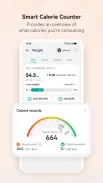
Huawei Health helps you track workouts, monitor health metrics, and synchronize data with wearable devices. The app provides activity tracking, sleep analysis, heart rate monitoring, guided workouts, and detailed reports to help you set goals and understand your daily habits for better wellness management.
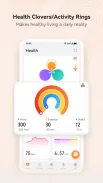
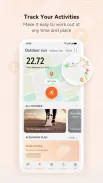
Huawei Health combines everyday activity logging with deeper physiological insights. It records step counts, distance, calories burned, and active minutes while also offering continuous heart rate readings, blood-oxygen estimates, and sleep staging. Regular summaries and trend charts make it easier to spot improvements or patterns across days, weeks, and months.
The user interface focuses on clarity and quick access. A dashboard presents your daily progress at a glance, while dedicated tabs organize exercise logs, health metrics, and device settings. Notifications and widgets keep important updates visible without opening the full application. Data syncs automatically when a paired wearable is in range, streamlining your routine.
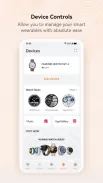
Huawei Health pairs with a wide range of Huawei and Honor wearables as well as select third-party devices. Bluetooth pairing, firmware updates, and device management are handled inside the app. It also supports exporting data to third-party health ecosystems where allowed, helping you consolidate records across platforms.
Personal settings let you tailor tracking sensitivity, notification preferences, and goal types. Create daily step goals, set sleep targets, or pick heart-rate zones for training. The app’s widgets and watch faces can be customized so your most-used metrics appear first on the paired wearable.
Huawei Health is optimized for efficiency when used with compatible wearables, minimizing battery impact during continuous monitoring. Background syncing and GPS tracking can increase power draw, so it’s straightforward to adjust sampling rates or disable always-on features to extend battery life. Frequent firmware updates also improve performance and add new tracking algorithms.
Health apps handle sensitive information, and Huawei Health follows standard encryption for data in transit and at rest on the device. You control permissions for location, sensors, and data sharing. Regularly reviewing privacy settings ensures that only chosen information is synced or exported.
To begin, download Huawei Health from the store, grant the requested permissions, and create or sign in to your account. Pair your wearable through the device management screen and allow a short sync period so historical data uploads. From there, set basic goals and explore the curated training plans to match your fitness level.
Huawei Health is designed for people who want a balanced mix of everyday tracking and deeper health insights without extra complexity. The app suits those who use wearables for motivation, athletes seeking structured plans, and anyone focused on developing consistent, measurable habits for long-term wellbeing.
File size: 19.10 M Latest Version: 9.22.5.2
Requirements: Android Language: English
Votes: 246 Package ID: cm.aptoide.pt
Developer: 深圳市荣盛全科技有限公司


Top Health Free Apps for Android
Take charge of your wellbeing with our innovative health and fitness apps. Monitor your activity, sleep, nutrition and more using our advanced tracking tools. Access personalized insights to develop healthy habits. Check symptoms, manage medications, and connect with doctors through our telehealth services. Follow customized workout plans for any fitness level with our virtual coaching.






LIVE A HERO
Retro Hero Mr Kim
Empire of Passion
Arcane Quest Legends
Magic Snap: Momotaro
AllStar Manga Heroes
Lunescape
ONE PIECE Thousand Storm JP
Tap Titans 2