Scan to Download
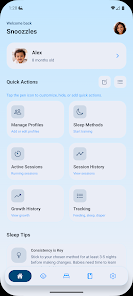
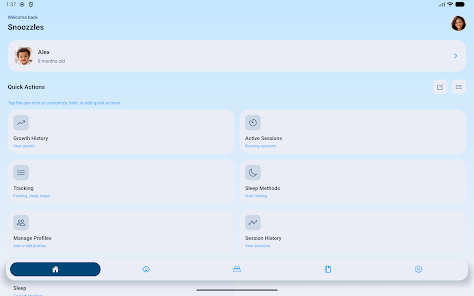
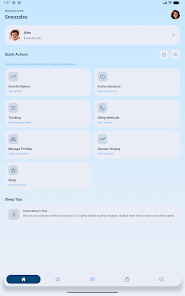
Snoozzles: Sleep Trainer & Log helps parents and caregivers establish calmer nights by combining structured sleep training guidance with detailed day-to-day tracking. Snoozzles: Sleep Trainer & Log places a smart, automated timer and three gentle fading approaches at the center of its workflow so you can follow an evidence-based, gradual progression without guesswork. The app is designed to be straightforward on small screens: start a session, select a fading method, and let the timer guide check-ins while the app records sleep length, feeding details, diaper changes and growth metrics for each baby profile.
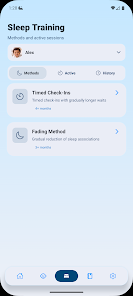
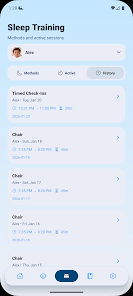
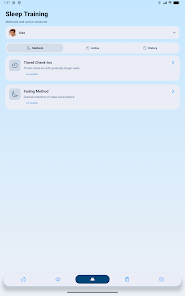
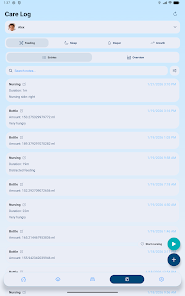
The core of the app is the timed check-in system, which uses a smart timer that automatically adjusts intervals across a recommended seven-day progression. You control the pace by choosing one of three fading styles—Chair Method, Pick Up/Put Down, and Bedtime Fading—and Snoozzles adjusts the timing so you don’t need to recalculate intervals. Log screens are single-tap and optimized for quick entries during nighttime or low-light conditions: start and stop sleep sessions, tap to add feeding volumes in milliliters, record breastfeeding duration with a timer, and mark diaper changes with a single touch.
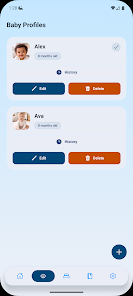
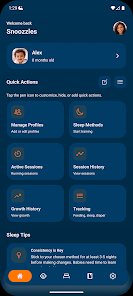
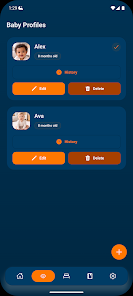
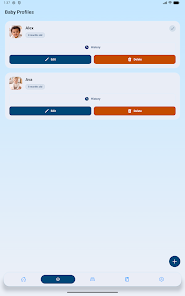
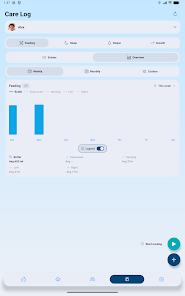
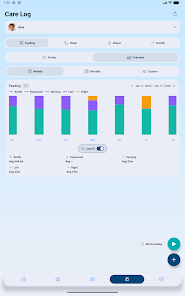
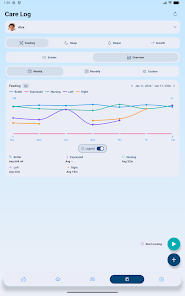
Multiple baby profiles let households track more than one child independently, each with its own history and analytics. Session history is stored on the device so you can review how routines evolve over days and weeks, and weekly and monthly charts make trends visible at a glance. Growth tracking supports both metric and imperial units and presents interactive trend charts to show percentile-like trends over time.
Progression is intentional and transparent: the seven-day program is a suggested framework, and controls let you fine-tune interval lengths, silence notifications during quiet hours, and set custom reminders. The app’s controls follow familiar mobile conventions—tappable cards, sliders to adjust duration, and clear buttons to pause or reset a session—so parents can operate the app one-handed while holding a baby. Visual cues and short on-screen prompts explain each step of the selected method to reduce confusion and help caregivers stay consistent.
Snoozzles focuses on a calm, uncluttered visual design with muted color palettes and large, readable type to reduce late-night eye strain. Data screens emphasize trends rather than raw numbers: timeline views show recent naps and overnight stretches, while chart views surface average sleep length and frequency of awakenings. The app aims to minimize cognitive load by presenting only the most relevant actions during an active session and keeping configuration in a separate settings area.
The app encourages repeat use by making each session meaningful: entries accumulate into weekly summaries that let you compare progress across different fading methods or across siblings. Because Snoozzles supports multiple profiles, it is suited to families who return to sleep training at different ages or who want to compare responses between children. Adjustable difficulty comes from the interval controls and optional stricter or gentler pacing, so families can test what works best for their temperament and routines without starting from scratch.
Snoozzles includes accessibility-minded features such as adjustable font sizes and high-contrast display options for better readability. The app functions offline for core features: timers, local logging and charts work without a network connection, ensuring reliable operation in nurseries, basements or during travel. Data is saved locally on the device so entries remain available even when connectivity is intermittent.
Sleep training requires consistency and patience; the app is a guided tool rather than a magic fix. Night regressions, illness and developmental changes can alter progress, and the gradual seven-day progression means visible improvements often take several days. Snoozzles helps by documenting patterns and keeping schedules consistent, but it does not replace professional guidance.
Snoozzles: Sleep Trainer & Log is an assisting tool and not a substitute for medical advice. Always consult a pediatrician before beginning any sleep training program, especially for babies under four months of age or with health concerns. The app is intended to support informed, gradual behavior change and to provide clear records that caregivers and health professionals can review together.
File size: 76.00 M Latest Version: 3.3.1
Requirements: Android Language: English
Votes: 362 Package ID: co.snoozzles.app
Developer: Idrion Labs


Make your house a home with our selection of innovative apps. Discover programs to simplify cleaning, organize closets, and manage home maintenance. Take the hassle out of chores and keep your space running smoothly. Design, visualize, and renovate like a pro using our augmented reality and 3D modeling tools. Enhance security and monitor your property 24/7 with our connected home tech.






LIVE A HERO
Retro Hero Mr Kim
Empire of Passion
Arcane Quest Legends
Magic Snap: Momotaro
AllStar Manga Heroes
Lunescape
ONE PIECE Thousand Storm JP
Tap Titans 2