Scan to Download
Snap Reaction is a compact Android utility that combines a face-cam reaction recorder, a WhatsApp status saver and a private video downloader into a single, easy-to-use mobile tool. Designed for creators and casual users who want to capture on-screen commentary, archive status updates or save reference clips for offline use, Snap Reaction keeps the core tasks together so you do not need to switch between multiple apps while preparing short reaction videos or saving content for later viewing.
The reaction cam puts a resizable, movable face overlay on top of any playing video and records your expression in sync with the source clip. You can adjust opacity, size and screen position to make the overlay blend naturally with your footage, choose whether the face-cam appears in a corner or as a centered picture-in-picture, and trim the recorded reaction independently so the timing matches the segment you want to highlight. Controls are intentionally simple: start and stop recording with one tap, scrub the playback timeline to line up moments, and use the built-in preview to check framing before exporting.
The status saver automatically detects WhatsApp status items that appear on your device and provides a one-tap option to save photos and videos directly to your gallery. Saved items remain on the device for personal use and are handled locally; there is no forced upload or sharing unless you explicitly choose to do so. The detection workflow is designed to be unobtrusive: the app monitors available statuses, shows a compact list of items, and lets you review and select which files to keep, helping you manage storage and avoid duplicates.
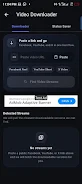
The private download manager supports pasting direct links or browsing web pages inside the app to locate media to download. When you choose a clip it offers common format and quality options so you can export a version that fits your storage or editing needs. Downloads are organized in a simple queue so you can pause, resume or reorder tasks if needed, and completed files are accessible from an in-app library for quick re-use in new reaction projects.
Controls are built around a step-by-step creation flow: pick or download a source video, enable the face-cam overlay and record your reaction, then trim and export. The timeline editor provides basic trimming and splitting so you can remove mistakes or tighten the pacing without leaving the app. Touch gestures let you reposition the overlay and adjust opacity, while on-screen buttons control recording and playback; the interface avoids deep menus so common tasks remain one or two taps away. Accessible labels and large touch targets aim to make the core features usable on phones of different sizes, and a built-in help section explains each control in plain language.
Snap Reaction offers export settings that let you choose resolution and file format for the final video, and it avoids placing a forced watermark on exports. You can maintain full-quality clips for archiving or choose smaller sizes for faster sharing. The app supports local rendering, so the final composition—your face-cam layered over the source—renders on-device without requiring a continuous connection, which keeps files private and reduces reliance on external servers. Presets for overlay positioning and common export profiles can be saved so you can repeat a preferred setup across multiple projects.
Rather than levels or progression in a game sense, the app encourages a creative workflow that improves with practice: start by recording short reaction snippets, experiment with different overlay placements and opacity to find your style, then refine timing through the timeline editor. Reusable templates and saved export profiles give the app replay value for creators who produce recurring content, and the in-app library helps you manage source clips, saved statuses and completed exports so you can revisit and remix material over time.
Built with Flutter to emphasize native performance on Android, the app performs local rendering and offline processing for exports, which makes finalization faster and keeps private material on the device. Downloading new source videos requires an internet connection, but once media is on the phone you can compose, edit and export fully offline. Background rendering and efficient use of device codecs help keep battery and CPU impact reasonable for typical short-form reaction videos.
The design includes readable labels and simple navigation to help users of varying experience levels complete tasks quickly. Touch targets are sized for one-handed use on modern phones, and the app respects Android storage permissions so users retain control over where files are saved. Snap Reaction is optimized for Android devices and does not currently target other operating systems.
Saved statuses and recorded reactions are stored locally on your device unless you choose to share them; there is no mandatory uploading or cloud requirement. Snap Reaction is developed by SpeckInTech and built with Flutter to prioritize on-device rendering and a responsive editing experience. If you need a compact, privacy-minded tool for recording reactions, saving stories and downloading reference clips without forced watermarks, Snap Reaction keeps those tasks centralized and straightforward on Android.
File size: 108.72 M Latest Version: 1.0.0
Requirements: Android Language: English
Votes: 361 Package ID: com.snapreaction.app
Developer: SpeckInTech




Empower learning and research with our innovative reference apps. Access dictionaries, thesauruses, encyclopedias, and more with our comprehensive databases. Get homework help, study tips, and writing guides from our academic resources. Learn new skills by browsing how-to videos and manuals. Stay up-to-date with latest news, data, and facts curated by our editors.




LIVE A HERO
Retro Hero Mr Kim
Empire of Passion
Arcane Quest Legends
Magic Snap: Momotaro
AllStar Manga Heroes
Lunescape
ONE PIECE Thousand Storm JP
Tap Titans 2