Scan to Download
CREWLINE is a practical work-support app for airline crew that centralizes schedule management, communication and crew resources into a single, easy-to-use interface. CREWLINE helps cabin and flight crew view and manage rosters, coordinate with colleagues and keep essential travel notes close at hand, whether you are preparing for a duty day or reviewing a past rotation. The app is independent and not affiliated with any airline or government organization, and it focuses on giving individual crew members streamlined tools to stay organized before, during and after flights.
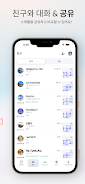
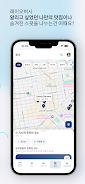
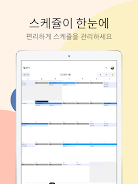
The core features include a consolidated flight schedule view where duties can be scanned by day, week or month, and an interactive roster timeline that highlights duties, layovers and rest periods. Schedule comparison tools let you place two timetables side-by-side to spot overlaps, potential swaps or free time windows. Built-in crew chat supports one-to-one messages and small group threads for pre-duty coordination; community boards let crew share trip notes, local tips and operational observations. Saved places and location notes provide a personal repository for hotels, lounges and meeting points, including phone numbers, addresses and short reminders. Staff travel and flight information tools act as a quick reference for common operational details you might need while traveling.
CREWLINE is designed for fast, thumb-friendly operation on mobile devices. Swipe and tap gestures move between roster days and timeline segments, while long-press and quick-action menus allow fast edits to duty entries or the creation of a swap request. A search field filters rosters, messages and saved places by keyword or city name, and context-aware buttons present the most likely next steps when viewing a duty or message. Notifications are configurable so you receive only the alerts that matter, and many actions are reachable from a one-tap overview screen.
Personalization is central to the experience: profile and preference settings let you choose notification rules, local time display and roster color-coding to match your workflow. As you add saved places, pinned colleagues and templated notes, CREWLINE becomes more productive—frequently used locations appear first, repeat duty patterns are easier to spot and common messages can be sent with a tap. This gradual accumulation of personalized resources creates a simple progression system: the more you use the app, the faster you can complete routine tasks during busy rotations.
The app favors a clean, utilitarian visual style with readable type, clear contrast between duty types and compact card-like duty summaries that expand into detailed views. Information is organized into logical levels: overview (day/week), duty detail (time, role, layover notes), and context (saved places, messages, community posts). Dark and light display modes reduce eye strain on long flights or overnight shifts, and compact list and expanded timeline views let you choose the presentation that best suits quick checks or in-depth planning.
For crew who travel regularly, CREWLINE is built to be used repeatedly across many rotations: saved templates, reusable notes and an evolving personal index of hotels and local tips increase efficiency over time. The app reduces repetitive setup, so routine tasks like coordinating a swap or finding a preferred lounge become faster with every use. Designed to be intuitive for international crews, the interface minimizes friction when juggling different time zones, overnight duties and short layovers.
Accessibility features include adjustable text sizing and clear color contrasts to help users with varying visual needs. CREWLINE caches recently viewed rosters and saved places so basic information remains available offline when connectivity is limited; however, real-time messaging and new community posts require network access. The app stores personal notes and preferences locally and offers standard device-level protections such as passcode or biometric unlocking where supported. CREWLINE is not an official rostering system and should not be used as the sole source for regulatory duty confirmation—always verify assignments with your employer or official roster provider.
Because the app is independent of airline systems, features such as schedule comparison and community boards are most effective when colleagues participate and keep their information up to date. CREWLINE focuses on practical productivity tools rather than replacing official operational systems, and its privacy and data controls are designed to keep your personal travel notes and communications under your control. If you rely on a formal rostering platform for legal duty records, use CREWLINE as a complementary planning and coordination tool rather than a substitute.
File size: 59.94 M Latest Version: 1.2.1
Requirements: Android Language: English
Votes: 462 Package ID: com.aviator.crewline
Developer: FlyWithPark




Must Have Communication Apps for Android
Connect deeper through meaningful conversations with our communication apps. Enjoy crystal-clear calls, video chats, messaging, and file sharing. Find the perfect emojis, GIFs, and stickers to express yourself. Keep the non-stop group banter organized in one place. Block unwanted interactions at the source. Meet new people worldwide through our global community features.






LIVE A HERO
Retro Hero Mr Kim
Empire of Passion
Arcane Quest Legends
Magic Snap: Momotaro
AllStar Manga Heroes
Lunescape
ONE PIECE Thousand Storm JP
Tap Titans 2