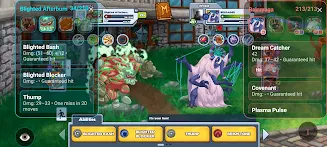
Miscrits Engine is a real-time battle assistant built for competitive Miscrits PvP players that analyzes live fights and offers quick, context-aware predictions to help you decide which move to make. Miscrits Engine captures visible damage values, status icons, and other on-screen battle indicators during PvP matches to estimate hit probability and expected damage outcomes, so decisions that once relied on guesswork can be guided by immediate, data-driven estimates.
Miscrits Engine performs on-device screen analysis during matches, detecting numeric damage readouts, status effect markers, and turn order cues to model likely results of individual moves. The app uses configurable thresholds to translate raw readings into a percent chance that a move will land and a projected damage range. Results are presented as concise, readable prompts during combat so you can act quickly. The system is designed around observable in-battle information rather than external data feeds, which keeps predictions tied closely to what is actually happening on screen.
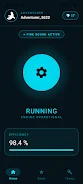
The user interface is focused on minimal distraction: a calibration step aligns Miscrits Engine with the layouts you encounter, then simple toggles let you enable or disable live overlays, sound or haptic alerts, and the level of prediction detail. You can adjust sensitivity for detection of faint damage numbers, set confidence thresholds to only show high-probability outcomes, and choose whether the app highlights lethal-damage opportunities. Touch controls and an optional floating start/stop button make it easy to begin capture at the start of a match and pause when needed without interrupting gameplay.
Rather than inventing new in-game progression, Miscrits Engine helps you progress by improving your decision quality across matches. The app maintains local session logs that summarize predicted vs. actual outcomes so you can review performance trends and spot recurring mistakes. These local statistics make it simpler to track improvement over time, identify common misreads, and tune the prediction settings to match your playstyle. There is no dependency on online leaderboards or cloud saves in order to preserve privacy and keep the focus on practical, personal improvement.
Visually, Miscrits Engine aims for clarity and unobtrusiveness. Overlays are designed with contrast and legibility in mind so prediction text and confidence bars remain readable over varied arena backgrounds and visual effects. The detection logic recognizes common PvP arena layouts and adapts to different camera and resolution settings; the calibration process recommends optimal screen regions for reliable detection while providing on-screen guidance to help you align the app with whatever UI scale you are using.
Accessibility is addressed through adjustable font sizes, high-contrast themes, and optional colorblind-friendly indicators. You can enable vibration or short audio cues for critical events such as predicted lethals or low-probability outcomes so the assistant communicates in ways that suit your sensory preferences. The app also offers a straightforward settings panel that documents each option in plain language, making it easier for new users to understand how predictions are generated and how to adapt the tool to their device.
The real replay value of Miscrits Engine comes from repeated use in real PvP matches: as you experiment with different risk tolerances and prediction thresholds, the app helps you refine instincts and reaction times. Reviewing session logs between play sessions creates a simple practice ritual that encourages deliberate improvement. Because the core functionality is analysis rather than manual stat tracking, many players find the assistant useful across multiple matchups and team compositions without needing frequent reconfiguration.
Most detection and prediction features run locally on-device so the core assistant works without a constant internet connection, though certain optional updates or help resources may request connectivity. Miscrits Engine does require clear on-screen visuals and active screen capture to detect numbers and effects reliably; in situations with poor lighting, aggressive overlays from other apps, or compressed image artifacts, predictions may be less accurate. The app provides warning notes when confidence is low and is explicit that its estimates are probabilistic guidance rather than guarantees of match outcomes.
To begin, install Miscrits Engine, complete the quick calibration to match your display layout, and run a few training PvP matches while monitoring the overlay. Tweak detection sensitivity and confidence thresholds in the settings, and use the local session logs to compare predicted versus actual results so you can steadily improve decision-making under pressure. Miscrits Engine is intended as an on-screen assistant to make faster, more informed choices during competitive play without changing the core game experience.
File size: 14.00 M Latest Version: 1.0.2
Requirements: Android Language: English
Votes: 435 Package ID: com.crimsoncorridors.miscritsengine
Developer: Crimson Corridors


Top Events Free Apps for Android
Discover and share the hottest events around with our intuitive apps. Find local concerts, festivals, shows, and more based on your unique interests. Create customizable calendars of upcoming events to coordinate schedules with friends. Purchase tickets seamlessly from our integrated platforms. Check real-time transit schedules to plan your trip. Access maps, directions, and parking information for any venue.






LIVE A HERO
Retro Hero Mr Kim
Empire of Passion
Arcane Quest Legends
Magic Snap: Momotaro
AllStar Manga Heroes
Lunescape
ONE PIECE Thousand Storm JP
Tap Titans 2