TSARAP SCOP is a mobile application designed to help small and medium businesses manage operations and financial flows in real time. TSARAP SCOP provides immediate visibility into key figures and outstanding balances, and TSARAP SCOP connects your accounting cooperative with an easy-to-use mobile dashboard that keeps accounts synchronized and accessible while you are on the move.
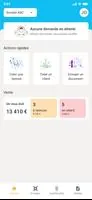
The app centralizes essential business metrics in a compact interface so you can monitor cash position, receivables and payables, and other performance indicators from a single screen. Live account monitoring shows outstanding customer and supplier balances, while the cooperative sharing function allows authorized partners to receive the same records to reduce reconciliation effort. A configurable dashboard presents prioritized KPIs and summary cards that update as new data arrives, letting you focus on the numbers that matter to day-to-day decisions.
TSARAP SCOP is organized around simple workflows: link your company profile and cooperative account, confirm data-sharing permissions with your accountant, and begin viewing synchronized balances. Data flows from your records to the cooperative and back, and the dashboard populates as entries are recorded. The app emphasizes transparency by showing both aggregated figures and itemized outstanding transactions so you can drill down into individual invoices or supplier statements with a few taps.
Navigation is optimized for mobile: swipe between dashboard tabs, use in-screen filters to narrow by period or account, and tap items to open detailed transaction views. Search and quick-sort controls help you find customers, invoices, or suppliers fast, while pull-to-refresh requests the latest synchronized data. The interface minimizes steps to get to core actions—reviewing balances, sending data to your cooperative, or checking the cash flow summary—so routine checks are efficient on a smartphone or tablet.
Onboarding guides you through account setup and cooperative linking in a few clear steps, showing progress as critical connections are completed. As more accounts and entries are added, the app’s analytical modules fill with meaningful trends and ratios, improving the usefulness of the dashboard over time. You can prioritize which KPIs appear first, and the recommended setup path helps new users reach a working view quickly without overwhelming them with all options at once.
The visual design favors clarity and legibility: contrast for numeric tiles, concise labels, and consistent color cues for positive and negative balances. Charts and trend lines use simplified visuals to highlight direction and volatility, while list views show sortable columns for quick reconciliation. The goal of the visual language is to make it easy to interpret figures quickly during routine checks or while discussing results with your accounting cooperative.
Functionality is grouped into modules such as Dashboard, Customers, Suppliers, and Cooperative Sync so users can move between summary and detail without losing context. Each module contains task-oriented screens: the Customers module focuses on receivables and aging, while Suppliers concentrates on payables and open credits. This modular layout supports focused workflows and makes it easier to train multiple team members to use specific parts of the app.
Users can customize which KPIs are displayed, set default time ranges, and configure alert thresholds for overdue balances or liquidity warnings. Permission settings control what your accounting cooperative can view or edit, preserving a separation of responsibilities. These settings let businesses adapt the app to internal procedures and reporting habits without changing the core synchronization behavior.
The app provides cached access to recently viewed dashboards and transaction lists so you can reference important figures while offline; full real-time updates require a network connection and cooperative synchronization. When a connection is restored, the app refreshes data and reconciles any local views with the latest cooperative records, maintaining an up-to-date perspective of outstanding balances.
TSARAP SCOP includes standard access controls and role-based permissions to limit financial data visibility to authorized users and cooperative partners. The interface supports larger text sizes and high-contrast display modes to improve readability, and common navigation patterns help users with assistive tools complete routine tasks more reliably.
Daily and weekly checks, end-of-period reconciliations, and on-the-road account reviews are natural recurring use cases for the app. Its value increases as you use it regularly: repeated data entry and synchronization create a richer history for trend analysis, and recurring alerts or saved filters speed up routine inspections. This makes TSARAP SCOP suitable for business owners and finance teams who need a dependable mobile companion for financial oversight.
Full functionality depends on having an accounting cooperative configured to receive and share data; without that connection some collaborative features are limited. Real-time visibility also depends on timely data entry and regular synchronization, so the app works best when your accounting partner and internal users maintain consistent update habits.
File size: 98.30 M Latest Version: 3.7.0
Requirements: Android Language: English
Votes: 175 Package ID: com.tsarapscop
Developer: MY UNISOFT






Must Have Finance Apps for Android
Take control of your money with our powerful finance apps. Track spending, create budgets, and set savings goals using our easy-to-use tools. Invest wisely by accessing real-time market data and analyst reports. Manage portfolios and optimize taxes for greater returns. Apply for loans, credit cards, and insurance with our partners for personalized rates. Securely link accounts for a consolidated view of your finances.






LIVE A HERO
Retro Hero Mr Kim
Empire of Passion
Arcane Quest Legends
Magic Snap: Momotaro
AllStar Manga Heroes
Lunescape
ONE PIECE Thousand Storm JP
Tap Titans 2