Scan to Download
IMB MAX is a utility app built to help players preview and test cosmetic skins and battle effects in real time before deciding to purchase them. The IMB MAX preview environment is designed to reproduce combat visuals, animations, and particle effects so you can see how a skin performs in action and make a more informed choice. This editor-style introduction explains how the tool works, what you can control, and how it fits into a player’s workflow for evaluating cosmetic items.
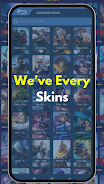
At its core, IMB MAX aggregates creator-made and customized cosmetics from independent designers and presents them in a configurable demo environment. The app focuses on visual fidelity: lighting, color variations, weapon trails, and hit reactions are rendered in a short combat simulation so you can observe how a skin looks under movement, during attacks, and when special effects trigger. The collection includes items that may not be available for purchase inside the base game, giving you exposure to a wider variety of designs while clearly marking which items are unofficial or creator-made.
The preview environment mimics standard combat pacing so you can judge skins by typical gameplay scenarios. A short looped encounter demonstrates animations such as idle poses, sprinting, melee or ranged attack cycles, and special ability visuals where appropriate. You can choose different test scenarios—close range, mid-range, or area-effect demonstrations—to see how particle effects and animation offsets behave across common combat situations. These playback mechanics are intended for visual evaluation rather than as a substitute for actual gameplay.
The app uses simple, touch-friendly controls for navigating the demo. A timeline scrubber and playback controls let you pause, rewind, and slow down animations for frame-by-frame inspection. Camera controls include orbit, zoom, and preset viewpoints so you can examine a skin from head-on, low-angle, and top-down perspectives. A comparison mode allows side-by-side previews of two skins so you can evaluate differences in silhouette, color contrast, and effect intensity without switching back and forth.
Rather than a player progression tied to gameplay, IMB MAX organizes content through collections, favorites, and locally saved presets. You can tag skins, create themed galleries, and save camera and playback settings for repeat evaluations. The app also includes basic metadata for each item—creator name, upload date, and notes—so you can track availability and origin. These organizational tools help you build a personal reference library for cosmetics you want to monitor over time.
Preview arenas are compact, optimized scenes designed to highlight visuals without distracting environmental clutter. Lighting presets emulate common in-game conditions such as daylight, dusk, and arena lighting so you can assess color balance and effect visibility across scenarios. While the demo scenes are not full game levels, they are structured to present a range of animations and particle densities, from single-target strikes to area effects, to provide a consistent basis for visual comparison.
Replay value comes from exploring new creator uploads and refining your personal collections. Regularly updated creator galleries and the ability to reconfigure test scenarios encourage repeated use. The interface emphasizes quick, repeatable inspections: load a skin, set camera and lighting, run the demo, and save notes or favorites. This workflow is intended to reduce buyer’s remorse by giving players confidence in how cosmetics will appear during play.
IMB MAX aims to be accessible: controls are large and clearly labeled, contrast settings and adjustable playback speeds assist users who need slower motion for inspection, and camera presets simplify navigation. Many preview assets can be cached for offline use so you can inspect previously downloaded items without a constant network connection; however, availability of new creator uploads requires connectivity. The app is optimized for a wide range of devices, with scalable quality settings to balance visual detail and performance on older hardware.
Creator-made skins in IMB MAX are presented for preview and are not necessarily official in-game items; availability and support depend on the original creators and may change over time. The app is intended as a visual evaluation tool and does not alter your in-game inventory or perform purchases on your behalf. Where applicable, the app can point to official store pages or documentation to help you complete a purchase through the game’s supported channels.
File size: 19.50 M Latest Version: 1.2
Requirements: Android Language: English
Votes: 312 Package ID: com.imb.max
Developer: XReborn


Must Have Tools Apps for Android
Equip yourself with our all-in-one toolbox app for everyday tasks and projects. Instantly convert between units, calculate tips, scan documents, manage files, and more with handy productivity tools. Includes a level, compass, QR code reader, ruler, speedometer, decibel meter, and flashlight. Save frequently used tools to your customizable dashboard for one-tap access. Track billable hours, wages, budgets, and invoices. Annotate screenshots, magnify labels, and sign PDFs on the go.






LIVE A HERO
Retro Hero Mr Kim
Empire of Passion
Arcane Quest Legends
Magic Snap: Momotaro
AllStar Manga Heroes
Lunescape
ONE PIECE Thousand Storm JP
Tap Titans 2