
Scan to Download
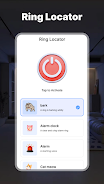
Ring Locator is a small, focused utility that helps you stop wasting time when your phone goes missing by letting you trigger a loud ringtone with a single tap. The app opens quickly to a large, easy-to-read button that plays a chosen tone at the volume and vibration strength you set, and you can control how long the alert sounds so it keeps ringing long enough to be heard when your device is under a cushion or buried in a bag. Designed for fast retrieval, Ring Locator offers a wide variety of tones, simple controls, and straightforward settings so anyone can set it up and start locating a misplaced phone within seconds.
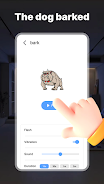
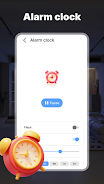
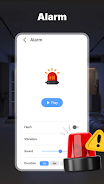
The app provides a rich library of tones that ranges from classic alarms to playful effects and clear animal sounds, letting you pick alerts that are most noticeable in your daily environment. A single-tap activation is the core interaction, and the interface emphasizes large touch targets and immediate feedback so triggering the ringtone is quick and dependable. Volume, vibration intensity and alert duration are all adjustable from the main screen, and you can preview each sound before choosing it. The design favors no-nonsense controls rather than complex menus, so common adjustments are one or two taps away.
Controls are intentionally simple: tap to ring, tap again to stop, and use sliders or presets to change volume and vibration. The app requests only the permissions needed to play sounds and use the device vibrator so it can alert you where audio or haptic signals work best. For even faster access, the app supports adding a home-screen shortcut to start the ringtone with a single tap without opening full settings. A built-in test mode lets you simulate an alert to confirm the chosen tone, volume and vibration are effective in your environment before you rely on it in a real situation.
Customization goes beyond selecting a tone: you can adjust the exact duration of the alert, pick different vibration strengths, and save preferred setups as named profiles for different places such as home, office or car. Over time you can refine these profiles to match recurring situations, which acts as a simple progression system where your saved presets reflect what works best for you. Changing profiles takes only a tap, and profiles let you switch from a subtle alert to a loud, long ringtone when you know the phone tends to get lost in noisy settings.
The visual style favors high-contrast elements, large icons and clear labels to make the app readable at a glance. Buttons and sliders are spaced to accommodate quick, accurate taps and the layout scales for different screen sizes. In addition to audible alerts, the combination of visual cues and adjustable vibration supports users with different needs: if sound alone is not sufficient, a stronger haptic setting increases the chance of detecting the device. The UI is designed for straightforward navigation so setup is accessible for a wide range of users.
Ring Locator is built to work offline and does not require a network connection to play tones or vibrate, which means it remains reliable even without cellular or Wi‑Fi access. The app minimizes background activity and is optimized to avoid unnecessary battery drain, but long, repeated alerts will use power so you can balance duration and loudness to preserve battery when needed. Because it operates locally, it does not rely on cloud services or accounts to perform the core ringing function.
Use Ring Locator when your phone slips between couch cushions, is left in another room, or is buried under clothing; it’s also handy in shared workspaces where a distinctive tone helps you find your device quickly. The ability to create and cycle through profiles gives the app replay value: you can experiment with sounds and settings to find the combination that best matches different environments. Keep in mind the app relies on audio and vibration signals, so it will not provide a precise map or GPS-style pinpointing. Effectiveness depends on the chosen volume and vibration; very low settings or extreme noise levels may make alerts harder to detect.
Installation is quick and the first-run experience walks you through choosing a tone, setting volume and saving a profile. If you prefer minimal interaction, the one-tap shortcut option provides the simplest workflow: add it to your home screen and tap whenever the device goes missing. Regularly testing your preferred alert in the places you use your phone ensures the settings remain effective as environments change.
File size: 56.93 M Latest Version: 1.3
Requirements: Android Language: English
Votes: 199 Package ID: com.ringlocator.clap.find
Developer: HP Entertainment
Top Audio Free Apps for Android
Immerse yourself in an audio wonderland with our exceptional audio app downloads! Escape into a world of captivating stories, immersive podcasts, and spellbinding audiobooks. Let your imagination soar as you listen to gripping narratives, engaging interviews, and mind-expanding educational content. With our vast collection of audio content, there's something for everyone.





LIVE A HERO
Retro Hero Mr Kim
Empire of Passion
Arcane Quest Legends
Magic Snap: Momotaro
AllStar Manga Heroes
Lunescape
ONE PIECE Thousand Storm JP
Tap Titans 2










































