Scan to Download
XMTV Player is a lightweight, versatile Android media player designed to handle local videos, network streams, and IPTV playlists with a clean, touch-friendly interface. It supports multiple audio and subtitle tracks, gesture controls, and hardware acceleration to deliver smooth playback across a wide range of devices.
XMTV Player focuses on practical playback features rather than flashy extras. You can open single files, entire folders, or import M3U playlists for live channels and VOD lists. The app supports external subtitle files and can detect multiple audio streams. Built-in gesture controls let you seek, change volume, and adjust brightness without visible buttons, keeping the screen tidy during playback.
The interface is uncluttered and optimized for touch. Simple icons and fullscreen gestures reduce learning time, while an organized library view makes it easy to browse local media and network sources. Playlists display channel names, thumbnails, and status indicators so you can quickly pick what to watch. Playback controls remain accessible but unobtrusive.
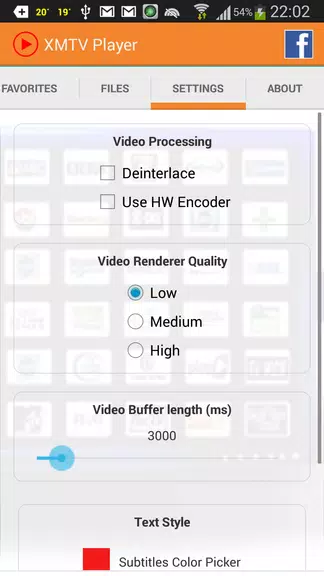
Designed for both local playback and network streaming, XMTV Player handles HTTP streams and common IPTV playlist formats. It offers options for buffering and reconnect behavior to improve stability on variable connections. The app also works with DLNA and casting protocols, allowing you to send content to compatible devices when a bigger screen is preferred.
Performance is a major focus: hardware acceleration support reduces CPU load and helps maintain high frame rates on mid-range devices. When software decoding is required, fallback routines preserve playback compatibility. Resume playback, background audio playback, and sleep-timer controls allow you to tailor behavior for long viewing sessions or audio-only use.
Playback can be personalized through subtitle styling, audio delay adjustments, and playback speed controls. Subtitle synchronization and font size controls improve readability for different screen sizes. For users who prefer a particular look, basic theme options adjust contrast and button visibility, while the compact mode reduces on-screen elements for distraction-free viewing.
XMTV Player simplifies media management with playlist import/export and basic sorting tools. You can create favorites, add or remove channels from a list, and rearrange entries. The library supports scanning local storage for new content and keeps track of recently played items to speed up access to frequently used media.
The app requests only the permissions needed to access local files and network resources. Playlist data and local metadata are stored locally unless you choose to export or share them. If you use network streams, treat playlist sources responsibly and verify that streams are lawful and authorized for your use.
XMTV Player runs on a wide range of Android phones and tablets. It adapts to different screen resolutions and supports both portrait and landscape orientations. Lower-end devices may require reduced resolution or software decoding for demanding content, while newer devices benefit from hardware-accelerated playback and smoother navigation.
If a stream fails to play, verify the playlist URL and network connection. Enabling hardware acceleration can reduce CPU usage but may cause issues on some devices—try toggling it if playback is unstable. For subtitle problems, try an alternate subtitle file or adjust the sync offset. Clearing cache and restarting the app often resolves unexpected behavior.
XMTV Player provides a practical, no-nonsense approach to mobile media playback. With playlist management, network streaming support, and gesture-driven controls, it suits users who want reliable performance and flexible playback options on Android devices.
File size: 14.20 M Latest Version: 2.0.10.22
Requirements: Android Language: English
Votes: 377 Package ID: com.xmtvplayer.watch.live.streams
Developer: RachevLabs


Must Have Tools Apps for Android
Equip yourself with our all-in-one toolbox app for everyday tasks and projects. Instantly convert between units, calculate tips, scan documents, manage files, and more with handy productivity tools. Includes a level, compass, QR code reader, ruler, speedometer, decibel meter, and flashlight. Save frequently used tools to your customizable dashboard for one-tap access. Track billable hours, wages, budgets, and invoices. Annotate screenshots, magnify labels, and sign PDFs on the go.






LIVE A HERO
Retro Hero Mr Kim
Empire of Passion
Arcane Quest Legends
Magic Snap: Momotaro
AllStar Manga Heroes
Lunescape
ONE PIECE Thousand Storm JP
Tap Titans 2