
Scan to Download
Live Now is a compact screen recording and live-streaming tool designed to capture crisp video, screenshots and camera feeds directly from your Android device. If you want to save important moments, record demonstrations, or broadcast events from your phone, Live Now gives you high-resolution output and straightforward streaming options without unnecessary clutter. The app supports both front and rear cameras, offers customizable export settings and encoders, and emphasizes clean recordings — making it a practical choice for creators who need reliable mobile capture and simple broadcast setup.
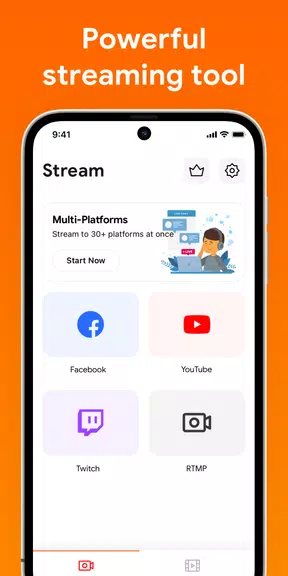
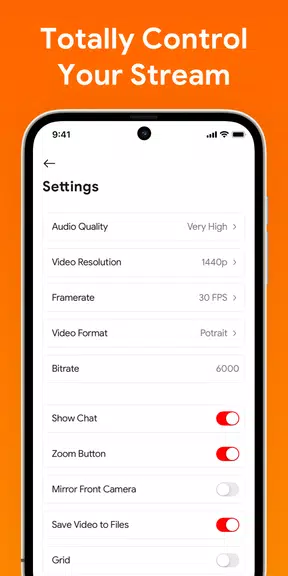
Live Now handles three core tasks: recording the device screen, taking screenshots, and streaming camera video. It records at resolutions from 240p up to Full HD (1080p), supports frame rates between 15FPS and 60FPS, and can export videos at up to 12Mbps. For live broadcasts it encodes video with H.264 and audio with AAC, can stream to any RTMP server and also supports the secure RTMPS protocol. Additional tools include an optional logo watermark and a video stabilizer to improve output quality.
Highlights include gameplay and screen capture capabilities without forced watermarks, adjustable quality settings, and the ability to stream using either camera while simultaneously sharing your screen. Full HD recording at 60FPS and a 12Mbps bitrate is supported for smoother, higher-fidelity captures, while lower resolutions and framerate options help conserve storage or bandwidth. The app offers a three-day trial for subscription access; subscriptions auto-renew unless turned off at least 24 hours before the end of the billing period and can be managed through Google Play. Live Now also works with multi-destination services to send the same broadcast to multiple platforms.
Getting started is straightforward: open Live Now, enter your RTMP server address and key if you plan to broadcast, tap the screen recorder control and then Start Broadcast — a countdown begins and a thin red bar indicates an active session. The interface focuses on quick setup and minimal steps so you can start recording or streaming with little friction. To cancel the subscription from Google Play, open the Play app, tap your profile icon, go to Payments & subscriptions > Subscriptions, select Live Now and follow the prompts to cancel; cancelling stops future renewals but preserves access for the period already paid.
This app is aimed at users who need a dependable mobile recorder and streaming companion: it balances advanced encoding options and secure broadcast support with a simple workflow. Whether you’re preserving highlights, producing tutorial videos, or sharing live events, the tool streamlines capture and delivery while keeping quality and control front and center.
File size: 18.70 M Latest Version: 2.5.7
Requirements: Android Language: English
Votes: 241 Package ID: com.nabiapp.livenow
Developer: Nabiapp


Top Events Free Apps for Android
Discover and share the hottest events around with our intuitive apps. Find local concerts, festivals, shows, and more based on your unique interests. Create customizable calendars of upcoming events to coordinate schedules with friends. Purchase tickets seamlessly from our integrated platforms. Check real-time transit schedules to plan your trip. Access maps, directions, and parking information for any venue.






LIVE A HERO
Retro Hero Mr Kim
Empire of Passion
Arcane Quest Legends
Magic Snap: Momotaro
AllStar Manga Heroes
Lunescape
ONE PIECE Thousand Storm JP
Tap Titans 2










































