Scan to Download
Radardroid Pro is a GPS-based speed camera alert and navigation assistant for Android that warns you about fixed and mobile radar locations, speed traps and traffic cameras in real time. It runs offline, uses configurable alerts and integrates with your existing GPS app to help drivers stay informed and avoid fines.
Radardroid Pro focuses on practical, in-car safety by combining a comprehensive database of traffic camera positions with a minimal but effective interface. The app is optimized for drivers who want advance warnings without distracting visuals. It supports multiple map and routing apps, conserves battery with smart GPS handling, and works without constant internet access.
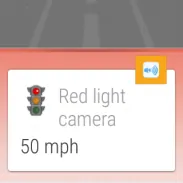
Radardroid Pro constantly monitors GPS coordinates and compares them to its internal list of camera locations. When you approach a known point it triggers an alert depending on the distance and your chosen settings. The app accounts for route direction so alerts are meaningful—if a camera is on the opposite carriageway you won’t be bothered. Background mode keeps it running while other navigation apps remain in use, and you can set quiet hours or speed thresholds to avoid unnecessary notifications.
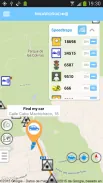
One of Radardroid Pro’s strengths is granular control. Configure separate sounds for fixed and mobile cameras, set individual warning distances, and enable progressive alerts that increase as you get closer. The app supports user-generated reports; you can flag new cameras or incorrect positions and share them with communities if you choose. For power users there are options to tweak GPS polling intervals to balance responsiveness and battery life.
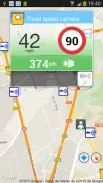
The design is utilitarian: large text, clear icons and big buttons make it suitable for quick glances while driving. The main view shows distance to next alert, current speed and camera type. Performance is light on resources; the developer prioritizes efficient GPS reads and low CPU usage so most modern devices will not suffer noticeable battery drain. Occasional database updates are small and can be scheduled over Wi-Fi.
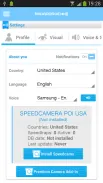
Install Radardroid Pro, grant location permissions and choose whether to load an offline database. Walk through initial sound and distance settings in a short test drive. After a few trips you’ll have the app tailored to your routine and driving style, with fewer interruptions and more useful alerts during commutes or long journeys.
File size: 11.60 M Latest Version: 3.75
Requirements: Android Language: English
Votes: 131 Package ID: com.ventel.android.radardroid2
Developer: Radardroid

Empower learning and research with our innovative reference apps. Access dictionaries, thesauruses, encyclopedias, and more with our comprehensive databases. Get homework help, study tips, and writing guides from our academic resources. Learn new skills by browsing how-to videos and manuals. Stay up-to-date with latest news, data, and facts curated by our editors.






LIVE A HERO
Retro Hero Mr Kim
Empire of Passion
Arcane Quest Legends
Magic Snap: Momotaro
AllStar Manga Heroes
Lunescape
ONE PIECE Thousand Storm JP
Tap Titans 2