
Scan to Download
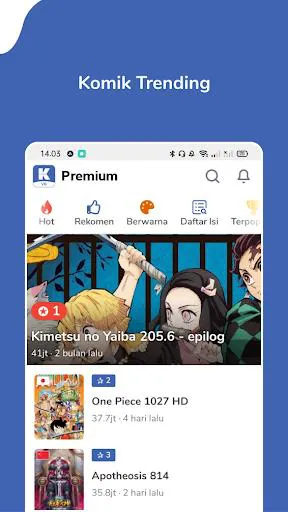
Komikcast.web.id is a streamlined comic reader and cataloging app that brings translated manga, manhwa, and webtoons into one accessible interface. It focuses on fast browsing, reliable downloads for offline reading, and personalized libraries so you can organize and enjoy serialized stories without interruption.
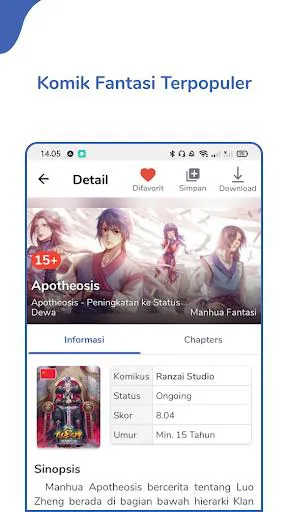
The app centralizes large comic libraries with clear metadata for each title — author, genre, status, and update history. Komikcast.web.id supports chapter bookmarking, batch downloads, and automatic detection of new releases. Built-in search filters let you narrow results by language, popularity, and freshness. For frequent readers, a queue manager keeps upcoming chapters in order and ready to fetch.
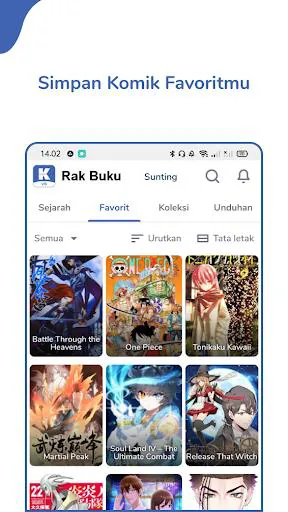
Design emphasizes readability: an uncluttered UI, adjustable page margins, and a clean font rendering system minimize eye strain. Navigation works with intuitive gestures — swipe to turn pages, pinch to zoom, and tap zones for quick menu access. The library view offers grid and list layouts, showing unread counts and last-read timestamps to help you pick up stories where you left off.
Komikcast.web.id includes several reader modes that adapt to different formats. Continuous vertical scrolling suits webtoon-style comics; double-page spread supports traditional manga layouts; and single-page mode is ideal for portrait reading. Brightness override and sleep timer protect battery life during long sessions, while customizable color filters enhance visibility for low-contrast scans.
Reliable offline reading is a priority. The download manager lets you select chapters or whole series, choose image quality to balance storage with fidelity, and schedule background downloads over Wi-Fi only. The app also offers auto-clean options so older watched chapters are removed to free space, and manual export/import for backups.
Organizing content is straightforward. Create collections and shelves to group favorites, ongoing reads, or genre-specific stacks. Komikcast.web.id syncs reading progress across devices when signed in, and supports tags and notes for tracking plot points or favorite panels. A quick-scan feature scans your saved files and integrates local comics into the main library.
Lightweight caching and optimized image loading keep scrolling buttery-smooth even on mid-range devices. The app handles a variety of image formats and compressed archives, and it adapts to different screen sizes and Android versions. Background tasks are tuned to minimize memory usage so the reader remains responsive during heavy browsing.
Komikcast.web.id collects minimal user data, limited to preferences and library sync tokens when you opt in. Local files remain on your device unless you choose cloud backup. The app includes parental controls to hide mature content and a reporting mechanism for problematic uploads to help maintain a safe community library.
Enable scheduled downloads during off-peak hours to keep your device ready without impacting daily data. Use tags and color-coded shelves to build a priority list and leverage the history filter to locate previously viewed chapters quickly. Komikcast.web.id also supports keyboard shortcuts and external controller mappings for immersive reading on larger screens.
For anyone who reads serialized comics regularly, Komikcast.web.id balances convenience with control. Fast search, flexible reading modes, and robust offline handling make it a practical choice for long-term collectors and casual readers alike. Frequent updates refine compatibility and add community-requested features, keeping the experience current and dependable.
File size: 10.90 M Latest Version: 1.4.7
Requirements: Android Language: English
Votes: 198 Package ID: org.komiku.sixth
Developer: Komiku.co.id
Top Comics Free Apps for Android
Enter imaginative worlds and escape into legendary stories with our comics apps. Discover new series, stay current with new issues, and revisit timeless classics. Take advantage of exclusive deals, previews, and bundles. Build and manage your dream collection across digital and print. Dive deeper through character bios, fan forums, and behind-the-scenes content. Learn to draw your favorite heroes through our step-by-step video tutorials.





LIVE A HERO
Retro Hero Mr Kim
Empire of Passion
Arcane Quest Legends
Magic Snap: Momotaro
AllStar Manga Heroes
Lunescape
ONE PIECE Thousand Storm JP
Tap Titans 2










































