Scan to Download
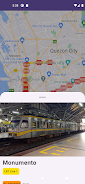
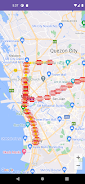
Pinoy Tren is a compact, informative app that helps users explore and learn the layout of Philippine railway lines and station groupings, making it easy to get an overview of how routes connect urban centers and surrounding areas. Pinoy Tren places line summaries and station lists in a straightforward layout so commuters, students, planners, and rail enthusiasts can quickly find the information they need without wading through clutter. The design favors clarity: colors, concise labels, and intuitive navigation let you scan networks at a glance and dive into a specific line or station when necessary.
The app presents a clear, organized overview of each railway line along with associated stations and major interchange points. Instead of overwhelming users with technical details, Pinoy Tren focuses on the essentials: line names, station order, terminus points and how routes intersect. Each line view includes a simple visual cue for direction and a readable station list that works well on phones and tablets. The interface reduces cognitive load by avoiding dense timetable tables or excessive map clutter, so it’s useful for quick reference while planning or commuting.
Navigation in Pinoy Tren is designed to be simple and consistent: scroll through lists, tap a line to open its station sequence, and use search or filters to find a station or route name. Touch controls are straightforward and optimized for one-handed use; scrolling is smooth and tapping a station reveals its position within the line. Search supports partial matches and sensible sorting so you can locate stations even if you only remember part of a name. These controls emphasize speed and reliability rather than complex gestures.
Rather than a game-like progression, Pinoy Tren supports a gradual learning curve that helps users build familiarity with the rail network. You can start with major trunk lines and then explore branch lines, or use the app to compare how lines connect at interchange hubs. The app’s organization encourages a step-by-step approach: overview first, station lists second, and then line-by-line inspection, which is well suited to students, researchers, or anyone preparing for a commute in a new city.
The visual style is clean and utilitarian, with color-coded line markers and readable typography to aid quick recognition. Pinoy Tren avoids decorative flourishes in favor of high contrast and legible fonts that remain clear under different lighting conditions. Basic customization options help tailor the display for comfort, such as adjustable text size and a compact layout mode for smaller screens. These choices keep the app accessible to a wide audience while maintaining a consistent presentation across different devices.
Content is structured by line and region rather than levels; this allows recurring exploration as networks evolve or as users focus on different travel needs. Replay value arises from repeatedly using the app for route planning, comparing multiple lines, and discovering lesser-known stations. For rail enthusiasts, the app provides a steady stream of small discoveries as you trace connections and study how lines interlink, offering a low-pressure, non-competitive way to deepen understanding over time.
Pinoy Tren emphasizes a minimal learning curve and responsive performance. Accessibility considerations include scalable text, clear contrast choices, and consistent touch targets so that users with varying needs can navigate comfortably. The app is suitable for short lookups during travel as well as longer study sessions, and its compact layout minimizes distractions so you can focus on route structure and station relationships.
The app’s lightweight design makes it practical in situations with limited connectivity: because Pinoy Tren focuses on static line and station information rather than live services, pages load quickly and consume minimal data. This design choice prioritizes fast reference and small storage footprint, which is helpful when you need a quick reminder of a route while offline or in areas with spotty mobile reception.
Pinoy Tren is best used as a reference for understanding route networks, planning general journeys, and researching Philippine rail infrastructure. It is not a replacement for official timetables, real-time service alerts, or fare calculators—users should consult operator websites or transit authorities for live schedules and service changes. The app deliberately avoids providing live tracking or timetable management to keep the focus on map-like line organization and station context.
Commuters seeking a quick route orientation, travelers preparing to navigate a new city, students studying transport networks, and rail enthusiasts who appreciate clear, factual overviews will all find Pinoy Tren useful. The app’s simple, focused approach makes it a handy complement to more detailed transit tools rather than a comprehensive service app, and it works well as a starting point for anyone wanting to understand how Philippine railway lines fit together.
File size: 23.84 M Latest Version: 1.1
Requirements: Android Language: English
Votes: 427 Package ID: com.pjlapps.pinoytren
Developer: PJ Lim


Best Free Travel Apps for Your Android Phone
Make travel planning effortless with our all-in-one trip companion app! Get insider tips from locals on top attractions, hidden gems, restaurants, and accommodations at your destination. Book flights, rental cars, and hotels at the lowest prices. Access maps offline; track bookings, itineraries, and reservations; create shared group trips; and auto-translate menus, signs, and conversations abroad. Our clever algorithms surface personalized recommendations everywhere you go.






LIVE A HERO
Retro Hero Mr Kim
Empire of Passion
Arcane Quest Legends
Magic Snap: Momotaro
AllStar Manga Heroes
Lunescape
ONE PIECE Thousand Storm JP
Tap Titans 2