Scan to Download
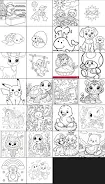
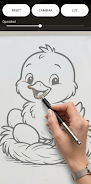
AR Drawing Easy Pro turns your phone into an augmented reality tracing studio by projecting a selectable image onto paper so you can trace it in real time. Point the camera at a flat surface, pick an image from the built-in collection or import one from your gallery, and the app overlays a clear guide that stays aligned with the camera view as you draw. The result is a simple, low-friction way to practice proportions, outlines, and composition without setting up complex projectors or transfers.
The core experience of AR Drawing Easy Pro centers on camera-driven controls and a handful of on-screen adjustments. Use a single finger to move the projected guide, pinch to zoom, and rotate with a two-finger gesture to match the paper orientation. A slider controls opacity so you can make the guide faint enough to transfer only the key lines, and a brightness control helps compensate for different lighting. You can flip or mirror an image, toggle a grid overlay for alignment, and lock the projection in place when your phone is steady. All interaction is designed to be intuitive for artists who want minimal setup time.
Although AR Drawing Easy Pro is not a game in the competitive sense, it supports structured practice that functions like a progression system. The app categorizes images by complexity—simple shapes, intermediate compositions, and detailed references—so you can pick exercises that match your current skill level. Beginners can follow basic outlines to learn proportion and hand control, while more experienced users can choose detailed references to practice shading and contour work. Suggested practice sessions and repeatable drills encourage steady improvement without requiring online accounts or subscriptions.
The app organizes reference material into thematic sets—portraits, animals, objects, lettering and more—creating short practice “levels” you can work through in sequence. Each set often moves from larger, broad shapes to smaller, detail-focused traces, giving a clear learning curve within a single theme. For an extra challenge, local timed-tracing modes and precision settings let you concentrate on speed or accuracy; these operate entirely on-device and store your session history so you can track personal progress over time.
Projection options let you tailor the visual style of the guide to your workflow. Change line weight, toggle between outline-only and shaded reference, choose color overlays that contrast with your paper, and enable a temporary highlight for focal areas. These controls help you match the projection to pencil, ink or marker work and prevent the guide from overwhelming the page. The app keeps the user interface minimal to maximize the visible workspace while still exposing useful customization when you need it.
AR Drawing Easy Pro focuses on accessibility and comfort. UI elements can be scaled for easier tapping, high-contrast labels improve readability in bright environments, and optional haptic feedback confirms important actions like locking the projection. Camera permission is required to use AR features, and the app provides on-screen tips about ideal lighting and surface selection to improve accuracy. These small details help artists of all ages and abilities get productive quickly.
The app supports offline work by caching images you’ve searched or imported so you can trace without an internet connection. You can import photos from your device gallery to create custom templates and save completed projects to your camera roll for further refinement. A local library keeps recent references and saved sessions organized so you can return to successful practice exercises whenever you like.
Replay value comes from the breadth of the searchable image collection and the ability to create personalized practice routines. Because projection is flexible and almost limitless in size, the same reference image can be used for different exercises—full-page studies, cropped detail work, or lettering practice—encouraging repeated use. The app’s combination of instant setup and a persistent local history supports gradual skill development over weeks and months.
AR Drawing Easy Pro requires an AR-capable device and camera access; older phones may not support every projection feature. Projection accuracy depends on steady camera handling, good lighting and a flat surface, so results may vary by environment. The app is free to use and designed for artists who want a practical, low-cost way to accelerate drawing practice without complicated equipment.
Artists learning basic proportions, hobbyists exploring sketching, and experienced illustrators seeking a fast way to lay down accurate outlines will find AR Drawing Easy Pro useful. It is especially handy for teachers and students who want a portable tracing tool for practice sessions, sketches, and preparatory studies. The app offers a practical bridge between digital convenience and analog drawing techniques, helping users improve line work and composition through deliberate, repeatable practice.
File size: 14.00 M Latest Version: 1.2
Requirements: Android Language: English
Votes: 103 Package ID: com.tunombre.calcovisual
Developer: Gabriel Varela

Best Free Media Apps for Your Android Phone
Explore an immersive world of entertainment with our media software. Watch, listen, and engage with your favorite shows, music, movies, and more. Access exclusive content, personalized recommendations, and innovative formats. Enhance your experience with our suite of cutting-edge applications. Discover hidden gems tailored to your unique tastes. Create, share, and connect over personalized playlists, reviews, and forums.






LIVE A HERO
Retro Hero Mr Kim
Empire of Passion
Arcane Quest Legends
Magic Snap: Momotaro
AllStar Manga Heroes
Lunescape
ONE PIECE Thousand Storm JP
Tap Titans 2