
Scan to Download
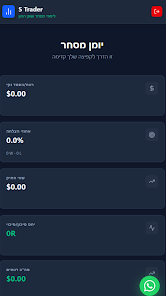
S-Trader journal יומן מסחר is a compact trading journal designed for active investors who want to record trades, analyze outcomes and refine their approach without sending data to external servers. The app places emphasis on disciplined trade management by letting you enter buys and sells with prices, quantities and dates, attach personal notes describing strategy and emotion, and review profit-and-loss summaries visually. Whether you keep a few speculative positions or operate a larger portfolio, S-Trader journal יומן מסחר centralizes your trade history so you can measure progress, identify recurring mistakes and keep private records on the device itself.
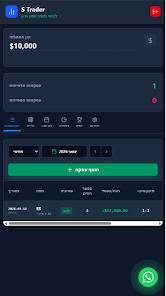
Trade entry in S-Trader journal יומן מסחר is built around quick, repeatable controls that reduce friction. You can create a new record with only the essential fields—ticker, direction, price, quantity and date—and then open the same record later to add commentary about reasons for the trade, exit rules or psychological notes. The interface uses familiar mobile controls: dropdowns for instruments or accounts, date pickers for timestamps and simple numeric inputs for price and volume. Small touches like auto-filling the most recent price or copying values between buy and sell entries speed up logging so maintaining a consistent journal becomes practical even during busy trading days.
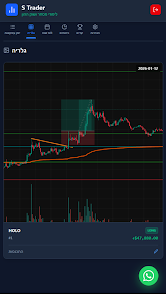
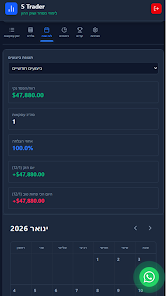
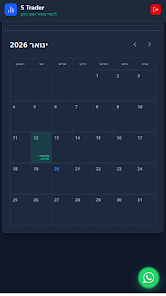
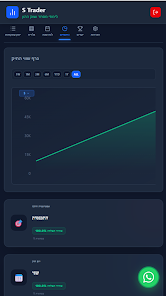
The app includes visual profit-and-loss charts and timeline views that show your performance over days, weeks or custom date ranges. Visual tools emphasize the progression of your account and highlight cycles such as winning streaks, drawdowns and average trade duration. Built-in summary metrics let you track win rate, average profit and loss, risk per trade and other measures that define progression; these metrics act like a training ladder, showing small improvements over time and helping you design new targets for position sizing and risk control. Because the app focuses on clarity rather than flashy dashboards, charts are easy to read at a glance and you can zoom or filter to inspect specific periods.
To keep a large history usable, S-Trader journal יומן מסחר supports tagging, filters and simple grouping by strategy or asset class. Tags let you label trades as momentum, value, news-driven or experimental, and filters can combine tags with date ranges so you can replay a sequence of similar trades to see what worked. Custom notes and fields are available to capture exit rules, the trade plan and post-trade lessons, which increases replay value: reviewing past trades with consistent fields teaches patterns you might otherwise miss. The app also allows light customization of display options such as compact or expanded rows and the ability to choose which metrics appear in summary rows.
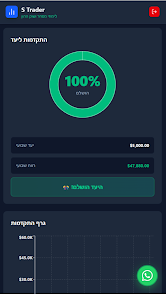
Risk-management views present the full picture of open positions and historical exposures so you can understand concentration, position sizing and unrealized risk. The app does not automate orders, but it supports a small set of challenge-style trackers—monthly profit targets, maximum acceptable drawdown and consecutive loss counters—that encourage discipline. These lightweight challenge tools help you maintain focus on the process: when a limit is reached, the record is clearly visible so you can decide whether to alter position sizing or pause trading until rules are reviewed.
S-Trader journal יומן מסחר uses a clean and legible visual style focused on data readability: high-contrast text, simple charts and clear typography make it suitable for long review sessions. Accessibility options include adjustable font sizes and color theme choices that help users with visual sensitivities, and interfaces are optimized for both phones and tablets so controls remain accessible when you are on the move. The navigation is intentionally straightforward to reduce cognitive load—primary actions are available from the main screen and deep editing is reserved for the trade detail view.
The app stores all data locally on your device and does not require an internet connection for basic use; this offline model preserves privacy and minimizes external dependencies. The same design means there is no cloud synchronization or automatic cross-device backup—if you want redundancy you must export your records manually or back up your device. Trades are entered manually, so the quality of your record is tied to how consistently you log activity; however, the low-friction entry flow aims to make logging fast and repeatable.
Use S-Trader journal יומן מסחר if you want a practical, private trading journal to develop disciplined habits, capture the reasoning behind trades and analyze performance without complex integrations. The app is suitable for retail investors, part-time traders and learners who value clarity, local data storage and straightforward analytics over automated connectivity or cloud features.
File size: 10.00 M Latest Version: 17.0
Requirements: Android Language: English
Votes: 251 Package ID: com.strader.journal
Developer: S Trader - Trading Journal

Must Have Tools Apps for Android
Equip yourself with our all-in-one toolbox app for everyday tasks and projects. Instantly convert between units, calculate tips, scan documents, manage files, and more with handy productivity tools. Includes a level, compass, QR code reader, ruler, speedometer, decibel meter, and flashlight. Save frequently used tools to your customizable dashboard for one-tap access. Track billable hours, wages, budgets, and invoices. Annotate screenshots, magnify labels, and sign PDFs on the go.






LIVE A HERO
Retro Hero Mr Kim
Empire of Passion
Arcane Quest Legends
Magic Snap: Momotaro
AllStar Manga Heroes
Lunescape
ONE PIECE Thousand Storm JP
Tap Titans 2