
Category: Finance Date:2026-09-18 16:12:01
Rating: 4.1 Tags: Entertainment
Scan to Download
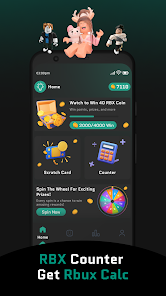
RBX Counter Get Rbux Calc is a fan-made simulation and educational utility designed to help players experiment with RBX-style balances and reward mechanics without any real money or account access. The app combines a straightforward calculator with interactive mini-games and tracking tools so users can practice conversions, estimate virtual values, and try out simple strategies for managing a virtual coin balance. RBX Counter Get Rbux Calc is intended for entertainment and learning, offering an approachable way to explore how in-app currencies and daily rewards can behave in a safe, simulated environment.
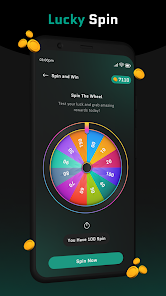
Gameplay focuses on short, repeatable interactions that fit casual sessions. The core calculator lets you enter amounts and see quick unit conversions and estimated item values. Around that core are two small mini-games: a scratch card and a spin wheel. Both mini-games are single-player, tap-controlled experiences that award only in-app virtual coins used by the app’s internal tracker. Controls are simple: tap to reveal scratch tiles or spin the wheel, with optional long-press confirmations to avoid accidental actions. There are no mechanics that access external accounts or initiate purchases.
Progression is built around daily engagement and incremental unlocks within the simulation. Regular use rewards users with small virtual payouts and streak bonuses that demonstrate how daily incentives affect balance over time. As you accumulate virtual coins inside the RBX Counter Get Rbux Calc environment, the redeem-style tracker lets you simulate saving toward hypothetical items, showing estimated time-to-goal and illustrating pacing strategies. The app emphasizes steady, predictable progression rather than sudden gains, making it useful for learning concepts like budgeting and reward pacing.
The app is designed for quick one-handed use on phones and works with standard touch controls. Buttons are large and labeled for clarity, and there are options to disable sound, reduce animation, and increase text size for improved readability. These accessibility options help keep the experience comfortable for a broad range of users, including those who prefer low-motion interfaces or need clearer visual contrast. All interactive elements respond to common gestures like tap and long-press; no complex gestures are required.
RBX Counter Get Rbux Calc uses a clean, playful visual style that favors clear icons and readable type. The layout separates the calculator, mini-games, and tracker into distinct panels so new users can find features quickly. A modest set of cosmetic choices—light or dark theme and simple color accents—lets users tailor the look without changing functionality. Visual feedback during mini-games and when updating the tracker helps players understand the outcome of each action and the immediate effect on their simulated balance.
Rather than traditional levels, the app uses a progression curve expressed through daily tasks and reward tiers. Mini-games adjust slightly in reward frequency rather than introducing new mechanics; this keeps challenges approachable while providing reason to return. Occasional timed challenges and limited-time cosmetic themes provide mild variation and a gentle way to test different tracking strategies. The challenge systems are deliberately low-stakes and educational, intended to demonstrate balancing mechanics rather than to create competitive pressure.
Replay value comes from experimenting with different saving strategies, attempting streaks, and using the calculator to model hypothetical scenarios. The app supports offline play for all local features, so users can open the calculator, play mini-games, and update their tracker without a network connection. Feedback and short summaries after sessions help users reflect on patterns and learn how small daily actions compound over time. The overall user experience is casual, low-commitment, and geared toward learning through iteration.
RBX Counter Get Rbux Calc is a fan-made tool and is not affiliated with ROBLOX CORPORATION. The app does not provide real Robux, gift cards, or any official in-game items, and it cannot access or modify actual game accounts. Its purpose is informational and recreational: to teach basic ideas about virtual economies and reward pacing within a safe, simulated environment. Users should treat results as illustrative estimates rather than guaranteed values.
Offered by Fusion Lab, the app is lightweight, runs on most modern Android phones, and includes brief compatibility notes within the app settings. Regular small updates focus on interface improvements and accessibility tweaks rather than major feature additions. If you encounter issues or have suggestions, the in-app feedback option sends basic diagnostic details so the team can prioritize fixes and usability improvements.
This app is suitable for casual users who enjoy calculators and simple simulation tools, educators who want a visual aid for discussing virtual economies, and anyone curious about how daily rewards affect long-term balances. RBX Counter Get Rbux Calc is meant to be a safe, educational space to test ideas and build intuition about in-app currencies without involving real transactions or account activity.
File size: 12.00 M Latest Version: 1.0
Requirements: Android Language: English
Votes: 377 Package ID: com.robuxe.rbxtools.rbxcounter
Developer: Fusion Lab



Top Free Entertainment Necessary Apps for Android
Discover a world of entertainment with our immersive apps. Access movies, TV shows, music, books, and more from your favorite platforms. Get recommendations personalized to your tastes to find hidden gems. Learn fascinating trivia, go behind-the-scenes, and connect with other fans. Try augmented and virtual reality demos from the hottest studios.






LIVE A HERO
Retro Hero Mr Kim
Empire of Passion
Arcane Quest Legends
Magic Snap: Momotaro
AllStar Manga Heroes
Lunescape
ONE PIECE Thousand Storm JP
Tap Titans 2