Scan to Download
Resume Review uses AI to analyze your CV and deliver focused, practical suggestions aimed at improving clarity and recruiter response; this editor overview explains how Resume Review handles common file types, the user workflow, and what to expect from the results so you can decide whether the app fits your job search routine. The first review takes only seconds on well-formatted documents and returns clear, actionable edits rather than vague recommendations, helping both recent graduates and seasoned professionals tighten language, highlight achievements, and reduce formatting issues before submitting applications.
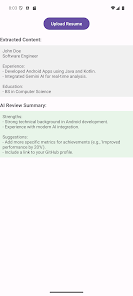
The app reads .pdf, .doc and .docx files and preserves text, tables and structured sections so the review reflects the resume as a hiring manager would see it. Resume Review runs a content extraction step that separates headings, dates, job descriptions and education entries, allowing the AI engine to target phrasing, bullet clarity and chronological consistency. Reports include concrete line-level edits, suggested rewording for impact, and notes on missing or weak elements such as quantifiable results or clear role summaries.
After you upload a supported document the app extracts content and performs a multi-pass analysis that looks at tone, keyword relevance, role alignment and structural clarity. The system highlights strengths—such as measurable achievements or concise summaries—while flagging weaknesses like inconsistent tense, overly long paragraphs, or missing action verbs. Rather than producing a single long critique, the output is broken into bite-sized recommendations grouped by section so you can apply changes quickly and iterate on drafts.
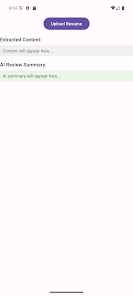
The interface is designed for simple, repeatable actions: select or drag a file to upload, review the segmented feedback, and accept or adapt suggested edits. Controls focus on clarity: preview your document, jump to flagged lines, and toggle between original text and suggested rewrites. For users who revise and re-upload, the app emphasizes rapid turnaround so you can test alternative phrasings and see how small edits change the guidance in subsequent reviews. The design minimizes steps so the core tasks—upload, view, revise—are straightforward on phones and tablets.
Rather than treating a resume review as a one-off, the app supports ongoing revision cycles: you can upload multiple versions and compare suggestions to track whether common issues are being resolved. This progression helps you learn which changes produce clearer descriptions and better alignment with target job postings. The ability to run a new check after edits creates natural replay value for users preparing tailored applications for different roles or industries.
Resume Review keeps the visual style clean and readable so recommendations are easy to scan: color cues and section headers guide your attention to the highest-impact edits. Customization options let you set preferences for tone—concise professional, creative, or technical—and adjust the verbosity of suggestions. Accessibility features include scalable fonts and high-contrast display modes so users with varying needs can interact with reviews comfortably, and touch controls are optimized for one-handed use on mobile devices.
Documents are processed securely during analysis, with personal information used only to generate the review and not repurposed. While AI processing requires a server step to produce rich suggestions, the app supports saving reports locally so you can view prior feedback offline and export edited resumes for submission. The overall user experience aims to reduce friction: meaningful recommendations are available quickly and presented in a way that helps you prioritize edits before applying.
AI-powered feedback excels at sharpening wording, flagging common resume errors, and suggesting clearer phrasing, but it does not replace personalized coaching from a human career advisor who can provide tailored interview strategy or industry-specific negotiation guidance. The app currently supports .pdf, .doc and .docx formats only, so other file types must be converted before upload, and the quality of suggestions depends on document formatting and the clarity of the information provided.
This editor overview is intended to give you a clear sense of what Resume Review does, how it integrates into a typical job application routine, and the kinds of improvements you can expect from repeated use; if you value fast, focused edits that make resumes easier to scan and more recruiter-friendly, this app is designed to fit smoothly into the revision and submission workflow.
File size: 48.00 M Latest Version: 1.0
Requirements: Android Language: English
Votes: 267 Package ID: com.programmeworld.resumereview
Developer: Programmer World

Best Free Education Apps for Your Android Phone
Unlock your greatest potential with our innovative education apps. From early learning to college prep, we offer tools for students of all ages. Young learners can build skills through interactive games and stories. Older students can strengthen expertise in math, science, writing, and more with our targeted training. Test prep students can access thousands of practice questions and simulations. Manage assignments, take notes, and stay organized with our productivity tools.






LIVE A HERO
Retro Hero Mr Kim
Empire of Passion
Arcane Quest Legends
Magic Snap: Momotaro
AllStar Manga Heroes
Lunescape
ONE PIECE Thousand Storm JP
Tap Titans 2