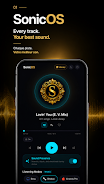
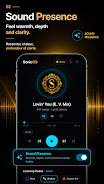
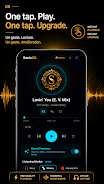
SonicOS transforms how you listen to music on Android by applying real-time audio processing to local files, boosting perceived bass, warmth and loudness so inexpensive earphones sound fuller and higher-end sets reveal more detail. The app launches a visually responsive local player that runs entirely offline, offers a sleep timer and variable playback speed, and bundles hand-tuned equalizer presets so you can improve playback with a single tap while keeping your library private on the device. If you want clearer, more engaging sound without subscriptions, SonicOS is a compact utility that enhances audio quickly and keeps your tracks on-device.
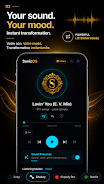
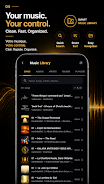
The core of SonicOS is its real-time processing chain and practical playback tools. An 8-band equalizer with several hand-tuned presets (Flat, Bass Head, Bosy, Shokzy, Airpody Pro, Classical, Jazz and more) provides immediate tonal changes, while one-tap sound enhancements boost presence and loudness without complicated configuration. A sleep timer can fade music out smoothly after a chosen interval, and playback speed ranges from 0.75× to 2× for learning, podcast listening or casual slowing of tracks. The player supports browsing Songs, Albums, Artists, Folders and Playlists stored locally so everything remains offline and private.
Playback controls are designed for quick, tactile use: large play/pause and skip buttons, a responsive seek bar and an on-screen reactive ring that mirrors the current audio output. Adjust equalizer settings to fine-tune frequency bands or switch between presets to match different headphones or genres. Queue management is straightforward — you can add tracks to the up-next list, reorder items, and use the sleep timer and speed controls without interrupting playback. The app is optimized for single-handed operation and quick adjustments while commuting or exercising.
The library in SonicOS is organized to feel familiar and efficient: navigate by Songs, Albums, Artists, Folders or user playlists and sort by album, track, or recently added. Playback progression is preserved during active sessions so you can resume where you left off, and the player keeps track of position during long podcasts or audiobooks. Playlists are local and portable, encouraging a simple progression through albums, mixes or study sessions without requiring network access.
SonicOS emphasizes a clean, modern player interface that foregrounds album art and reactive visuals. The visualizer includes a responsive spectrum display, a reactive ring and blurred backgrounds that animate smoothly with the music for an immersive listening experience. These visual options are lightweight and designed not to drain battery unnecessarily, so you can enjoy polished visuals and still get many hours of offline playback. The combination of presets and visual feedback invites repeated experimentation with different settings and tracks, increasing replay value as users discover nuances in familiar songs.
Controls and on-screen elements are sized and contrasted for clarity, and common playback actions are reachable from the main player screen to reduce repeated navigation. Text labels and simple icons help users of varying experience levels quickly understand available tools such as the equalizer, sleep timer and speed control. Because SonicOS operates offline and stores its settings locally, it can be used in low-signal situations, on flights, or in privacy-sensitive contexts where connectivity is limited or undesired.
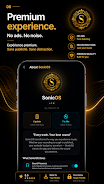
SonicOS is built to run efficiently on a wide range of Android devices; however, audio improvement depends on the original file quality and the headphones you use, so results will vary between setups. The app intentionally avoids cloud streaming or online catalogs — it works only with files stored on your device — and there are no subscriptions, ads or tracking. For best performance, use reasonably encoded source files and allow the app to run without aggressive task-killer interference. Note that while the equalizer and processing enhance many tracks, they cannot recover detail that is absent from a low-bitrate source.
File size: 21.49 M Latest Version: 1.0.1
Requirements: Android Language: English
Votes: 251 Package ID: com.martinb.sonicos
Developer: MartinB





Must Have Tools Apps for Android
Equip yourself with our all-in-one toolbox app for everyday tasks and projects. Instantly convert between units, calculate tips, scan documents, manage files, and more with handy productivity tools. Includes a level, compass, QR code reader, ruler, speedometer, decibel meter, and flashlight. Save frequently used tools to your customizable dashboard for one-tap access. Track billable hours, wages, budgets, and invoices. Annotate screenshots, magnify labels, and sign PDFs on the go.






LIVE A HERO
Retro Hero Mr Kim
Empire of Passion
Arcane Quest Legends
Magic Snap: Momotaro
AllStar Manga Heroes
Lunescape
ONE PIECE Thousand Storm JP
Tap Titans 2