Scan to Download
매일 큐티 is an AI-assisted devotional and study companion that brings Scripture into daily life and supports focused preparation for worship. The 매일 큐티 app pairs automated, context-aware devotional suggestions with flexible manual journaling tools so individuals and small groups can capture observations, collect prayer requests, and organize sermon notes in a single, searchable place. Designed to be compact and unobtrusive, 매일 큐티 emphasizes simple workflows: enter a Bible passage and a brief context or type freely, then save, search, and revisit entries when you need encouragement or preparation for a service or a focused quiet time.
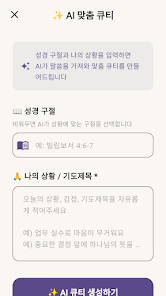
The app combines two complementary study modes: an AI QT mode that generates structured reflections and a manual QT mode for hands-on journaling. In AI mode you provide a scripture reference and a short situation or request, and the system analyzes the passage to produce observations, meditation prompts, practical applications, and a concise closing prayer intended to jump-start reflection. Manual mode offers fields for observation, meditation, application, and prayer so you can write, structure, and compare your own insights alongside generated content. Scripture cards let you overlay verse text on customizable backgrounds for sharing or personal review without exporting raw text. Each entry is saved by date, tagged if you choose, and archived so your notes remain available for later study.
The AI component is presented as a study aid rather than a replacement for the Bible text. When you enter a passage and a short context, the system highlights core observations, suggests contemplative prompts to guide meditation, proposes concrete applications for daily life, and offers a prayer tailored to your stated need. All generated material is clearly labeled so you can compare it with Scripture and your own insight, and every suggestion can be edited or replaced before saving. This approach models structured journaling and helps users develop disciplined habits of observation, interpretation, and application without obscuring the original text.
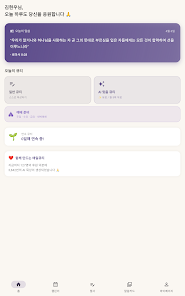
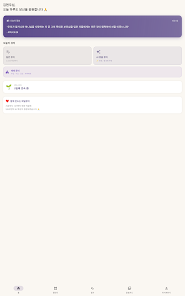
Interaction in 매일 큐티 is intentionally straightforward: tap to select a passage or type a reference, enter a short context or personal note, and use on-screen fields to accept or refine the AI output. The layout favors readability with adjustable font sizes and contrast themes to keep text comfortable for early morning devotionals or late-night reflection. Typing and transcription screens are minimal to reduce distraction; focus mode hides nonessential elements so you can concentrate on the passage. Accessibility features include scalable text, clear button labeling, and adaptable layouts so the app works on a wide range of phones and tablets without crowding the screen.
Rather than a game-like leveling system, progression in this app grows from a personal archive and repeated practice. 매일 큐티 stores entries by date and allows keyword or tag searches so you can trace themes, revisit past prayers, and monitor spiritual growth over time. For users who prefer routine, recurring study rhythms are supported by keeping recent entries visible and offering quick re-entry of previous passage references. Reviewing older entries often surfaces new insights and provides a natural replay value: the mix of editable AI prompts and manual journaling encourages users to return and refine their reflections.
Privacy is a core consideration in 매일 큐티: personal reflections and prayers are not used to train external AI models, and most content is stored locally so you can access entries offline. Cloud backup and syncing are optional and clearly explained so you can choose the level of convenience you want. A premium subscription removes ads, unlocks unlimited AI-generated entries, and preserves full access to your archived history; the current monthly price is listed inside the app. Settings make it clear which data is stored on-device and which items are synced, helping you manage privacy and backup preferences.
There are sensible boundaries: the free tier limits the number of AI-generated QTs per month and generated content should be checked against the original Bible passage for accuracy and context. The transcription tool intentionally displays a visually obscured Bible text during typing to encourage active engagement rather than passive reading; if you prefer a clearer reference, manual copy or notes fields are available. These design choices aim to promote disciplined study habits and to support both short-term encouragement and long-term devotional growth.
File size: 51.00 M Latest Version: 1.0.1
Requirements: Android Language: English
Votes: 127 Package ID: com.maeilqt.bible_daily_app
Developer: Bible_Lab




Empower learning and research with our innovative reference apps. Access dictionaries, thesauruses, encyclopedias, and more with our comprehensive databases. Get homework help, study tips, and writing guides from our academic resources. Learn new skills by browsing how-to videos and manuals. Stay up-to-date with latest news, data, and facts curated by our editors.






LIVE A HERO
Retro Hero Mr Kim
Empire of Passion
Arcane Quest Legends
Magic Snap: Momotaro
AllStar Manga Heroes
Lunescape
ONE PIECE Thousand Storm JP
Tap Titans 2