
Scan to Download
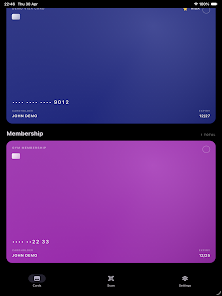
CardVault: Card Manager is a secure, offline-first organizer that helps you store payment cards, loyalty cards, gift cards and identity documents on your Android device without exposing them to cloud services. Designed for users who prefer tight control over personal data, CardVault: Card Manager keeps everything locally encrypted with AES-256 via SQLCipher and provides straightforward access through biometric unlocking and PIN protection. The app is aimed at replacing a bulky physical wallet while keeping important scans and card details available when you need them, with a focus on privacy and recoverability.
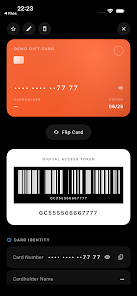
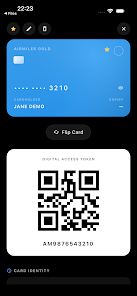
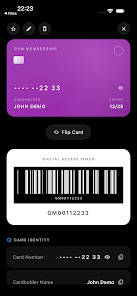
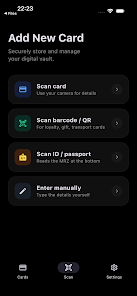
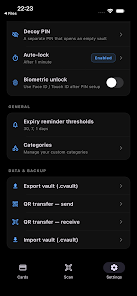
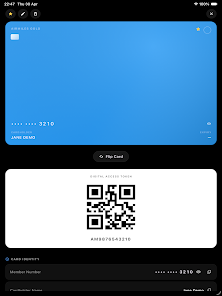
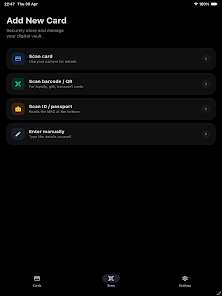
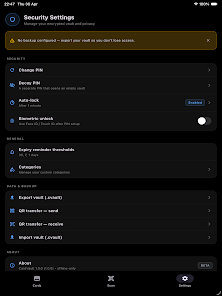
The core of CardVault: Card Manager is its local, encrypted vault: all records live on your device and are protected by AES-256 encryption implemented through SQLCipher. You control the vault key and can enable biometric unlock (fingerprint or face recognition) as a convenient alternative to typing your passphrase. For plausible deniability the app offers a decoy vault option so you can present a limited set of entries when required. Scanning tools include camera OCR for card numbers, barcode and QR scanning for loyalty and membership cards, gallery import for pre-existing images, and MRZ scanning for passports and ID documents to capture details quickly and accurately.
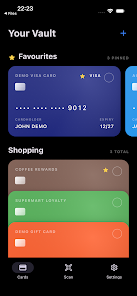
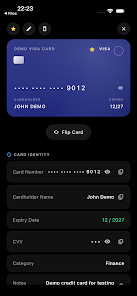
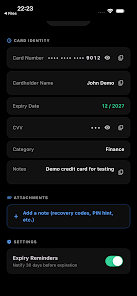
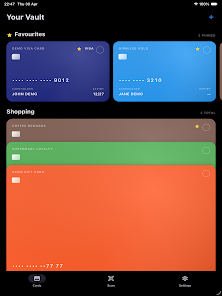
Navigation is kept simple with tap-to-open card views and long-press actions for quick edits or deletion. A dedicated scan button in the entry screen opens the camera scanner and guides you through document capture with on-screen framing hints. Search and filter controls help you find cards by name, type, or custom tags, while a favorites or pinned section keeps the most-used cards one tap away. Notifications are used optionally to deliver expiry reminders; permissions for camera, biometrics and notifications are requested only when those features are enabled.
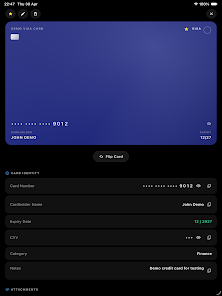
As your vault grows you can organize entries into categories and use custom tags to structure groups such as payment cards, memberships, gift cards and IDs. Progression here is practical rather than game-like: the app supports bulk import workflows, mass edits and expiry tracking so you can maintain an up-to-date collection without friction. Visual customization lets you switch between light and dark themes and adjust font sizes to improve readability. Card entries can include notes and custom fields so the vault adapts to your routines and keeps recurring information consistent.
Encrypted backups are created locally and protected by a passphrase you choose; when you need to move data to a new device you can transfer the backup file or use the app’s QR-based transfer feature to avoid uploading sensitive data to third-party services. Because CardVault: Card Manager is offline-first it does not perform automatic cloud sync—this design intentionally reduces exposure to remote breach vectors but means cross-device access requires manual encrypted backups or the QR transfer. Backup integrity and restore procedures are explained in-app and include verification steps so you can confirm successful migration before wiping an old device.
Privacy-focused measures include no analytics tracking, local-only storage, and device integrity checks such as root and jailbreak detection to warn users when the environment may be compromised. Secure key management and encryption protect stored items even if the device is lost. Accessibility features include adjustable text size and clear contrast-friendly UI elements; the interface is structured to work well with screen readers and supports large tappable targets to reduce accidental input. The app requests only the permissions necessary for the features you opt into and documents why each permission is used.
Because the app intentionally avoids cloud storage, CardVault: Card Manager does not offer integrated online sharing, account-based syncing, leaderboards or any remote services. Some functionality depends on device hardware and OS-level services: camera access is required for scanning, biometric unlock depends on the device sensor, and notification permissions are needed for expiry alerts. Users expecting seamless multi-device syncing should plan encrypted backups or QR transfers as part of their workflow. These trade-offs prioritize control and privacy while providing practical tools for daily card and ID management.
File size: 53.00 M Latest Version: 1.0.4
Requirements: Android Language: English
Votes: 500 Package ID: com.o.wallet
Developer: Openbeta Limited

Must Have Tools Apps for Android
Equip yourself with our all-in-one toolbox app for everyday tasks and projects. Instantly convert between units, calculate tips, scan documents, manage files, and more with handy productivity tools. Includes a level, compass, QR code reader, ruler, speedometer, decibel meter, and flashlight. Save frequently used tools to your customizable dashboard for one-tap access. Track billable hours, wages, budgets, and invoices. Annotate screenshots, magnify labels, and sign PDFs on the go.






LIVE A HERO
Retro Hero Mr Kim
Empire of Passion
Arcane Quest Legends
Magic Snap: Momotaro
AllStar Manga Heroes
Lunescape
ONE PIECE Thousand Storm JP
Tap Titans 2










































