
Scan to Download
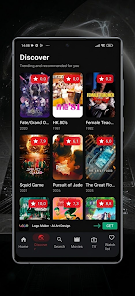
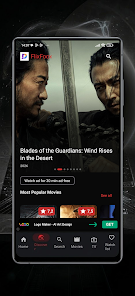
Willow tv helps you discover movies and TV shows through a clean, intuitive interface that makes choosing what to watch faster and less stressful. Willow tv places discovery at the center of the experience: browse popular titles, preview trailers, and quickly build a personal watchlist without wrestling with cluttered menus. If you prefer a discovery-first app that balances trending picks with lesser-known gems, Willow tv streamlines the process and keeps recommendations easy to navigate.
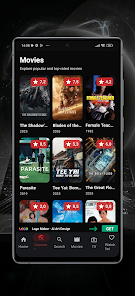
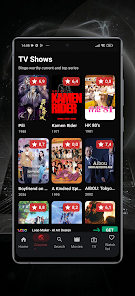
The core of Willow tv is its browsing flow. Content is organized into clear categories—popular, recently added, genre-based collections and editorially highlighted selections—so you can move from broad browsing to focused discovery in a few taps. Search and filter controls are lightweight but effective: you can refine by genre, mood, era or popularity, and the app surfaces trailers and brief synopses inline so you don’t have to leave the list view to get a sense of a title.
Interaction in Willow tv is designed for quick decisions. Tap-based controls allow fast swiping through cards, one-touch trailer previews and easy long-press gestures to add items to a watchlist or mark them as favorites. The interface is optimized for touch navigation on phones and tablets, with predictable back-navigation, clear icons, and contextual menus when you need more options without overwhelming the main browsing surface.
Willow tv supports simple progression tracking so you can keep tabs on what you’re watching next. Watchlists and favorites organize titles into a personal queue, and the app shows basic progress indicators for series and multi-episode shows so you can pick up where you left off. Playlists and custom lists let you plan a sequence of movies or episodes for a themed night or a binge session, helping the app feel like a personal planning tool rather than just a catalog.
The visual approach is deliberately minimal: large cover art, readable typography and ample spacing help each title stand out. Willow tv uses subtle visual cues to distinguish trending content from staff picks and niche recommendations, and previews load smoothly to avoid disrupting the browsing flow. This clean design reduces decision fatigue and makes it easier to spot both mainstream hits and hidden gems.
Personalization in Willow tv focuses on tailoring the discovery feed to your tastes without demanding a steep setup. As you mark favorites and interact with recommendations, the app adapts which suggestions it surfaces most prominently. You can also customize how lists are sorted—by popularity, release date or personal relevance—so the app respects your preferred browsing patterns while still nudging you toward unexpected picks.
Willow tv includes practical tools for organizing group viewing: build a shared list of candidate titles, export or copy a list to share with friends, and create a short lineup for a movie night. These features are intended to make planning easier without requiring everyone to be in the same place; they keep coordination simple and file-friendly for messaging or calendar apps.
Because Willow tv mixes trending hits with curated finds, it encourages repeated visits. Regularly updated highlights and rotating editorial collections keep the catalog feeling fresh, and short trailer previews mean you can reassess a title in seconds. The app’s balance of familiarity and novelty is designed to provide sustained discovery rather than one-off recommendations.
Willow tv aims for clear readability and straightforward navigation, with attention to contrast, legible font sizes and touch targets that suit a broad range of users. These choices help reduce friction for people navigating large catalogs, and the consistent layout makes it easier to learn the app quickly. Settings allow basic adjustments to sorting and preview behavior so you can tailor the experience to what works best for your viewing habits.
Willow tv concentrates on discovery and planning rather than extensive playback controls. It is not a full-featured streaming player and does not replace apps that provide in-depth playback, advanced streaming settings, or offline downloads of full content. Users who want deep personalization or highly granular filtering may find the feature set intentionally streamlined, but many will appreciate the lighter, more focused approach to finding and organizing titles.
Overall, Willow tv is a discovery-focused discovery tool with an uncluttered interface, practical organization for watchlists and group planning, and a design that favors fast previewing and easy navigation. If your primary goal is to find something great to watch without friction, Willow tv provides a straightforward, human-centered way to explore movies and television with fewer distractions and more useful context.
File size: 10.00 M Latest Version: 1.0
Requirements: Android Language: English
Votes: 169 Package ID: com.willow.willowtv
Developer: EL HADI

Must Have Tools Apps for Android
Equip yourself with our all-in-one toolbox app for everyday tasks and projects. Instantly convert between units, calculate tips, scan documents, manage files, and more with handy productivity tools. Includes a level, compass, QR code reader, ruler, speedometer, decibel meter, and flashlight. Save frequently used tools to your customizable dashboard for one-tap access. Track billable hours, wages, budgets, and invoices. Annotate screenshots, magnify labels, and sign PDFs on the go.






LIVE A HERO
Retro Hero Mr Kim
Empire of Passion
Arcane Quest Legends
Magic Snap: Momotaro
AllStar Manga Heroes
Lunescape
ONE PIECE Thousand Storm JP
Tap Titans 2