Scan to Download
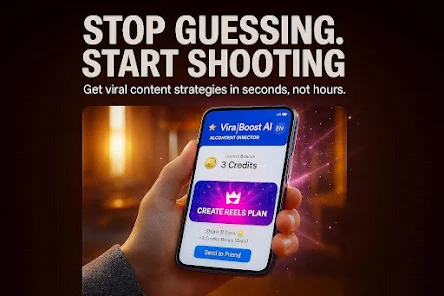
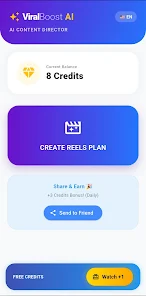
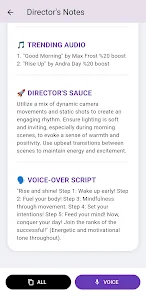
ViralBoost AI puts an AI director on your phone to help you create high-impact short-form social content in seconds. ViralBoost AI is designed for business owners, influencers, and independent creators who want a practical tool that transforms a brief idea into a scene-by-scene video blueprint, a catchy opening hook, suggested captions and hashtags, and a tailored seven-day content calendar. This introduction explains how the app structures ideas, how you control outputs, and what to expect as you integrate the assistant into your content routine.
The core of ViralBoost AI is its scene-by-scene script generator: tell the app the concept or niche, select duration and platform, and it produces concise shot-by-shot guidance suited to short-form formats. The hook generator suggests opening lines tailored to different attention spans and platform behaviors so viewers stop scrolling. Caption and hashtag suggestions are framed for clarity and discoverability, and the seven-day content calendar offers a sequence of ideas that builds thematic consistency while avoiding repetition. Fast concept generation means you can move from idea to publishable draft in minutes, and each result is built to be editable so you can adapt voice and length before recording.
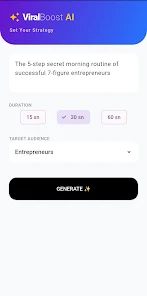
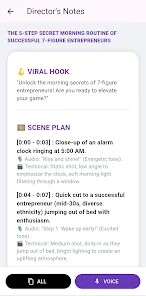
Using ViralBoost AI is straightforward: enter a short prompt describing your topic, choose the clip length and tone, and press generate. Controls let you request more visual direction, tighter scripts, or alternative hooks; you can create multiple variations and compare them within the app. The output is written to read like a production note, with suggested camera shots, line cues, and optional staging tips that are compact enough for quick reference while filming. Everything created remains editable in an inline editor so you can rewrite lines, change hashtags, or adjust the calendar sequence to match your launch schedule.
Rather than a leveling system, progression in ViralBoost AI is practical: repeated use helps you build a reusable idea bank and an evolving content rhythm. The seven-day calendar provides a scaffold that you can replicate week over week, refining tone and formats as you see which concepts perform best on your channels. Over time, creators often develop a set of preferred templates and hook styles that accelerate production: the app helps you move from planning to batch-creation, reducing the friction of ideation and allowing for more consistent publishing.
ViralBoost AI outputs are attentive to visual and stylistic choices common to short-form video: suggested shot types, pacing cues, and thumbnail phrasing are given so your finished video has a clear visual intent. You can set preferences for tone, energy level, and brand voice so results default closer to your style, and each script can be customized for length, speaking speed, or on-screen text. The app also supports template-driven approaches, letting you save a preferred shot structure or caption format and apply it to future ideas to maintain visual consistency across posts.
Content creation in the app is organized around micro-tasks rather than traditional levels: each idea acts like a short project with a clear starting brief, a script phase, and a publish-ready caption. Replay value comes from generating multiple variations for the same prompt, experimenting with different hooks, and rotating calendar themes to keep your feed fresh. For creators who want structure, the app suggests weekly themes and prompt-based mini-challenges that push you to try new formats, such as a 30-second tutorial, a behind-the-scenes clip, or a single-question hook—each challenge offers a way to practice techniques and expand your repertoire.
The app aims for a clean, distraction-free interface with readable fonts and clear action buttons so creators can generate ideas quickly even on smaller screens. Text outputs are optimized for copy-and-paste into recording notes or social platforms. Accessibility considerations include adjustable text size in the editor and straightforward labeling for generation options. The inline editor supports quick keyboard input so creators who prefer typing can speed through drafts, and visual cues help guide those who work primarily from shot lists while filming.
ViralBoost AI encourages saving drafts and exporting scripts so you can view or edit them offline when you are on set or traveling. While AI-driven generation typically requires an internet connection, saved ideas and calendars remain accessible without connectivity for review and recording. Users should note limitations: AI suggestions often need tone adjustments to match a personal or brand voice, focus primarily on short-form video rather than long-form content, and cannot guarantee viral results—final performance still depends on execution, timing, and audience fit.
File size: 21.00 M Latest Version: 1.0.0
Requirements: Android Language: English
Votes: 418 Package ID: com.resar.viralboost_ai
Developer: Resar Development

Top Free Business Necessary Apps for Android
Streamline operations and maximize productivity with our innovative business apps. Manage contacts, schedule meetings, and route calls seamlessly. Collaborate on documents and projects in real-time. Track inventory, finances, and analytics to inform smart decisions. Build customized proposals, invoices, and contracts to win clients. Stay on top of emails, tasks, and passwords for efficient work.





LIVE A HERO
Retro Hero Mr Kim
Empire of Passion
Arcane Quest Legends
Magic Snap: Momotaro
AllStar Manga Heroes
Lunescape
ONE PIECE Thousand Storm JP
Tap Titans 2