Scan to Download
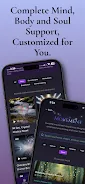
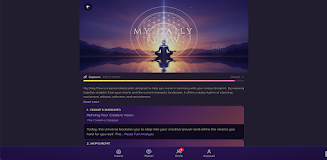
SoulScript is a personalized wellness app that helps you build consistent daily habits for clarity, self-awareness and sustained personal growth. SoulScript combines short guided movement, breathwork, stillness, journaling and simple tracking into an adaptive routine you can use in the morning or any time you want to reset. The app creates a tailored My Daily Flow from your profile and recent activity, suggests movement and breath sessions that fit the time you have, prompts reflection, and logs mood and energy so patterns become easy to spot over weeks of use.
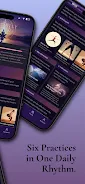
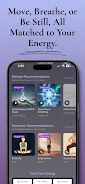
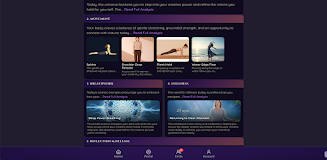
The My Daily Flow is the core experience: a ready-made guided routine that adapts as you use the app, shortening or expanding to match available time and your stated focus. Movement content ranges from brief mobility and release sequences to beginner-friendly yoga and strength micro-workouts, with options that scale toward more advanced practice. Breathwork and stillness tools include animated breathing guides, narrated meditations and layered soundscapes that fill the screen for full audio immersion. Reflection and tracking are integrated — the app offers contextual journaling prompts, gentle tapping or release techniques to anchor attention, and daily mood & energy entries that feed progress insights over time. Personalization is profile-driven: choose goals such as energy, calm, clarity or recovery, and the app shifts session suggestions accordingly. Social features like milestones, guided journeys and optional group challenges are present but fully user-controlled, appearing only if you opt in.
SoulScript uses a simple progression model rather than gamified ranks: regular practice unlocks progressively deeper journeys and milestone content that help deepen a habit rather than inflate a score. New users receive an onboarding sequence that sets preferences and baseline mood entries; subsequent days refine the My Daily Flow recommendations based on duration, preferred practices and tracked outcomes. Controls are intentionally straightforward — tap to start, swipe to skip or rearrange segments, and use on-screen timers to pause or extend a session. Audio and narration can be adjusted mid-session so you can match speed and volume to your environment. The app is optimized to start quickly on most Android devices so brief moments of time can still become meaningful practice.
Each session is modular: you can complete a condensed flow in five minutes or expand components into a longer practice when you have time. Modules include movement, breath, stillness and reflection; you can reorder modules, save custom sequences as shortcuts, and bookmark favorite instructors or soundscapes. Difficulty scales across modules, with step-up progressions that add repetitions, longer holds or more complex movement as you become consistent. The app also supports multiple daily routines so you can create distinct flows for morning, commute-friendly resets, or evening wind-downs to suit different aspects of your day.
The interface favors calm, readable layouts and subtle motion to reduce cognitive load. Visual themes are designed to be unobtrusive — soft gradients, clear typographic hierarchy and large tap areas make navigation easy while you’re moving or breathing. Soundscapes are mixed for clarity on typical phone speakers, and full-screen audio sessions minimize visual distraction so you can focus on practice. Onboarding includes quick tips for using controls and tailoring the look and feel to your preferences.
Accessibility is built into core navigation: large buttons, clear labels, adjustable text sizes and narrated guidance options make sessions approachable for a wide range of users. One-touch start and pause controls allow hands-free continuation when you need to focus on movement or breath, and visual timers provide alternatives to audio cues. The app supports common Android assistive settings so the experience can work with device-level accessibility tools.
SoulScript records session length, selected modules and daily mood/energy entries to create trend views that highlight correlations between practice and well-being. Weekly summaries show changes over time and surface which routines tend to improve energy versus calm. Journaling prompts evolve based on prior answers, helping reflection feel relevant instead of repetitive. Insights are intended to guide personal learning rather than produce competitive metrics.
The core app is free to install and includes a set of foundational flows and tracking tools so you can begin immediately. Full access to the complete library of journeys, advanced routines and some guided audio collections requires a paid subscription; plans start at $14.99/month or $134.99/year and include a 7-day free trial. Aware of different practice habits, SoulScript makes social and sharing features optional and keeps your private progress visible only to you unless you choose to participate in group challenges.
Replay value comes from adaptive sequencing and a variety of instructors, soundscapes and micro-workouts that change subtly each day so repeated use remains engaging. Milestones and themed journeys encourage longer-term consistency without pressure, and optional challenge series provide structured short-term goals for users who want extra motivation. Whether you have five minutes or a full session, SoulScript aims to make a daily habit simple to start and useful to sustain.
File size: 18.97 M Latest Version: 1.0.24
Requirements: Android Language: English
Votes: 247 Package ID: net.soulscriptapp.mobile
Developer: SoulScript






Best Free Books Apps for Your Android Phone
Discover your next great read with our innovative book apps. Access millions of ebooks, audiobooks, and comics on any device. Get personalized recommendations from our advanced algorithms so you always have your next great story lined up. Track your reading habits and browse curated lists for inspiration. Join online book clubs to connect with fellow bibliophiles. Listen to samples and download seamlessly with our integrated stores.





LIVE A HERO
Retro Hero Mr Kim
Empire of Passion
Arcane Quest Legends
Magic Snap: Momotaro
AllStar Manga Heroes
Lunescape
ONE PIECE Thousand Storm JP
Tap Titans 2