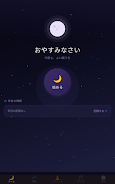
SleepMind AI is a smart sleep-support app designed to help you understand nightly rest and make steady improvements using automated tracking, AI-driven analysis and practical coaching. SleepMind AI uses your phone's built-in sensors to log sleep time and movement, then translates that raw data into an easy-to-read nightly score and clear suggestions so you can make gradual changes without disrupting your routine. The app balances automated insights with hands-on tools like a configurable alarm, a modular sound mixer and guided stretch routines to support both falling asleep and waking up more refreshed.
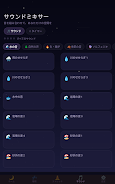
The app offers continuous sleep tracking that estimates sleep stages and interruptions using accelerometer and ambient sound sampling when permitted. Its AI analysis reviews nightly patterns over time and highlights consistent influences on your sleep quality, offering actionable tips rather than one-off judgments. The smart alarm aims to wake you during lighter sleep windows to reduce morning grogginess, while the customizable sound mixer lets you blend calming audio layers such as white noise, nature sounds and gentle tones to create a personal bedtime environment. Short guided stretch sequences are provided to help relax the body before sleep or ease stiffness after waking.
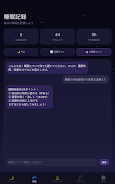
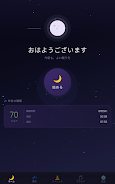
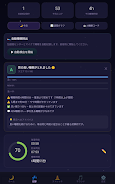
SleepMind AI collects sensor data passively while you sleep and organizes that information into a visual timeline and a single nightly sleep score. Each sleep score is accompanied by a short narrative that explains which factors influenced the result, for example inconsistent bedtimes, short deep-sleep segments or frequent awakenings. Trend charts across days and weeks reveal whether changes you make—like modifying evening light exposure or the sound mix—correlate with improved scores. The AI coach personalizes suggestions based on your history, prioritizing small, sustainable adjustments that are easy to adopt and measure over time.
User controls are intentionally simple: start tracking with one tap, set a target wake window for the smart alarm, and fine-tune the sound mixer with sliders for individual layers. Visual design emphasizes clarity with clean charts, color-coded sleep stages and short, plain-language explanations that avoid technical jargon. You can customize bedtime reminders, choose stretching sequences tailored to mobility needs, select dark or light themes, and adjust audio crossfades so the bedtime experience matches your preferences. These options make SleepMind AI flexible for different sleep styles and daily schedules.
Rather than gamified points, progression is represented through measurable improvements in sleep score consistency and the stability of trends over weeks. SleepMind AI includes optional habit-building prompts and simple multi-week challenges—such as consistent bedtimes or a nightly wind-down routine—that help turn insights into lasting behavior changes. Replay value comes from iterating on settings, experimenting with sound combinations, and following tailored coaching advice to see how small adjustments influence long-term sleep patterns. Regular summaries and milestone reports help maintain motivation and show concrete improvement over time.
The interface is optimized for quick in-app review of last night’s sleep and for deeper analysis when you want it. Accessibility features include readable fonts, adjustable contrast, and the ability to enlarge timeline elements for users who prefer larger visuals. SleepMind AI functions offline for core tracking and audio playback; analysis and trend synchronization occur when connectivity is available, so basic use does not require a constant internet connection. Notifications, alarms and sounds operate reliably without network access.
Tracking accuracy depends on smartphone sensor quality and device placement, so results may be less precise than those from clinical sleep hardware. The app’s AI suggestions are intended for everyday improvement and are not a substitute for professional medical diagnosis or treatment. SleepMind AI is designed with user privacy in mind: raw sensor data is processed for analysis and trend reporting, and personal health decisions should always include input from qualified healthcare providers when concerns persist. Consistent nightly use yields the most reliable insights; occasional tracking provides a useful snapshot but limits long-term recommendations.
File size: 193.03 M Latest Version: 1.0.4
Requirements: Android Language: English
Votes: 103 Package ID: com.serenova.app
Developer: t.next369



Top Health Free Apps for Android
Take charge of your wellbeing with our innovative health and fitness apps. Monitor your activity, sleep, nutrition and more using our advanced tracking tools. Access personalized insights to develop healthy habits. Check symptoms, manage medications, and connect with doctors through our telehealth services. Follow customized workout plans for any fitness level with our virtual coaching.





LIVE A HERO
Retro Hero Mr Kim
Empire of Passion
Arcane Quest Legends
Magic Snap: Momotaro
AllStar Manga Heroes
Lunescape
ONE PIECE Thousand Storm JP
Tap Titans 2