Scan to Download
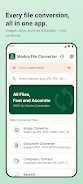
Modoo File Converter is a compact, privacy-focused file tool that performs image, document and archive conversions entirely on your Android device. It places conversion controls, batch processing and file management in a single app so you can prepare files for sharing, printing or storage without sending data to external servers. The app opens quickly, keeps a local conversion history and supports both dark mode and native system themes for a comfortable, distraction-free workflow.
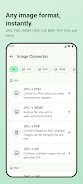
The interface is organized into clear sections for Images, Documents, Archives and Utilities so you can find the right tool without hunting through menus. Image conversion supports common formats including JPG, PNG, WEBP, HEIC (on Android 10+), GIF, TIFF, SVG and BMP, and offers an image-quality slider that balances file size against visual fidelity. Document tools handle PDF, DOCX, XLSX, PPTX, TXT, CSV, Markdown and HTML conversions in typical one-to-one tasks, for example turning PDFs into images for easy sharing or exporting spreadsheets to CSV for analysis. Archive tools compress and extract ZIP, 7Z, TAR, TAR.GZ and GZIP files; the compressor exposes format options and compression level so you can choose faster or tighter packing without guessing the terminology. A Base64 encoder and decoder is included for quick text or small binary tasks and updates in real time as you type.
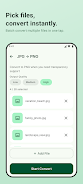
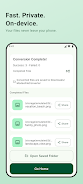
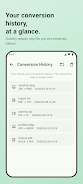
Batch mode lets you add multiple files to a conversion queue and process them in sequence, with clear progress indicators and per-task status so you always know which file is active and which ones will follow. You can cancel or pause a running operation and resume later when needed; completed conversions are saved to Downloads/ModooFileConverter for easy access by other apps. Conversion history stores recent jobs and output locations, simplifying repetitive workflows by letting you repeat a previous operation without rebuilding settings from scratch.
Controls are designed for touch-first use: choose files from the system picker, adjust format-specific settings on compact panels, and confirm with a single Convert button. Visual previews are shown where applicable so you can verify an image conversion or merged PDF before finalizing. The app follows Android conventions for back navigation and share sheets, so sharing converted files to messaging, email or cloud apps is immediate and familiar. Performance options let you select CPU-friendly modes when working on older devices or prioritize speed on modern hardware.
Settings include theme selection, the default output folder, and a one-time purchase option to remove ads for an uninterrupted workspace. Accessibility features include support for larger font sizes and compatibility with TalkBack for screen-reader navigation, making common tasks accessible to users with visual impairments. Modoo File Converter currently ships with Korean and English interfaces and is structured to accept additional localizations in future updates.
All conversions occur locally on your phone, so there is no automatic upload of your documents or photos to cloud servers. This offline-first model reduces privacy risk for sensitive files and ensures the app functions when you have limited or no internet connectivity. Because processing happens on-device, results depend on your phone’s available memory and CPU; large batches or very large files may process more slowly on older hardware.
HEIC conversion requires Android 10 or newer for native support of that format, so users with older versions cannot convert iPhone HEIC photos directly without prior format changes. The free version includes ads, and removing them requires a single in-app purchase. For very large archives or complex document layouts, conversions aim to preserve content but exact layout fidelity for edge cases (complex fonts, macros or advanced spreadsheet formulas) is not guaranteed.
For people who manage photos, reports and compressed backups on mobile, Modoo File Converter streamlines common chores into a compact offline toolkit. Its combination of batch processing, conversion history and adjustable quality settings reduces repetitive work and keeps important files local and under your control. Whether you need quick image-to-PDF merges, lightweight archive packing for transfer, or an on-device Base64 utility for text tasks, the app provides practical controls and transparent behavior so you can complete tasks reliably on the go.
File size: 14.00 M Latest Version: 1.0.5
Requirements: Android Language: English
Votes: 180 Package ID: com.modoo.fileconverter
Developer: 모두 스튜디오(Modoo Studio)


Must Have Tools Apps for Android
Equip yourself with our all-in-one toolbox app for everyday tasks and projects. Instantly convert between units, calculate tips, scan documents, manage files, and more with handy productivity tools. Includes a level, compass, QR code reader, ruler, speedometer, decibel meter, and flashlight. Save frequently used tools to your customizable dashboard for one-tap access. Track billable hours, wages, budgets, and invoices. Annotate screenshots, magnify labels, and sign PDFs on the go.






LIVE A HERO
Retro Hero Mr Kim
Empire of Passion
Arcane Quest Legends
Magic Snap: Momotaro
AllStar Manga Heroes
Lunescape
ONE PIECE Thousand Storm JP
Tap Titans 2