Scan to Download
PawDoo is a practical pet-care companion that helps owners keep consistent, date-stamped records for every animal in the household. PawDoo centralizes daily logging, calendar overviews and reminder workflows so you can track feeding, walks, potty breaks, weight changes, hygiene and medical treatments without scattered notes or photos. The app is designed for people who prefer structured records and fast input, making it simple to review patterns before a vet visit or to keep hands-on routines running smoothly.
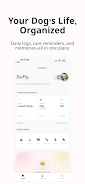
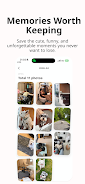
PawDoo puts routine entries into a clear timeline and reminder system: fast pet profiles with one consolidated record per animal, quick-entry templates for feeding and walks, and detailed potty logging that captures stool or urine type, location, consistency or volume, time, notes and optional photos. Walk and activity records store duration, route or location notes, behavior tags and mood indicators alongside images. Feeding, hygiene and medical entries support vaccine and deworming details, product names and reaction notes. Weight and body condition score tracking show history tables and chart-style trend displays. A calendar timeline (month/week/list), category filters and a Reminder Center organize scheduled alerts into overdue/today/upcoming/completed groups.
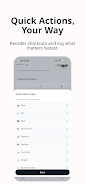
Input controls emphasize speed and clarity: choose a pet profile, tap a pre-set action button (feed, walk, potty, med) and fill short fields with dropdowns, toggles or free-text notes. Templates reduce repetitive typing for common events and let you attach a photo in one step. Navigation relies on consistent gestures and a familiar toolbar so daily logging takes only seconds. Progression is measured through accumulated entries and visual trend lines rather than game mechanics—consistent logging produces clearer charts and makes long-term care decisions easier.
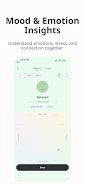
The interface focuses on readability and quick review: clean timelines with date stamps, color-coded categories and compact list views for scanning many entries at once. Chart displays use simple lines and bars to highlight weight or activity trends, and calendar modes let you toggle between month, week or detailed list views. Visual tags such as mood or behavior icons help you spot changes immediately without digging through notes. The overall visual approach aims to reduce clutter so the most important info is visible at a glance.
PawDoo supports multi-pet households with separate profiles and an archive flow to move pets in and out of active view while keeping records intact. You can add breed, age, medical history and photo for each pet, set custom categories and add personal tags to events for tailored filtering. Custom reminder types let you schedule recurring tasks for vaccines, deworming, weight checks or any care routine you define, and optional fields let you record product names or reaction details for future reference.
Instead of conventional progression systems, the app rewards consistency by turning repeated observations into useful trends: weight charts, frequency reports and behavior summaries reveal gradual changes over weeks and months. This historical perspective increases the app's replay value—regular logging becomes part of a care routine that yields clearer insights over time. Review screens let you filter by category, date range or pet so you can prepare vet visit summaries or export notes manually if needed.
PawDoo is built for easy, everyday use with large tappable controls, clear labels and concise forms to minimize friction. The app is usable without a constant internet connection for local logging; reminders and notifications rely on device settings and will function while offline. Small accessibility touches such as adjustable text sizes and consistent iconography support users with different needs. Overall the app emphasizes a predictable, low-friction experience so care tasks fit naturally into daily life.
There are a couple of practical constraints to know: PawDoo depends on manual entries to build its value, so the most useful features appear when logs are added consistently. Reminder types are currently focused on vaccines, deworming, weight, care and custom schedules and may not cover every highly specialized need without using custom fields. These trade-offs reflect the app's focus on a clear, privacy-friendly local record rather than a complex automation platform.
File size: 43.49 M Latest Version: 1.0.0
Requirements: Android Language: English
Votes: 139 Package ID: com.pawdoo.app
Developer: PawDoo App Inc.



Make your house a home with our selection of innovative apps. Discover programs to simplify cleaning, organize closets, and manage home maintenance. Take the hassle out of chores and keep your space running smoothly. Design, visualize, and renovate like a pro using our augmented reality and 3D modeling tools. Enhance security and monitor your property 24/7 with our connected home tech.






LIVE A HERO
Retro Hero Mr Kim
Empire of Passion
Arcane Quest Legends
Magic Snap: Momotaro
AllStar Manga Heroes
Lunescape
ONE PIECE Thousand Storm JP
Tap Titans 2