Scan to Download
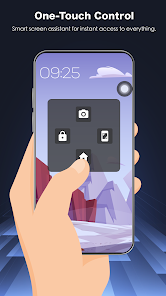
Assistive Touch 2026 is a lightweight utility that adds a persistent, customizable floating shortcut to your Android device, offering fast access to navigation controls, system settings and frequently used apps. Assistive Touch 2026 is designed for people who prefer one-handed operation, want to protect hardware buttons from wear, or need quick access to common device functions without digging through menus. The app stays on screen and responds to simple gestures and taps so you can move through tasks more quickly while keeping your main apps in view.
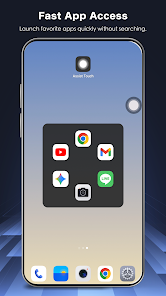
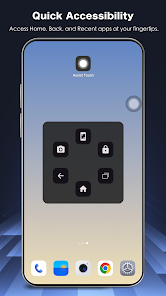
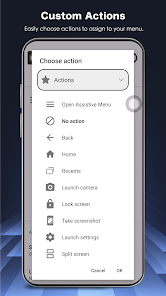
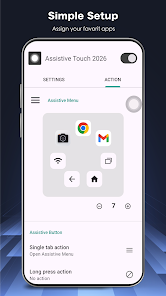
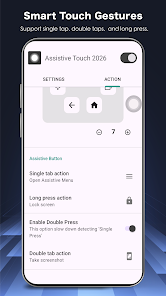
The floating panel provides virtual Home, Back and Recent buttons, plus dedicated lock and volume controls that mirror physical buttons. Taps and gestures are configurable: single tap can open a shortcut, long press can trigger a system action, and swipe gestures can reveal a secondary set of toggles. Quick-access toggles include connectivity and utility functions such as Wi-Fi, Bluetooth, flashlight, screen rotation, brightness adjustment, location and screenshot capture, all accessible from the panel without opening the settings app. Shortcuts to favorite apps let you launch messaging, media players or productivity tools from any screen.
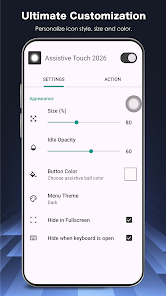
You can fine-tune the appearance and placement of the floating control so it fits your device and workflow. Choose icon styles, colors, transparency, size and the default screen edge where the button rests. The panel can be resized to reduce obstruction of on-screen content, and you can lock its position to prevent accidental movement. The app also offers simple presets and a compact mode so users who prefer a minimal footprint can keep only the most essential controls visible.
Assistive Touch 2026 leverages the Android Accessibility Service API to perform global actions such as returning to the home screen or opening recent apps. The setup flow explains required permissions step by step and includes an in-app guide that shows how gesture mapping and toggles work. Because the tool is built with accessibility in mind, it is helpful for users with limited mobility or those who find hardware buttons difficult to reach. Haptic feedback and optional audible cues make interactions clearer for a wider range of users.
Designed to be lightweight, the app runs locally on your device and does not require a persistent network connection for its core functions. Background resource usage is minimized to reduce battery impact; the floating control is optimized to keep CPU and memory overhead low while remaining responsive. There are simple settings to pause or hide the floating panel automatically during full-screen video or gaming sessions to avoid disrupting media playback.
The app requests only the permissions necessary to provide its features and explains the purpose of each one during setup. Assistive Touch 2026 uses Accessibility services to trigger system-level commands and does not collect personal content or send usage data to external servers by default. The privacy notes describe how actions are handled on-device and provide guidance for users who want to revoke permissions or uninstall the utility at any time.
Whether you frequently switch between apps, rely on one-handed navigation on large phones, or want to avoid repeated presses of physical keys, the floating panel speeds common tasks and reduces hardware strain. For example, power users can map a long press to lock the device after closing an app, or set a quick swipe to capture screenshots for fast documentation. Small adjustments—resizing, repositioning or switching to compact mode—help tailor the interface to different apps, handedness and daily routines.
Because the panel remains on top of other apps, it can occasionally obscure touch targets; taking a moment to set size and position limits interference. Some users may be cautious about granting Accessibility access; the description and setup prompts clarify intended use and permissions. If any incompatibility appears with specialized apps that use immersive full-screen modes, temporary hide and auto-pause options are provided so you can restore a clean display when needed.
Assistive Touch 2026 aims to simplify navigation and reduce wear on physical buttons while remaining unobtrusive. With straightforward controls, clear privacy practices and flexible customization, the app can be adapted to a wide range of devices and user needs, from everyday convenience to improved accessibility for users with limited mobility.
File size: 10.00 M Latest Version: 1.0.2
Requirements: Android Language: English
Votes: 322 Package ID: nu.assistive.touch
Developer: Wormhole Space

Must Have Tools Apps for Android
Equip yourself with our all-in-one toolbox app for everyday tasks and projects. Instantly convert between units, calculate tips, scan documents, manage files, and more with handy productivity tools. Includes a level, compass, QR code reader, ruler, speedometer, decibel meter, and flashlight. Save frequently used tools to your customizable dashboard for one-tap access. Track billable hours, wages, budgets, and invoices. Annotate screenshots, magnify labels, and sign PDFs on the go.






LIVE A HERO
Retro Hero Mr Kim
Empire of Passion
Arcane Quest Legends
Magic Snap: Momotaro
AllStar Manga Heroes
Lunescape
ONE PIECE Thousand Storm JP
Tap Titans 2