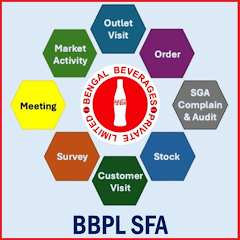
Scan to Download
BBPL MaxSale is a field-sales companion designed to bring route planning, visit management, order taking and reporting into a single offline-capable Android tool. BBPL MaxSale helps sales representatives follow daily routes, capture attendance with GPS-stamped login and logout, and record both planned and unplanned outlet visits while taking SKU-level orders that include pricing and quantities. The app balances reliable offline operation with automatic synchronization so teams can continue working without a live connection and upload queued data when connectivity returns.
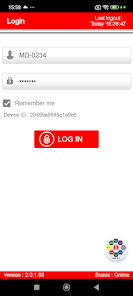
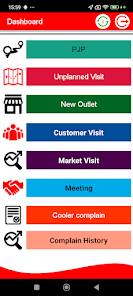
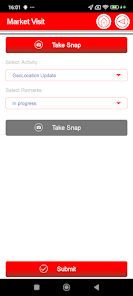
The core feature set of BBPL MaxSale centers on practical field tasks: configurable route planning that reflects a planned journey for the day, a simple attendance workflow for start and end-of-shift with GPS tags, and flexible visit recording that distinguishes planned (PJP) from unplanned (UJP) stops. Order capture works at SKU level and supports barcode scanning to reduce manual entry. Photo capture stores images with embedded GPS coordinates and timestamps to support verification and cooler complaint tracking. An integrated local queue stores transactions and photos until the device can sync with the backend to prevent data loss in low-connectivity environments.
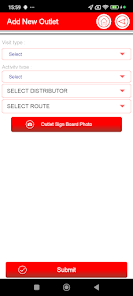
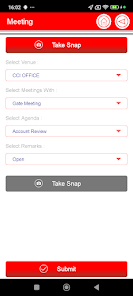
User interaction in BBPL MaxSale is optimized for quick field use: primary controls are tap-based and arranged for one-handed operation, forms use predictive input where possible, and barcode scanning integrates the camera so a single scan fills SKU fields. Map and list views let reps switch between geographic and tabular perspectives; tapping an outlet on the map opens that customer’s profile and active order form. Common actions use short workflows to reduce taps: add a visit, capture a photo, or place an order with a small number of clear screens, while validation messages and inline help guide correct data entry.
Progression in the app is driven by daily and periodical KPIs rather than gamified levels: BBPL MaxSale provides in-app KPI summaries, distance reports and visit compliance indicators so reps and managers can track achievement against targets. Managers can review aggregated sales, order frequency, and missed stops, while sales reps can monitor their own completion rates and on-route efficiency. The app’s reporting helps teams identify trends over time, such as repeat cooler complaints or consistent stockouts, supporting performance reviews and targeted coaching.
Offline-first behavior is a primary design choice: when internet access is intermittent, BBPL MaxSale queues orders, visit records and media locally using an on-device database and automatically synchronizes when a stable connection is available. The synchronization process is incremental to minimize data transfer and includes conflict handling for cases where the backend has updated master data. Local queues are visible to the user so outstanding items can be reviewed, and retry logic manages transient upload failures.
The interface favors clarity and legibility for outdoor use: high-contrast map overlays, large touch targets, and concise labels reduce friction during street-level work. Forms use grouped fields and contextual tooltips to speed data entry, while photos and barcode scans are presented in-line with orders for easier verification. BBPL MaxSale emphasizes a minimal visual hierarchy that surfaces the most important actions for each screen to cut down on cognitive load during long routes.
The app supports configuration of key business elements such as price lists, SKU assortments, visit types and route templates so organizations can align app behavior with existing processes. Administrators can enable or disable features like barcode scanning or photo requirements, and define which fields are mandatory for orders. This flexibility allows BBPL MaxSale to fit different sales models without changing the mobile client for routine updates.
BBPL MaxSale is designed to work on a broad range of Android devices but depends on certain hardware and permissions: GPS must be functional for accurate tagging, the camera is required for photo capture and barcode scanning, and occasional internet access is needed to upload queued data. The app includes accessibility considerations such as scalable text sizes and clear contrast, but best results come from mid-range or newer devices with reliable GPS, camera focus and sufficient storage for offline queues and media.
A typical day with BBPL MaxSale begins with route review and attendance check-in, continues through outlet visits where reps place SKU-level orders and capture supporting photos, and finishes with logout and automated synchronization. The main limitations to be aware of are the dependency on periodic connectivity to complete uploads and the need for a functioning GPS and camera on the device. These requirements are noted up front so teams can plan device selection and data connectivity strategies accordingly.
File size: 19.00 M Latest Version: 2.0.1.65
Requirements: Android Language: English
Votes: 283 Package ID: com.maxmobility.maxsalebbpl
Developer: MaxMobility

Top Free Business Necessary Apps for Android
Streamline operations and maximize productivity with our innovative business apps. Manage contacts, schedule meetings, and route calls seamlessly. Collaborate on documents and projects in real-time. Track inventory, finances, and analytics to inform smart decisions. Build customized proposals, invoices, and contracts to win clients. Stay on top of emails, tasks, and passwords for efficient work.






LIVE A HERO
Retro Hero Mr Kim
Empire of Passion
Arcane Quest Legends
Magic Snap: Momotaro
AllStar Manga Heroes
Lunescape
ONE PIECE Thousand Storm JP
Tap Titans 2