
Scan to Download
AI Emojis is a creative utility that converts a simple text prompt into a custom emoji, letting you express moods and reactions that standard emoji sets don't cover. The app uses AI to interpret your description and produce a unique image you can save, download, and share instantly, making it ideal for people who want personalized stickers for chats and social posts. With a straightforward prompt workflow and a massive catalog to browse for ideas, AI Emojis makes it easy to build a library of custom expressions, keep favorites for reuse, and quickly spread fresh reactions to friends.
⭐ Prompt-driven AI design: simply tell the system your mood or idea and watch it become a custom emoji.
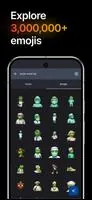
⭐ Massive searchable library with over 3,000,000 emoji variations to browse for inspiration.
⭐ Easy download and archive options so you can save favorite creations for repeated use.
⭐ Instant sharing tools to send your personalized emojis quickly to friends and chats.
✅ AI Emojis delivers unique, personalized expressions that help messages stand out compared to standard emoji sets.
✅ A large searchable collection makes it fast to find styles or ideas to refine your prompts.
✅ Saving and downloading creations builds a reusable library of stickers and reactions.
✅ Quick sharing streamlines sending custom emojis into conversations and social posts.
❎ Final results depend heavily on the clarity and detail of the prompt, so outcomes can vary.
❎ Generated emojis may not always match expectations and can require several attempts to refine.
❎ Use is governed by terms of use that users should review before creating or sharing content.
File size: 17.27 M Latest Version: 1.0.23
Requirements: Android Language: English
Votes: 386 Package ID: sh.emojis.app
Developer: 851 Inc.



Must Have Tools Apps for Android
Equip yourself with our all-in-one toolbox app for everyday tasks and projects. Instantly convert between units, calculate tips, scan documents, manage files, and more with handy productivity tools. Includes a level, compass, QR code reader, ruler, speedometer, decibel meter, and flashlight. Save frequently used tools to your customizable dashboard for one-tap access. Track billable hours, wages, budgets, and invoices. Annotate screenshots, magnify labels, and sign PDFs on the go.






LIVE A HERO
Retro Hero Mr Kim
Empire of Passion
Arcane Quest Legends
Magic Snap: Momotaro
AllStar Manga Heroes
Lunescape
ONE PIECE Thousand Storm JP
Tap Titans 2