Samsung Calendar helps you manage schedules, appointments, and reminders with a clean interface and multiple calendar views. The app syncs across accounts, supports shared calendars, and offers smart scheduling tools to keep personal and work life organized. It adapts to time zones and includes widgets for quick access.
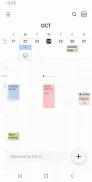
Samsung Calendar provides a suite of practical features designed for everyday planning. View options include month, week, day and agenda layouts so you can switch perspectives rapidly. Create single or recurring events, add location details, attach files or photos, and set multiple alarms for important appointments. Native reminders and task support help you track to-dos alongside calendar entries.
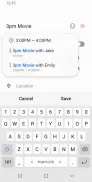
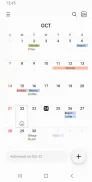
The interface focuses on clarity and speed: color-coded calendars, easy event creation, and swipe gestures let you navigate dates quickly. The event editor groups essential fields — title, time, repeat rules, guests, and notes — so scheduling takes only a few taps. Built-in widgets place upcoming events or a compact month view directly on the home screen for one-glance planning.
One of Samsung Calendar’s strengths is its ability to sync with multiple services. It supports Samsung accounts as well as third-party calendars like Google and Microsoft Exchange, enabling cross-platform consistency. Event sharing and guest invites let you coordinate with colleagues, friends, or family. Location integration connects with mapping apps to open directions from an event entry.
Personalize your calendar with custom colors for different calendars, adjustable start-of-week settings, and selectable first day views. Notifications can be fine-tuned per calendar or per event, and you can enable or disable reminders for specific accounts. For users who travel, time zone handling ensures events appear at the correct local time, with options to lock an event to a particular zone if needed.
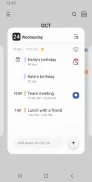
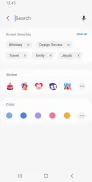
Beyond basic scheduling, Samsung Calendar includes features that boost productivity. Smart suggestions help autofill locations and frequently used attendees. The agenda view summarizes upcoming commitments, while search and filters let you find past or future events quickly. Integration with native tasks or reminder apps creates a unified workflow for managing deadlines and meetings.
Samsung Calendar asks only for permissions necessary for core functionality, such as access to calendars, contacts, and storage when attaching files. You remain in control of which accounts sync with the app, and local calendars can be kept private on-device. Regular updates address security and compatibility concerns to help protect your schedule information.
Designed to run smoothly on a wide range of Android devices, Samsung Calendar is optimized for both phones and tablets. It performs well on low-power devices and benefits from hardware acceleration on newer models for fluid scrolling and quick loading. Offline access to local calendar entries ensures you can view and edit events without an active connection; changes sync automatically once online.
To begin, install Samsung Calendar from the app store, sign in with your preferred account, and grant calendar permissions. Add any external calendars you use, adjust notification preferences, and customize views to match your routine. With a few setup steps, Samsung Calendar becomes the central hub for time management on your Android device.
File size: 54.50 M Latest Version: 12.7.00.20
Requirements: Android Language: English
Votes: 271 Package ID: com.samsung.android.calendar
Developer: Samsung Electronics Co., Ltd.


Must Have Home Apps for Android
Make your house a home with our suite of helpful home apps. Discover clever tools to organize closets, streamline chores, and simplify cooking. Take the stress out of cleaning and maintenance with handy checklists and schedules. Enhance security and control appliances and lighting with our smart home integrations. Design, visualize, and renovate like a pro using our 3D planning software.






LIVE A HERO
Retro Hero Mr Kim
Empire of Passion
Arcane Quest Legends
Magic Snap: Momotaro
AllStar Manga Heroes
Lunescape
ONE PIECE Thousand Storm JP
Tap Titans 2