
Scan to Download
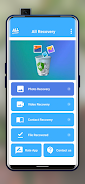
All Recovery is a compact utility designed to help you retrieve deleted photos, videos and contacts when accidental removal threatens to erase important memories or information. All Recovery scans device storage and presents recoverable items in a simple preview list so you can attempt restoration without navigating complex menus. The app focuses on straightforward, local recovery attempts and is intended for users who want a quick way to restore files with minimal setup.
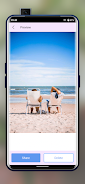
The core capabilities of All Recovery include targeted photo recovery, video restoration and contact retrieval from local device storage. The app performs a device scan that indexes deleted file fragments and groups results by media type, date and folder, allowing you to inspect what can be recovered before initiating restoration. Previews are available for many image and video formats so you can confirm items visually. Contact recovery shows found vCard entries or phonebook fragments and lets you merge restored contacts back into your address book.
All Recovery begins with a scanning phase that reads low-level storage areas to locate traces of deleted files. The app uses tiered scans: a quick scan for recently deleted items and a deeper scan for older or fragmented files. After scanning, results are presented with metadata such as file name, approximate deletion date and storage location when available. You choose which items to restore and All Recovery attempts to recover the most complete version possible based on available fragments. Because the app operates locally, success depends on how much new data has been written to the storage since deletion.
The interface is built around a few simple actions: scan, preview and restore. Controls are touch-optimized with clear buttons and progress indicators to guide each step. Scans can be paused and resumed, and restore actions include options to save recovered files to a chosen folder. All Recovery aims to reduce cognitive load by hiding advanced options behind an expert mode, so casual users see a minimal interface while power users can fine-tune scan depth and file type filters.
Rather than a game-like progression, All Recovery provides a procedural workflow that improves your chances of recovery over repeated attempts by allowing different scan settings and exclusion filters. You can customize the types of files to scan, set date ranges and exclude certain directories to speed up scans. This flexibility adds replay value because trying alternative scan depths or filter combinations can reveal additional recoverable items that were missed in an initial pass.
The app uses a clean, functional visual style focused on legibility and rapid inspection of results. Media items are organized into sections rather than levels, with separate views for images, videos and contacts. Each section includes sortable columns for date, size and confidence level so you can prioritize which items to recover first. The design favors neutral colors and clear typography to make previews and lists easy to scan, especially on phones with smaller screens.
All Recovery performs all scanning and restoration locally on your device and does not require an account or internet connection to operate, which preserves privacy and makes it usable offline. Accessibility considerations include adjustable text size, high-contrast view options and support for common screen readers so users with varying needs can operate the app. Permission requests are scoped to the minimum required access for scanning and saving files.
Recovery success can vary and is not guaranteed. Permanently overwritten or securely erased files may not be recoverable, and results depend on device usage after deletion. All Recovery provides clear warnings about these constraints before deep scans and surfaces confidence indicators for each found item. If a file has been partially overwritten, the app may recover a truncated or lower-quality version rather than the original intact file.
All Recovery includes in-app help that explains scan modes, recommended steps to maximize recovery chances and guidance on common file formats. Periodic updates refine scanning heuristics and expand format support as storage technologies evolve. For users who value a straightforward, privacy-minded recovery tool, All Recovery offers a practical option for attempting to restore lost photos, videos and contacts without introducing unnecessary complexity.
File size: 13.00 M Latest Version: 3.3.2
Requirements: Android Language: English
Votes: 389 Package ID: com.photoandvideoapps.recoveryphotovideocontactsne
Developer: Photo and Video apps



Best Free Media Apps for Your Android Phone
Explore an immersive world of entertainment with our media software. Watch, listen, and engage with your favorite shows, music, movies, and more. Access exclusive content, personalized recommendations, and innovative formats. Enhance your experience with our suite of cutting-edge applications. Discover hidden gems tailored to your unique tastes. Create, share, and connect over personalized playlists, reviews, and forums.






LIVE A HERO
Retro Hero Mr Kim
Empire of Passion
Arcane Quest Legends
Magic Snap: Momotaro
AllStar Manga Heroes
Lunescape
ONE PIECE Thousand Storm JP
Tap Titans 2










































