Category: Lifestyle Date:2026-10-15 19:51:01
Rating: 4.4 Tags: Health
Scan to Download
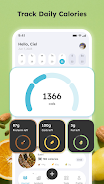
Calorie Counter & Diet Tracker is a practical, evidence-oriented nutrition app that helps you track daily intake, set healthy weight targets, and build consistent habits with minimal friction. The design prioritizes fast logging and clear visual feedback so you spend less time entering meals and more time understanding progress; within minutes of setup you can scan a barcode, search the built-in food database, or quick-add calories to start a reliable food diary. Calorie Counter & Diet Tracker balances a straightforward interface with deep tracking options — macronutrients, fiber, water and custom recipes are all available without cluttering the main workflow.
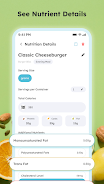
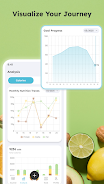
The app centralizes essential tracking tools in a compact, responsive layout. A comprehensive searchable food database is paired with a barcode scanner for fast meal entry, and recent-items plus favorites accelerate repetitive logging. You can save and edit custom recipes and meals to avoid re-entering the same data, set daily macro targets for protein, carbohydrates and fat, and monitor supporting metrics like fiber and hydration. Built-in progress charts show daily totals and longer-term trends so you can review calorie balance, macronutrient distribution and weight changes at a glance.
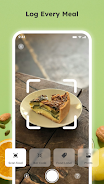
Controls are designed for speed and accuracy: a three-step logging flow — select or scan an item, confirm portion size, and add to the diary — minimizes taps while preserving precision. Favorite meals and meal templates are accessible from the main diary so common entries become one-tap actions, and a quick-add calorie field lets you enter an estimate when you’re short on time. Visual cues, color-coded progress bars and a clear breakdown screen make it straightforward to understand how each meal affects your daily goals without hunting through menus.
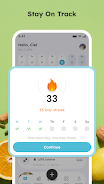
Progression in the app emphasizes measurable, sustainable improvements rather than arbitrary levels. Daily and weekly trend lines help reveal consistent patterns, milestones mark important habits like consecutive logging days or regular weigh-ins, and a simple streak tracker rewards steady behavior. These progression elements provide a natural replay value: refining goals, experimenting with macros, and tracking the results of small dietary changes creates an ongoing loop of observation and adjustment that keeps the diary useful long term.
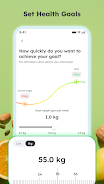
Personalization begins when you set your initial goal to lose, maintain or gain weight and continues through adjustable activity levels, macronutrient ratios and portion options. The app supports different dietary approaches — from balanced plans to higher-protein or lower-carb targets — by letting you tweak nutrient priorities and notification schedules. Display preferences such as units (metric/imperial), default portion types, and which nutrients are shown on the main screen let you tailor the experience to your routine and training objectives without altering the core logging workflow.
Reminders are focused and practical: gentle nudges to log meals, drink water, or weigh in arrive according to schedules you set. Short coaching cues appear in the diary to clarify nutritional trade-offs and offer concise tips for common situations, like adjusting portion sizes after a high-calorie meal. Optional, device-local challenge prompts — for example a seven-day hydration goal or a two-week logging streak — give structure without requiring online accounts and can be turned off if you prefer an unobtrusive experience.
Built to run smoothly on a wide range of Android devices, the app is lightweight and optimized for battery life. Offline mode allows full logging and access to past entries without an internet connection, and local backup and export options put you in control of your data. If you choose to connect with third-party health platforms, syncing is optional; core tracking remains fully functional on-device so you don’t lose access when offline or when you prefer to keep everything local.
Accessibility was considered throughout the interface: readable typography, high-contrast target indicators, large tap areas and compatibility with Android accessibility tools make the app easier to use for a variety of needs. Permission requests are limited to features that add convenience, such as camera access for barcode scanning and optional synchronization for external services. To get started, enter age, height, weight and activity level to create an initial calorie target, log a few meals to calibrate your diary, and use weekly views and trend charts to refine targets over time. Calorie Counter & Diet Tracker keeps control of your information local by default and provides clear options to export, back up or delete device-stored records.
File size: 77.00 M Latest Version: 1.0.7
Requirements: Android Language: English
Votes: 263 Package ID: com.calorie.tracker.fitnesstracker.caloriediary
Developer: Zeronebula Studio

Top Health Free Apps for Android
Take charge of your wellbeing with our innovative health and fitness apps. Monitor your activity, sleep, nutrition and more using our advanced tracking tools. Access personalized insights to develop healthy habits. Check symptoms, manage medications, and connect with doctors through our telehealth services. Follow customized workout plans for any fitness level with our virtual coaching.






LIVE A HERO
Retro Hero Mr Kim
Empire of Passion
Arcane Quest Legends
Magic Snap: Momotaro
AllStar Manga Heroes
Lunescape
ONE PIECE Thousand Storm JP
Tap Titans 2