
Scan to Download
SOLUM Smart Light is a mobile app that turns home lighting into an intuitive, customizable system. It centralizes schedules, scenes, and color controls for compatible bulbs and fixtures, offering automation, remote access, and energy-saving presets to simplify daily routines and boost ambiance across rooms and moods.
The SOLUM Smart Light app targets users who want straightforward control without sacrificing advanced options. It supports both single-room setups and multi-zone installations. The interface balances quick access for everyday tasks with deeper settings for power users, making it suitable for apartments, homes, and small offices where lighting plays a functional and aesthetic role.
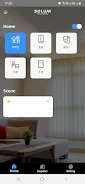
SOLUM Smart Light links with compatible bulbs and gateways through local Wi-Fi or Bluetooth, then syncs device status to the app. Once devices are paired, the app detects available features—dimming, color shifts, or scene support—and presents context-specific controls. The home screen uses tile-based shortcuts, so common tasks require just a tap.
Routines combine time triggers, geofencing, and sensor input where supported. For example, a morning routine can gently raise brightness while switching color temperature to daylight. In contrast, a night routine can reduce blue light and set a warm wake-up cue. Integrations with voice assistants are available for hands-free operation.
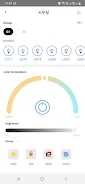
The customization suite is a highlight. Users can design complex scenes with layered transitions and duration controls. Color pickers let you define precise shades or choose curated palettes for reading, cooking, or relaxation. Grouping tools enable synchronized behavior for fixtures in the same room or independent control for accent lighting.
Performance is geared toward responsiveness. Animations are subtle, keeping interactions snappy while preserving visual clarity. The app is modular, so the main control panel loads immediately and deeper menus load on demand. This minimizes lag on mid-range devices and reduces battery impact when the app runs in the background.
Menus prioritize familiar icons and readable text. The SOLUM Smart Light design offers both a compact grid for quick toggles and an expanded view for precise adjustments. Haptic and audio feedback options are included to confirm actions without staring at the screen.
Start by grouping lights by room and building a handful of scenes for typical activities: work, relax, and night. Use the app’s scheduler to automate transitions so manual input becomes minimal. For larger installations, label devices clearly during setup to avoid confusion when editing routines.
Installation is guided. After downloading the app, create an account, follow the pairing wizard to add devices, and assign them to rooms. The initial setup includes a quick tutorial that demonstrates scene creation and scheduling. Regular updates expand compatibility and refine automation tools.
For anyone upgrading from manual switches or basic smart bulbs, SOLUM Smart Light provides a clear path to smarter lighting and more consistent control across the home. With practical automation and precise customization, it makes everyday lighting more convenient and more personal.
File size: 12.30 M Latest Version: 1.3
Requirements: Android Language: English
Votes: 249 Package ID: com.solum_ble_mesh.iot
Developer: SoluM

Must Have Home Apps for Android
Make your house a home with our suite of helpful home apps. Discover clever tools to organize closets, streamline chores, and simplify cooking. Take the stress out of cleaning and maintenance with handy checklists and schedules. Enhance security and control appliances and lighting with our smart home integrations. Design, visualize, and renovate like a pro using our 3D planning software.






LIVE A HERO
Retro Hero Mr Kim
Empire of Passion
Arcane Quest Legends
Magic Snap: Momotaro
AllStar Manga Heroes
Lunescape
ONE PIECE Thousand Storm JP
Tap Titans 2










































