Scan to Download
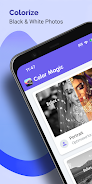
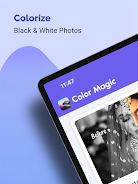
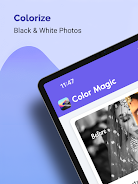
Colorize Photos is a mobile image restoration tool that transforms black-and-white pictures into vivid color images using on-device and cloud-enhanced algorithms. It targets hobbyists and professionals who need quick colorization, batch processing, and intuitive controls, offering a mix of automatic suggestions and manual fine-tuning for realistic results.
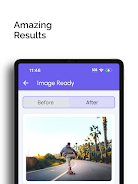
Colorize Photos combines machine learning with simple editing controls to breathe new life into old images. The app is built for people who want reliable colorization without steep learning curves. Results are often rapid and believable, while a set of manual tools allows careful correction when automatic color choices miss the mark.
The engine in Colorize Photos blends learned color statistics with contextual scene analysis. It recognizes faces, textiles, skies and vegetation, then proposes colors based on patterns extracted from a vast training set. When uncertainty exists, the app produces several alternatives so you can pick the most realistic result. If accuracy is paramount, selective masks let you override decisions and paint precise shades.
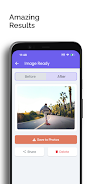
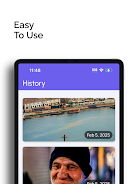
Design prioritizes clarity. A single project screen shows the image, an action bar with core tools, and a compact timeline of edits. You can toggle between automatic and manual modes quickly. Sliders provide immediate feedback and undo is non-destructive, so edits remain reversible throughout the session. Colorize Photos keeps frequently used controls within thumb reach for faster iteration on phones.
Beyond colorization, the app includes utility tools expected in a restoration workflow: noise reduction to clean scanned film grains, contrast recovery to restore faded tones, and repair brushes to fix scratches and spots. These tools are accessible in a dedicated restoration tab, so you can prepare the image before applying color, improving final fidelity.
Colorize Photos offers a balance between local and cloud processing. On-device colorization is fast for single images and preserves privacy; cloud processing enables higher-quality outputs and handles larger batches more efficiently. The app supports common image formats including JPEG, PNG and TIFF, and lets users choose export resolutions suitable for printing or web sharing.
Download and install the app from an official store, grant access to your photo library, and import a test image. Run an automatic colorization to get a feel for the algorithm, then explore the manual tools to refine tones. Tutorials and tooltips are available inside the app to shorten the learning curve.
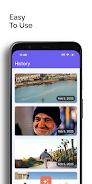
Users favor Colorize Photos for its practical balance of automation and control. Photographers and archival hobbyists appreciate the quality of the color suggestions and the convenience of batch workflows. The app’s non-destructive pipeline and comparison views make it easy to experiment without losing earlier versions.
Whether you need a quick color pass for sharing on social platforms or a careful restoration for printing, Colorize Photos provides a sensible toolkit that adapts to different skill levels and restoration goals.
File size: 39.09 M Latest Version: 1.0.0
Requirements: Android Language: English
Votes: 373 Package ID: com.eastfrisia.colorizephotos
Developer: East Frisia


Must Have Tools Apps for Android
Equip yourself with our all-in-one toolbox app for everyday tasks and projects. Instantly convert between units, calculate tips, scan documents, manage files, and more with handy productivity tools. Includes a level, compass, QR code reader, ruler, speedometer, decibel meter, and flashlight. Save frequently used tools to your customizable dashboard for one-tap access. Track billable hours, wages, budgets, and invoices. Annotate screenshots, magnify labels, and sign PDFs on the go.






LIVE A HERO
Retro Hero Mr Kim
Empire of Passion
Arcane Quest Legends
Magic Snap: Momotaro
AllStar Manga Heroes
Lunescape
ONE PIECE Thousand Storm JP
Tap Titans 2