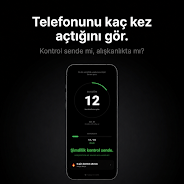
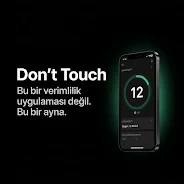
Don't Touch is a compact utility that logs every time you unlock your phone so you can see an honest count of how often you check your device. Don't Touch places a simple counter on your device — it does not coach, gamify, or judge — and gives immediate, unfiltered feedback so you can become aware of reflexive checking without added noise. The app is intentionally minimal: it focuses on the raw numbers and short-term trends so you can decide for yourself whether to change a habit.
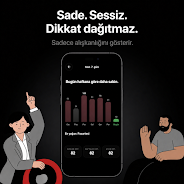
The core of the experience is a live unlock counter that increments every time the screen is turned on. A personal Daily Limit setting lets you set a target or cap and observe when you exceed it, turning awareness into a modest self-check without popups or rewards. Mirror Analytics surfaces the last seven days of activity with clear charts available in the enhanced view, while simple averages and trend indicators show daily, weekly and monthly behavior so you can watch small changes accumulate over time. The interface is deliberately minimalist and dark to reduce visual clutter and emphasize the numbers.
Interaction is straightforward: install, grant the small permission that allows the app to detect unlock events, and the counter begins working automatically. The main screen shows the current day’s unlock count and a compact summary of recent days; tapping into the analytics view reveals charted trends and averages. Settings are purposely limited to a few toggles and the Daily Limit field so controls stay fast to learn and easy to use.
Progression in this app is measured by awareness rather than levels or achievements. You progress by observing trends: daily numbers, moving averages and week-over-week comparisons provide context for habits that might otherwise be invisible. The app’s analytics help you spot patterns — times of day with frequent checks, weekday versus weekend differences, and whether a recent change in routine affected overall frequency. Premium charts provide extra detail for users who want deeper visualization of the last seven days.
Design choices center on clarity. The dark, minimalist theme reduces visual distraction and conserves battery on OLED screens, while typography and spacing prioritize legibility. Customization is intentionally limited so the app remains focused: you can set the Daily Limit and choose between a compact dashboard or the detailed analytics view, but the core presentation remains restrained to keep attention on the numbers rather than decorative elements.
Don't Touch operates locally on your device and is built to run without continuous background services that drain battery. It records unlock events on-device so you can review the data offline; optional enhanced charts are part of the app package and do not require sending personal usage data to external servers. Because the focus is simple counting, the app maintains a small storage footprint and modest power use.
This tool is suited for users who want immediate, objective feedback about unconscious phone checking without coaching, nudges or gamification. Don't Touch is not a substitute for comprehensive screen-time or app-usage monitors; it tracks unlock events only and does not measure time spent inside specific apps. Users who prefer playful or brightly themed applications may find the interface too stark, and those seeking guided programs or behavioral exercises should look for dedicated coaching apps instead.
The app favors simple navigation, high-contrast text in the default dark theme, and clear numeric displays to aid quick recognition. Basic accessibility considerations such as scalable font sizes and clear touch targets help make the app usable across a range of devices. Because the interface minimizes animations and notifications, the experience remains calm and focused for users who are sensitive to busy interfaces.
To begin, install the app, grant the minimal permission required to register unlocks, set a Daily Limit if you want a self-imposed cap, and check the dashboard throughout the day. Over the course of a week you can compare averages and see whether small adjustments in routine produce measurable changes. If you value direct, unobtrusive data about your device interactions, Don't Touch offers a lightweight, privacy-minded way to track how often you unlock your phone.
File size: 4.82 M Latest Version: 1.3
Requirements: Android Language: English
Votes: 325 Package ID: com.donttouch.mirror
Developer: BronzeRock Labs

Top Events Free Apps for Android
Discover and share the hottest events around with our intuitive apps. Find local concerts, festivals, shows, and more based on your unique interests. Create customizable calendars of upcoming events to coordinate schedules with friends. Purchase tickets seamlessly from our integrated platforms. Check real-time transit schedules to plan your trip. Access maps, directions, and parking information for any venue.






LIVE A HERO
Retro Hero Mr Kim
Empire of Passion
Arcane Quest Legends
Magic Snap: Momotaro
AllStar Manga Heroes
Lunescape
ONE PIECE Thousand Storm JP
Tap Titans 2











































