Scan to Download
Price Tracker is a lightweight Android utility that monitors product prices across stores and alerts you when items hit your target. It streamlines watchlists, sends timely notifications, and bundles historical price data to help shoppers buy smarter without endless manual checking across retailer apps and websites.
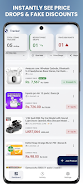
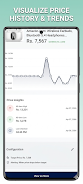
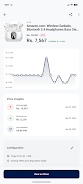
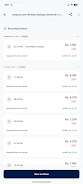
At its core, Price Tracker scans listings and aggregates price points so you can see trends at a glance. The app focuses on practical tools: creating alerts, comparing offers, and recording price changes over time. It’s designed for people who want to save money and reduce the time spent hunting for deals.
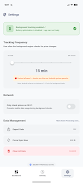
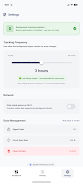
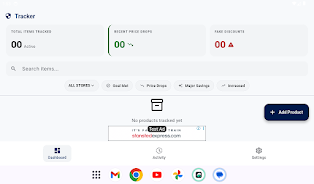
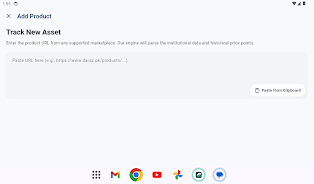
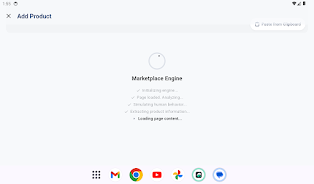
Getting started involves adding products to your watchlist via search, barcode scan, or by pasting a product URL. Price Tracker periodically polls retailer pages to refresh data and triggers alerts when conditions are met. Background updates are optimized to avoid heavy battery drain while still keeping your watchlist current.
Notification options are flexible: choose instant alerts for price drops, daily summaries, or weekly digests. You can fine-tune thresholds by percentage or absolute price, enable only certain retailers, and set quiet hours to avoid late-night pings. Custom labeling and categories make organizing large watchlists straightforward.
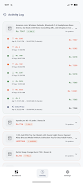
The interface emphasizes clarity. Price Tracker uses clean list views and simple charts that load quickly even on mid-range devices. Buttons and menus follow Android conventions, so learning the navigation feels intuitive. Performance is generally smooth; the app balances frequent updates with battery preservation and minimal background data usage.
Begin by adding a handful of high-interest items and set conservative alert thresholds so you don’t get overwhelmed. Use the historical chart to learn typical sale cycles for your favorite categories. If you see too many false positives, try increasing the refresh interval or enabling retailer filters to focus on trusted sources.
Installing Price Tracker is straightforward from the Android store. After granting the minimal permissions needed for notifications and background updates, import items or start a fresh search. The setup assistant walks you through notification preferences and lets you sync watchlists across devices if you sign in.
Users appreciate the practical combination of price alerts and historical data. Instead of constantly checking coupons and flash sales, people use Price Tracker to confidently wait for targets or to buy immediately when a genuine dip appears. The app reduces cognitive load by organizing information into actionable alerts and compact summaries.
As you add more items, the value of the app increases because trend insights become richer. Regularly prune items you no longer need so the watchlist stays relevant. Back up exports occasionally to preserve long-term data if you like to analyze seasonal price behavior.
For shoppers who value time and want clearer purchase decisions, Price Tracker is a focused tool that turns raw price data into timely alerts and readable trends without unnecessary complexity.
File size: 65.91 M Latest Version: 1.0.19
Requirements: Android Language: English
Votes: 445 Package ID: com.CeylonApp.PriceTracker
Developer: CeylonApp

Empower learning and research with our innovative reference apps. Access dictionaries, thesauruses, encyclopedias, and more with our comprehensive databases. Get homework help, study tips, and writing guides from our academic resources. Learn new skills by browsing how-to videos and manuals. Stay up-to-date with latest news, data, and facts curated by our editors.






LIVE A HERO
Retro Hero Mr Kim
Empire of Passion
Arcane Quest Legends
Magic Snap: Momotaro
AllStar Manga Heroes
Lunescape
ONE PIECE Thousand Storm JP
Tap Titans 2