Vynance is a modern personal finance companion that helps you see where your money goes, set and monitor budgets, and make smarter spending decisions with confidence. Vynance is designed for people who want a clean, privacy-focused experience without advertising or unnecessary complexity, whether you prefer manual entry or syncing across multiple devices. The app gives clear monthly summaries, safe-to-spend guidance that factors in bills and savings, and built-in tools to track debit orders and recurring payments so everyday finances feel less surprising.
Expense tracking in Vynance is straightforward: quick transaction entry lets you categorize spending as you go, add notes for context, and mark items as recurring. Budget management is organized by category with visual progress indicators and simple alerts when you approach limits. Safe-to-spend calculations combine upcoming bills, current budgets, and reserved savings to give a realistic daily spending number rather than a misleading bank balance. Spending analysis highlights patterns across weeks and months, showing where recurring costs concentrate and which categories are growing or shrinking over time. Debit order tracking keeps scheduled withdrawals visible so you can plan around them instead of reacting to bank surprises. Secure syncing is optional and uses encrypted backups, while local-only storage is available for users who prefer their data to remain on-device.
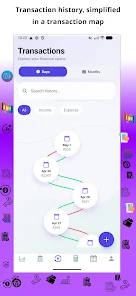
The interface focuses on quick interactions: add a transaction with a tap, edit amounts inline, and use straightforward filtering to review a week, month, or custom date range. Manual modes are practical for users who prefer to enter cash transactions by hand, and the recurring transaction controls cover bills and subscriptions so the app auto-schedules items you pay regularly. Visual cues such as color-coded categories and compact charts present a snapshot of your finances at a glance, while deeper drill-down screens let you investigate unusual spikes or declining categories. Progress systems let you set short-term targets—such as a weekly spending cap or a savings goal—and watch progress bars and trendlines update as you record transactions.
Vynance supports practical customization without overwhelming choices. You can rename, merge, or reorder categories to match how you budget, choose between compact and expanded views, and select a light or dark theme to suit your environment. Accessibility considerations include adjustable text sizes and high-contrast display options so information remains legible for more users. The app is built to work smoothly offline: all core functions for entering, reviewing, and budgeting work without a network connection, and optional encrypted cloud backups sync later when a connection is available. Notifications are configurable so reminders about upcoming debit orders or budget thresholds arrive on your schedule, not automatically.
Daily use of Vynance is intended to build better spending habits rather than create gamified pressure. Regular summaries, weekly check-ins, and meaningful insights encourage small adjustments that compound over time. Replay value comes from revisiting trend reports after a few weeks, testing a new budget allocation, or setting a seasonal savings goal and tracking progress; these behaviors create a useful feedback loop that supports steady improvement. The app prioritizes clarity and minimal friction: entry forms are concise, charts are explanatory, and contextual help is available for common tasks so new users can get productive quickly.
Vynance favors simplicity and privacy; as a result it may not match the needs of users who expect full hands-off automation or advanced financial modeling. Users seeking complex forecasting, investment management tools, or deep accounting features might find the feature set intentionally streamlined. The app emphasizes manual control and optional encrypted syncing rather than extensive automated bank integrations, so those who need direct aggregation from many external services should evaluate whether the balance between privacy and automation meets their needs.
File size: 99.00 M Latest Version: 1.0.8
Requirements: Android Language: English
Votes: 111 Package ID: com.vyre.ledgerX
Developer: vyre





Must Have Finance Apps for Android
Take control of your money with our powerful finance apps. Track spending, create budgets, and set savings goals using our easy-to-use tools. Invest wisely by accessing real-time market data and analyst reports. Manage portfolios and optimize taxes for greater returns. Apply for loans, credit cards, and insurance with our partners for personalized rates. Securely link accounts for a consolidated view of your finances.






LIVE A HERO
Retro Hero Mr Kim
Empire of Passion
Arcane Quest Legends
Magic Snap: Momotaro
AllStar Manga Heroes
Lunescape
ONE PIECE Thousand Storm JP
Tap Titans 2